


WinSPC
Last Updated
Overview
WinSPC is your ultimate ally in achieving manufacturing excellence. This robust statistical process control (SPC) software solution empowers manufacturers to monitor, optimize, and fine-tune production processes, ensuring unparalleled quality, reduced defects, and enhanced overall efficiency. Take control and exceed quality expectations with WinSPC.
WinSPC Specifications
- Production Planning
- Inventory Management
- Quality Control
- Supply Chain Management
WinSPC Features
Performance Metrics
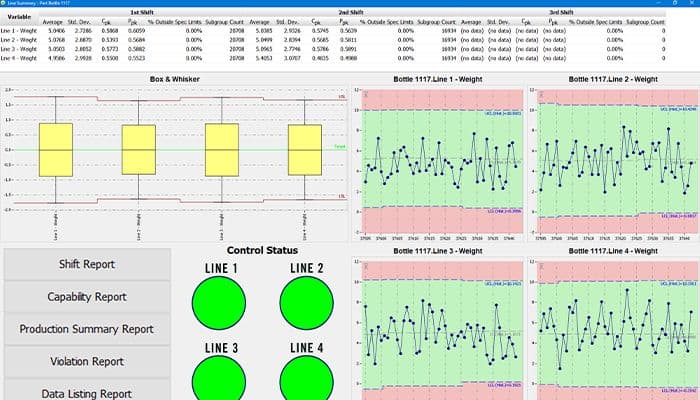
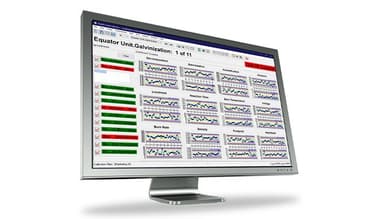
WinSPC provides various performance metrics and charts that enable businesses to monitor and analyze their manufacturing processes in real time, helping them to identify issues and make data-driven decisions to improve performance and quality.
Regulatory Compliance
Businesses comply with various industry regulations, such as FDA 21, CFR Part 11, ISO 9001, and TS 16949. It provides data management, tracking, and reporting tools, enabling businesses to maintain compliance more easily.
Corrective Actions (CAPA)
Corrective and Preventive Actions allow businesses to identify and address quality issues quickly and effectively. It helps them improve business processes and reduce the risk of defects and non-conformities.
Supplier Quality Control
The software provides tools for supplier quality control to monitor and manage suppliers in an organized manner, ensuring that suppliers meet requirements and deliver high-quality components and materials.
Defect Tracking
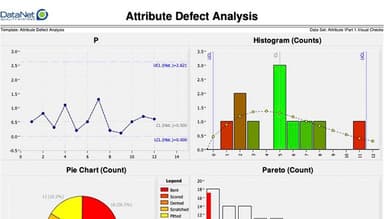
WinSPC provides tools for defect tracking and analysis, allows businesses to recognize and address defects quickly and effectively and it helps improve product quality and reduce costs.
Pros And Cons of WinSPC
Pros
Stable And Trustworthy
Great Customer Support
Ease Of Implementation
Cons
Difficult Data Entry Process
Establishing New Session Is Limited.
WinSPC Reviews
Total 15 reviews
4.6
All reviews are from verified customers
Rating Distribution
5
Stars67%
4
Stars27%
3
Stars7%
2
Stars0%
1
Stars0%
Share your experience
Consultants, 1-10 employees
Less than a year
“Superb FTP”
Pros
I find it easy to use and pretty simple without unnecessary additional features.
Cons
I cannot find any faults with the product as it meets my expectations completely.
Rating Distribution
Ease of use
10
Value for money
10
Customer Support
7
Functionality
10
Not Specified, 11-50 employees
Less than a year
“Establish SSH and TCP/IP connections”
Pros
PuTTy allows for easy TCP/IP connection to other machines that support it and it suggests useful tools to the end user during connection.
Cons
Copying and pasting is an essential part of my job, especially when dealing with logs but it often consumes a significant amount of time. The ability to establish new sessions is limited.
Rating Distribution
Ease of use
8
Value for money
8
Customer Support
8
Functionality
8
IT, 101-500 employees
More than a year
“WINSCP Review”
Pros
WINSCP simplifies file transfer on a Linux file system. I can easily edit various file types like .sql, .txt, .lis, and batch files.
Cons
Occasionally, file uploads may contain Windows characters that can impact the performance of the file, such as ^M characters in an SQL file. It would be beneficial to have some form of warning to identify these files for further review.
Rating Distribution
Ease of use
8
Value for money
8
Customer Support
8
Functionality
8
Frequently Asked Questions
What pricing plans does WinSPC offer?
WinSPC pricing is available on a collective usage basis or lease, including ninety days of standard service. The starting price is $1,600.00 (one time), and a free trial is available. Its cost may differ depending on your organization type and needs. For a customized pricing plan, please click Get Quote.
Who are the typical users of WinSPC?
It caters to manufacturing businesses of all sizes. Some WinSPC facilities include Transportation and Defense,Construction Materials, Food and Beverage, Medical Devices and Pharmaceuticals.
What languages does WinSPC support?
Some of the languages supported by WinSPC are English, Chinese, French, German and Spanish.
What other apps does WinSPC integrate with?
It integrates with various third-party applications, including Microsoft Excel, Microsoft SQL Server, Oracle Database, Minitab and Delmia.
Does WinSPC support mobile devices?
Yes, it offers support for iOS and Android.
What level of support does WinSPC offer?
It offers support via Phone Support, Email/Help Desk, Chat, FAQs/forums and Knowledge-Based.
Does WinSPC offer an API?
Yes, it offers an API.