


9teams
Last Updated
Overview
Having trouble keeping track of tasks and deadlines? 9TEAMS offers an innovative, agile solution for organizing your work. Collaborate with your team, track progress, and achieve success. Explore 9TEAMS functionalities to simplify your business operations.
9teams Specifications
- Time Tracking
- Task Management
- Reporting
- Budget Management
What Is 9TEAMS?
Overview
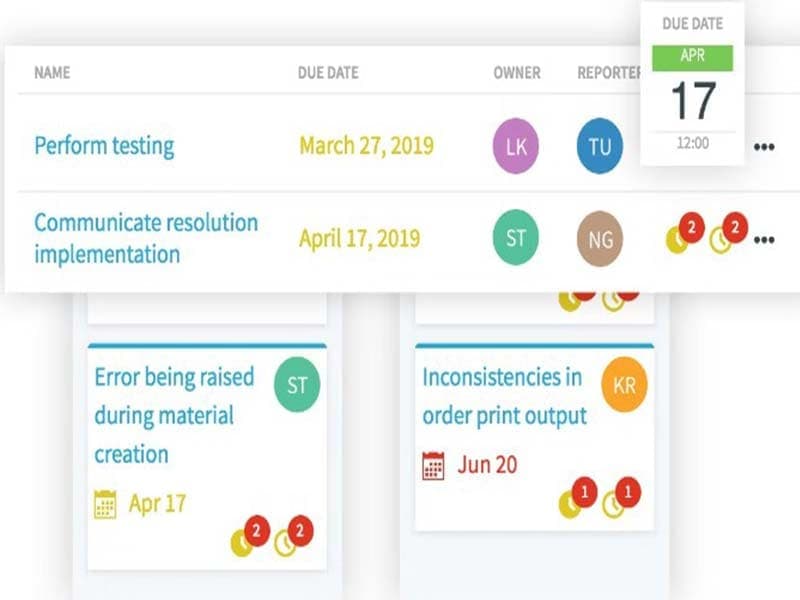
9TEAMS is a cloud-based project management software designed to help project stakeholders manage their operations more efficiently. It is a great collaboration tool to enhance productivity within teams. The software offers a user-friendly layout and several features enabling teams to collaborate, organize, and streamline their work.
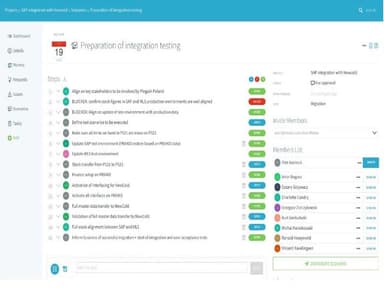
Additionally, 9TEAMS facilitates document sharing, real-time updates, and progress monitoring, ensuring everyone stays on the same page and projects stay on track. It offers an integrated platform that empowers organizations to share follow-up documents, track SAP implementation life cycle progress, and achieve successful projects.
What Is 9TEAMS Best For?
9TEAMS software is renowned for its affordable pricing packages that can accommodate the needs of growing organizations, from small businesses to large enterprises. It presents a cost-effective avenue for teams to access comprehensive tools for project planning, task management, collaboration, and progress tracking.
9TEAMS Pricing
The vendor offers the following five 9TEAMS pricing plans:
- Free – €0/month for 1 manager
- Starter – €199/month for 5 managers
- Regular – €699/month for 20 managers
- Plus – €1699/month for 50 managers
- Enterprise – €2699/month for 100 managers
Disclaimer: The pricing is subject to change.
9TEAMS Integrations
The information regarding its third-party integrations has not been disclosed by the vendor.
How Does 9TEAMS Work?
Here's how you can navigate the dashboard and make use of the software's features:
- Login to your 9TEAMS account
- Assign roles and permissions based on responsibilities
- Establish new projects or import existing ones
- Define project goals, key aspects, and timelines
- Assign tasks along with deadlines to team members
- Utilize communication features like chats and notifications to encourage team discussions
- Upload and organize project-related documents and implement access restrictions
- Allocate team members to tasks and manage workloads by monitoring resource utilization
- Generate successful project reports and performance analytics to make informed decisions
Who Is 9TEAMS For?
The software is designed for corporations of all sizes, including mid-sized and large companies. The following teams, departments, and industries use it:
- Agile teams
- Consultancy
- Marketing
- Information Technology
Is 9TEAMS Right For You?
Are you looking for a powerful and intuitive solution to help your business manage its operations more efficiently? 9TEAMS provides a powerful and intuitive solution that might be the right choice. It allows large and mixed teams to seamlessly organize work and engage all the stakeholders involved, simplifying alignment and follow-up processes.
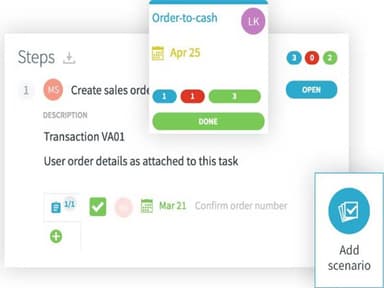
Furthermore, 9TEAMS is a highly scalable platform that can accommodate the needs of businesses of all sizes. It brings together all stakeholders, information, tasks, and scenarios in one place, allowing teams to work together effectively while minimizing follow-up efforts.
Still have any concerns about the 9TEAMS software? Call us at (661) 384 7070, and we will be happy to help you make an informed decision.
9teams Features
Milestone Tracking
Agile teams can monitor progress about project milestones using this feature. It helps mixed teams stay on track and ensure they meet their goals. The software also provides insights into project growth and the remaining work that needs to be done over a year, aiding informed decision-making.
Portfolio Management
The 9TEAMS portfolio management capabilities allow businesses to manage multiple ongoing projects and initiatives in one place. 9TEAMS helps organizations prioritize their work and allocate resources effectively. With portfolio management, businesses can see all of their projects in a centralized location and make decisions about priority projects. It helps corporations maximize their impact and achieve their goals.
Real-Time Editing
9TEAMS enables users to collaborate in real time with features such as real-time editing and discussion boards. It helps teams to work together more effectively and make decisions promptly. Users can work on the same document simultaneously without worrying about version conflicts or lost changes using real-time editing functionality.
Email Notifications
The email notifications functionality is a valuable tool to facilitate communication. It bridges the gap between project updates and normal e-mail exchanges. It also delivers targeted email notifications to team members and provides them with essential reminders and updates to ensure successful projects.
Pros And Cons of 9teams
Pros
Enables seamless teamwork and information sharing
User-friendly design to keep teams up and running
Allows simultaneous collaborative document editing
Monitors project progress towards key goals
Efficiently handles multiple projects in one platform
Cons
Initial setup complexity, according to some reviews
Potential information overload for new users
9teams Reviews
Total 3 reviews
4
All reviews are from verified customers
Rating Distribution
5
Stars0%
4
Stars100%
3
Stars0%
2
Stars0%
1
Stars0%
Share your experience
Not Specified, N/A employees
Free Trial
“9teams gives a boost to project team collaboration”
Pros
This tool was clearly developed by someone who understands how teams should collaborate within a project. It significantly improves teamwork and provides a clear understanding of open tasks and deliverables. These are key elements for project success. The intuitive nature of the tool makes it self-explanatory and requires minimal training to implement. It offers a wide range of features and functionalities at a reasonable cost.
Cons
The customer support could be better.
Rating Distribution
Ease of use
10
Value for money
10
Customer Support
7
Functionality
8
Not Specified, N/A employees
Free Trial
“9teams helps to structure follow-up of project and meetings!”
Pros
9teams is an excellent collaboration tool that empowers me to effectively monitor ongoing projects and recurring meetings. The intuitive web interface is user-friendly and easy to set up. Also it simplifies task and issue management which allows for quicker feedback compared to traditional email exchanges. The adoption of 9teams within our organization has significantly boosted productivity.
Cons
There's a slight learning curve involved.
Rating Distribution
Ease of use
8
Value for money
10
Customer Support
8
Functionality
10
Not Specified, N/A employees
Free Trial
“9teams - Pleasure to work with”
Pros
I've been using 9teams for over a year now, and it has been very helpful in providing me with a comprehensive overview of all current matters. It streamlines the management of various projects, requests, and issues. I can easily identify the tasks assigned to me and have a clear view of the tasks I've delegated to others. No more searching through emails for the latest updates all the information is conveniently gathered in one central location within 9teams. The platform allows everyone to make updates, attach files or screenshots, and access the same information. Additionally, the user-friendly interface ensures that people can easily navigate the tool.
Cons
I think there is always a room for improvement, so I believe updates can enhance this product even further.
Rating Distribution
Ease of use
8
Value for money
10
Customer Support
8
Functionality
8
Frequently Asked Questions
What language does 9TEAMS support?
9TEAMS supports the English language.
What types of pricing plans does 9TEAMS offer?
The vendor offers 5 flexible pricing plans: Free (€0/month), Starter (€199/month), Regular (€699/month), Plus (€1699/month) and Enterprise (€2699/month). Please click Get Pricing for a custom quote.
Does 9TEAMS offer an API?
No, 9TEAMS does not offer an API.
Who are the typical users of 9TEAMS?
9TEAMS is designed for organizations of all sizes. Additionally, the software is typically used by information technology, consultancy, and marketing teams.
Does 9TEAMS support mobile devices?
No, 9TEAMS does not support any mobile devices.
What other apps does 9TEAMS integrate with?
9TEAMS has not disclosed information about its third-party integrations.
What level of support does 9TEAMS offer?
9TEAMS offers email, forums, and phone support.