


Last Updated
Overview
Having trouble streamlining project management operations for your interior design company? Binary Management simplifies the entire project lifecycle. This software is suitable for novice designers and experienced executive management professionals, offering such an innovative product to achieve efficient, timely, and cost-effective outcomes. Explore Binary Management features today!
Overall Rating
Based on 2 users reviews
5
Rating Distribution
Positive
100%
Neutral
0%
Negative
0%
Starting Price
$10
per user per month
Binary Management Specifications
- Time Tracking
- Task Management
- Reporting
- Budget Management
Binary Management Features
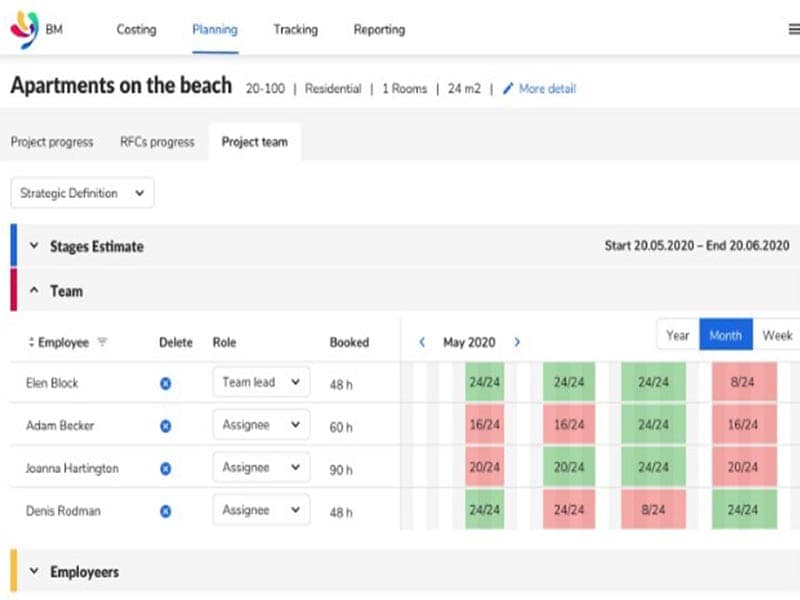
Planning
Binary Management aids in the meticulous organization of project details. It crafts a full project program and payment schedule, highlighting all invoice payments. The software provides a clear overview of the project timeline and offers a detailed insight into the budgetary aspects. It aids in effective resource management, ensuring that every aspect of the project is accounted for and executed as planned.
Costing
This functionality simplifies the complex process of calculating project design fees. By incorporating basic project information, it generates an accurate project design fee. Binary Management saves time and ensures precision in cost estimation, reducing the risk of financial discrepancies. It provides a reliable method to a project team for financial planning, ensuring transparency and accuracy in budget allocation.
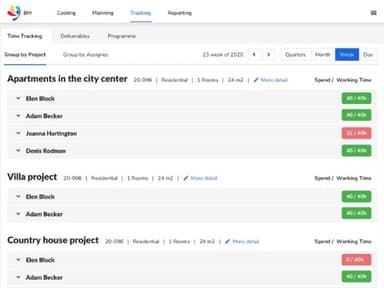
Tracking
The tracking feature offers real-time monitoring of project deliverables and time tracking per deliverable. It provides continuous updates on task status, enabling early identification of potential issues.
Collaboration Tools
The tracking feature offers real-time monitoring of project deliverables and time tracking per deliverable. It provides continuous updates on task status, enabling early identification of potential issues. The platform ensures the timely completion of tasks and maintains the quality of work by allowing for immediate corrective action when necessary. It is a reliable tool for maintaining the pace and quality of work, ensuring that every task aligns with the project’s timeline and standards.
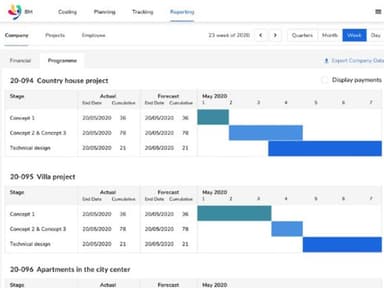
Reporting
This feature enhances communication within teams and with clients. It generates detailed reports on key metrics, providing valuable insights into the project’s progress and resource usage. These reports aid in improving project management practices and contribute to increasing profitability by identifying areas of improvement, making it an advanced project operations tool consolidating vital project data.
Pros And Cons of Binary Management
Pros
User-friendly interface for all experience levels
Cloud-based accessibility for remote project management
Comprehensive project costing, tracking and reporting features for efficient management
Effective communication tools for team collaboration
Real-time task monitoring and status updates
Cons
May require additional training for optimal utilization
Some advanced features may not be intuitive for everyone, according to some reviews
Limited customization options in certain areas
Binary Management Pricing
Professional | Business | Enterprise |
|---|---|---|
$10 | $20 | Custom Pricing |
|
|
|
Disclaimer: The pricing details were last updated on Aug 21, 2026 from the vendor's website. Please contact us for a tailored pricing list.
Binary Management Reviews
Total 2 reviews
5
All reviews are from verified customers
Rating Distribution
5
Stars100%
4
Stars0%
3
Stars0%
2
Stars0%
1
Stars0%
Share your experience
Carmen
Real Estate, 1-10 employees
“quite a good tool”
Pros
The software enhances the efficiency. Also it offers time-saving solutions for staff members at all hierarchical levels.
Cons
As of now, I've only had the opportunity to test it on small projects and there I have not discovered any problems. I am waiting to get a chance to utilize it on larger-scale projects to see how it performs
Rating Distribution
Ease of use
10
Value for money
10
Customer Support
10
Functionality
10
Mert
Architecture, 11-50 employees
Less than 6 months
“Such an innovative product!”
Pros
It is specifically tailored to meet the needs of interior design firms. The interface is intuitive and adaptable, allowing for seamless navigation. It streamlines tasks, saves valuable time and allows effective management.
Cons
At this point, I haven't encountered any noteworthy issues.
Rating Distribution
Ease of use
10
Value for money
10
Customer Support
10
Functionality
10
Frequently Asked Questions
What types of pricing plans does Binary Management offer?
The software offers three pricing plans: Professional ($10/month), Business ($20/month), and Enterprise (Custom). Get a personalized Binary Management price per your company’s needs.
Who are the typical users of Binary Management?
Typical users of Binary Management include human resource, creative, and interior design teams.
What languages does Binary Management support?
Binary Management supports the English language.
Does Binary Management support mobile devices?
No, Binary Management does not support mobile devices.
Does Binary Management offer an API?
No, Binary Management does not have an API for its users.
What other apps does Binary Management integrate with?
The vendor has not given any information about its integration with third-party applications.
What level of support does Binary Management offer?
Binary Management offers email, a help desk, forums, FAQs, and a knowledge base.