


Grizzly Software
Last Updated
Overview
Many organizations struggle to manage and extract insights from their vast document repositories. Grizzly software offers a cloud-based solution for file management, with features like document analysis, AI knowledge base, and content writing, significantly improving efficiency and productivity. Explore its capabilities to simplify your tasks.

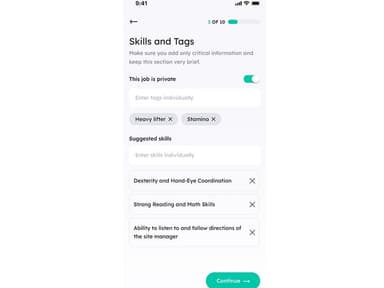

Grizzly Software Specifications
- Time Tracking
- Task Management
- Reporting
- Budget Management
What Is Grizzly Software?
Overview
Grizzly is a cloud-based AI-powered business analyst. It is designed to simplify your search and work with files. The software brings the power of AI to your documents, creating an AI-fueled search across your business. It allows your team to access the right information, increasing efficiency and productivity.
Grizzly Software Pricing
The vendor offers the following three Grizzly pricing plans:
- Starter – $29/seat
- Professional – $49/seat
- Enterprise – Custom pricing
Disclaimer: The pricing is subject to change.
Grizzly Software Integrations
The vendor has not disclosed any information about its third-party integrations.
Who Is Grizzly Software For?
The following industries use Grizzly software:
- Finance
- Food and beverages
- Safety and security
- Retail
- Creative
- Entertainment
- Information technology
Is Grizzly Software Right For You?
Looking for AI-powered software to simplify data insight discovery? Grizzly software might be the right solution. It has been recognized for its work and was nominated for Excellence in Innovation in the Westpac Auckland Business Awards in 2022. The platform ensures that your sensitive content is protected with end-to-end encryption, granular access permissions, and enterprise-grade security.
Still unsure whether Grizzly software is worth investing in? Contact us at 661-384-7070, and our customer support team will analyze the software according to your business requirements.
Grizzly Software Features
Document Analysis
This feature uses AI to analyze your PDFs and documents to extract valuable insights from your documents, making it easier to make data-driven decisions. It eliminates the need for manual document analysis, reducing the risk of errors.
AI Knowledge Base
The platform provides your team with AI-fueled search capabilities across your business. It means you can find the information you need quickly, improving productivity. Grizzly software also helps businesses make better decisions by providing tailored advice.
Content Writing
You can create content informed by your data with Grizzly project management software. It allows you to generate high-quality content tailored to your audience, enhancing conversion rates and engagement. The platform enables organizations to create compelling content that connects with the intended audience and drives engagement.
Pros And Cons of Grizzly Software
Pros
AI-powered search for quick insights
Efficient content writing tools
Enhanced decision-making support
Simplified file management
Streamlined data-driven tasks
Cons
May require training for full utilization, according to some reviews
Customer support response time can be improved
Potential information overload
Grizzly Software Reviews
Total 1 reviews
4
All reviews are from verified customers
Rating Distribution
5
Stars0%
4
Stars100%
3
Stars0%
2
Stars0%
1
Stars0%
Share your experience
Construction, 51-100 employees
Free Trial
“Great for quick tasks, needs adjustments”
Pros
Grizzly has been instrumental in helping us manage our workforce, particularly for short-term projects. The interface is user-friendly and the process of onboarding workers is smooth and simple.
Cons
I feel that the pricing model could be more transparent.
Rating Distribution
Ease of use
8
Value for money
8
Customer Support
7
Functionality
8
Frequently Asked Questions
Does Grizzly software offer an API?
No, Grizzly software does not offer an API to its clients.
What language does Grizzly software support?
Grizzly software supports the English language.
What other apps does Grizzly software integrate with?
The vendor has not provided any information about the third-party systems it integrates with.
Does Grizzly software support mobile devices?
No, Grizzly does not support mobile devices.
What types of pricing plans does Grizzly software offer?
The software has three pricing plans: Starter ($29/seat), Professional ($49/seat), and Enterprise (Custom pricing). Get a personalized Grizzly pricing quote based on your business needs and size.
Who are the typical users of Grizzly software?
Typical users of Grizzly software include information technology, safety and security, finance, retail, creative, entertainment, and food and beverages industries.
What level of support does Grizzly software offer?
Grizzly software offers several support options, including a support ticket and email.