


SAP S4/HANA Software
Last Updated
Overview
SAP S/4HANA offers time tracking, financial, vendor, and portfolio management. Although the vendor provides extensive onboarding support, the process can be time-consuming. However, the software is scalable and automated making it a worthy choice for digital creators.
SAP S4/HANA Software Specifications
- Time Tracking
- Task Management
- Reporting
- Budget Management
SAP S4/HANA Software Features
Financial Management
SAP S4/HANA has financial accounting tools that help study profitability and manage expenses. It combines all project data in a single source and makes decision-making accessible. As a result, all business processes have higher visibility, and users can analyze any data set. There are templates to support all business models and move planning cycles along at a much faster rate. In addition, financial functions are simplified and billing automated with a digital trail of all activities to assist with auditing.
Time Tracking Tools
The platform allows all managers, executives, and employees to log their tasks' time. As a result, they can improve the accuracy of billable hours and never miss an expense report. The software manages all resources, and there are real-time insights on the status of each one. Efficiency is increased with staff tracking and accounting for all new additions.
Vendor Management
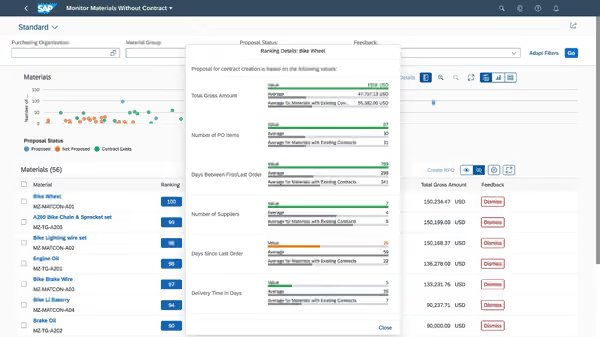
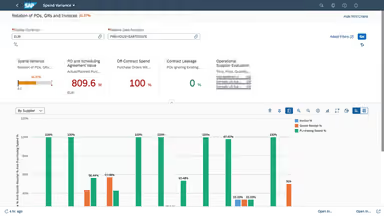
The organizations can streamline their purchasing and access real-time information from their vendors. SAP provides insights into spending, supplier ratings, and other procurement-related processes. In addition, there is a combined dashboard from where you can automate recurring tasks. There is no need for manual reordering or negotiation because the predictive analytic tool handles everything.
Portfolio Management
The software supports managing multiple portfolios and suggests how users improve their current practices. It leverages SAP expertise and accurate reporting to speed projects along. There are options for forecasting, setting up timelines, and sharing reports with clients. Setting up new projects is much easier with automated tools, and the intelligent project assistant makes valuable suggestions. In addition, there are ways to test scripts using the built-in templates and configure them according to your specifications.
Pros And Cons of SAP S4/HANA Software
Pros
Latest analytics for improved decision-making
Scalable to meet the needs of varying enterprises
Consistent innovation and feature upgradation
Easy integration of all business processes
Cons
User experience on mobile still needs improvements
Limited ability to change or turn off unused modules, according to some software users
SAP S4/HANA Software Reviews
Total 21 reviews
4.2
All reviews are from verified customers
Rating Distribution
5
Stars48%
4
Stars38%
3
Stars10%
2
Stars0%
1
Stars5%
Share your experience
Young realty, 2-9 employees
“Portfolio management ”
Pros
It supports managing multiple portfolios and suggest users way to improve their current practices. It leverage SAP expertise and accurate reporting to speed projects along.
Cons
None
Rating Distribution
Ease of use
7
Value for money
8
Customer Support
7
Functionality
7
Computer software , 2-9 employees
“Vendor management ”
Pros
The organizations have the option to streamline their purchasing and access real-time information from their vendors. It provides insights into spending, supplier ratings, etc.
Cons
None
Rating Distribution
Ease of use
7
Value for money
9
Customer Support
7
Functionality
7
GOPA ITC, 10-49 employees
“Good software but not very user-friendly”
Pros
Its a smooth and simple system to use once youve put up the fundamental framework and integration.
Cons
The only thing about this system is that its not very user-friendly. Navigation is hard and learning to set up is time-consuming.
Rating Distribution
Ease of use
8
Value for money
6
Customer Support
8
Functionality
7
Frequently Asked Questions
Does SAP S/4HANA offer an API?
Yes, SAP S/4HANA provides an API.
What language does SAP S/4HANA support?
The platform supports two default languages: English and German. Users can also install any regional or local language in SAP S/4HANA.
What other apps does SAP S/4HANA integrate with?
SAP S/4HANA seamlessly integrates with several third-party applications, such as Sap CRM, Microsoft Dynamics, Replicon, and ServiceNow.
What types of pricing plans does SAP S/4HANA offer?
The platform offers customized pricing plans tailored to your unique needs. Get a personalized SAP S/4HANA cost today!
Who are the regular users of SAP S/4HANA?
SAP S/4HANA caters to several sectors and industries, including automotive, manufacturing, retail, and construction.
What level of support does SAP S/4HANA offer?
SAP S/4HANA offers a help desk, knowledge base, chat, and phone support.