


Sciforma
Last Updated
Overview
Explore Sciforma software, a project portfolio management tool that streamlines projects and optimizes resource allocation. It offers features for idea management, visual collaboration, and project planning, providing a one-stop-shop to its users. Navigate your tasks with ease and track results in real time.
Sciforma Specifications
- Time Tracking
- Task Management
- Reporting
- Budget Management
What Is Sciforma Software?
Overview
Sciforma is a project and portfolio management (PPM) solution that helps organizations plan, deliver, and optimize their strategic initiatives. The software provides actionable intelligence through features like resource management, project planning and scheduling, portfolio analysis, and time tracking. It allows users to save time on reporting, improve project success rates, clarify staffing needs, and eliminate non-strategic projects. The cloud-based solution is aimed at boosting productivity for project and portfolio professionals.
What Is Sciforma Software Best For?
One of the most substantial capabilities of Sciforma software is resource and capacity management. The PPM solution allows organizations to effectively manage their resources to optimize utilization. It provides visibility into actual resource usage so managers understand how capacity is used. This helps ensure the right resources are allocated to the highest-priority projects and tasks. With Sciforma, resource planning and tracking are streamlined. Issues with over-allocation or under-utilization can be proactively addressed.
Sciforma Software Pricing
Disclaimer: The pricing is subject to change.
Sciforma Software Integrations
Sciforma's portfolio management solution can integrate with Azure Active Directory.
How Does Sciforma Software Work?
To use the Sciforma project management tool, follow these basic steps:
- Log in using your provided credentials
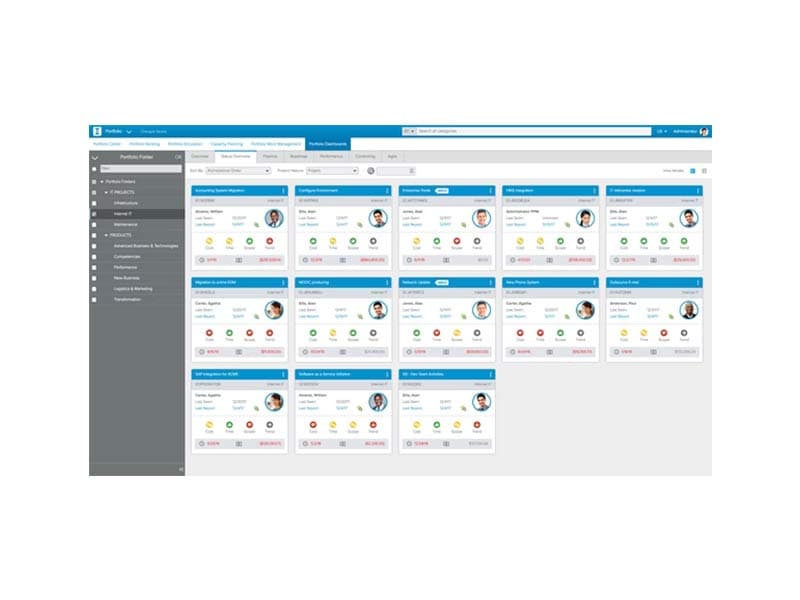
- Select the Projects or Portfolio menu option to see your list of current initiatives. Click on a specific project or item in the portfolio to open its dashboard and details. Review essential information like status, budget, and timeline and assign tasks or flag issues directly from this screen
- To plan new work, choose Idea Management and log a concept or opportunity for evaluation. As ideas are approved, use the Project Planning Center to break work down into detailed tasks with owners, dates, and dependencies
- For customer-facing innovations, enable the Innovation & NPD workspace to manage the entire product development life cycle
- Check the Resource Management module to review team availability, allocate people to tasks efficiently, and flag potential overloads
- Collaborate with stakeholders in real time using the Visual Collaboration board, Kanban views, or Gantt charts
- Record task progress updates, time spent and issues directly in Sciforma to keep project data live
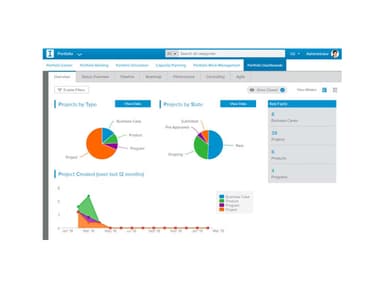
- Leverage reporting and analytics to make data-driven decisions, improve project selection, and maximize resource utilization
Who Is Sciforma Software For?
Sciform provides solutions to manage complex projects, research and development initiatives, and product innovation cycles. It offers project and portfolio management solutions for different business sizes across many industries and sectors, including:
- Banks and financial services
- Manufacturing
- Hospitals and healthcare
- Pharmaceutical and biotechnology
- Software development
- Telecommunications
- Transportation
- Aeronautics
- Food and beverages
- Automotive businesses
Is Sciforma Software Right For You?
Sciforma software is an ideal business process management solution for organizations looking to digitally transform their operations, automate manual processes, and ensure regulatory compliance.
As a portfolio management software, Sciforma takes security and privacy very seriously. It is ISO 27001 certified and adheres to stringent protocols like multi-factor authentication, role-based access controls, data encryption in transit and at rest, and activity logging.
Sciforma Features
Idea And Demand Management
Users can capture ideas and project demands across the organization in one central place. This helps create visibility on potential projects and ensures strategic alignment. It also facilitates collecting feedback from stakeholders.
Strategic Project Portfolio Management
Get visibility into the overall health of all ongoing projects and optimize resource allocation. The project team can assess risks, dependencies and alignments to strategic objectives in one dashboard. This ensures only the right projects with maximum impact and profitability are funded.
Resource Management
This feature gives managers a real-time view of resource capacity, allocation and utilization. Users can effectively plan resources across projects/programs based on skillsets. This helps eliminate resource over-allocation and bottlenecks, ensuring on-time project delivery.
Visual Collaboration
Facilitate collaborative work through shared project workspaces. Communicate seamlessly using discussions, checklists, and commenting on tasks. This improves team productivity and effectiveness through increased transparency.
Project Planning And Management
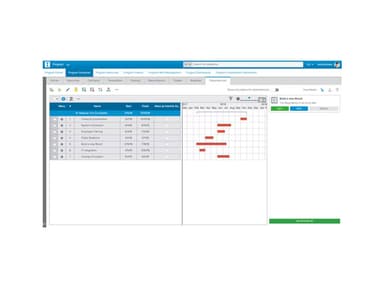
Sciforma's project management software lets you define project schedules, tasks, and dependencies in a Gantt view. Users can track progress, issues and changes in real time. This provides stakeholders visibility and ensures projects are delivered per plans.
Time Management
Allows resources to record their time against tasks and projects directly from within the software. Managers get insights into actual time spent versus planned. This helps address overruns and optimize workforce management.
Pros And Cons of Sciforma
Pros
Integrates portfolio, project, resource, and document management
Generates project status reports
Provides risk analysis
Helps with team collaboration
Cons
Clunky software UI
Certain loading screens freeze
Sciforma Reviews
Total 10 reviews
4.2
All reviews are from verified customers
Rating Distribution
5
Stars30%
4
Stars60%
3
Stars10%
2
Stars0%
1
Stars0%
Share your experience
Information Technology and Services, 101-500 employees
More than a year
“strong collaboration abilities”
Pros
The standout benefit is how well Planview supports project and team collaboration. It includes solid tools for planning projects, delivering training and tracking progress in a way that feels organized and effective. The simple UI also really helps when you're dealing with more complex workflows since everything is laid out to improve day-to-day efficiency. Another area that deserves praise is the notification system, it keeps everyone in the loop on frequent updates, upcoming deadlines and any changes. That constant, targeted communication helps the team stay aligned without feeling overly bombarded.
Cons
Even though it's a feature-rich platform, it can feel overwhelming at first for new users due to the learning curve. Security is another point where it falls short, while standard protection is included, there isn't the stricter security level you'd want for tighter control and stronger additional safeguards.
Rating Distribution
Ease of use
7
Value for money
7
Customer Support
7
Functionality
7
Higher Education, 11-50 employees
Less than a year
“project visibility win”
Pros
Best part is how well it's set up, plus the clear visibility it gives into ongoing projects and available resources. With Project Collaboration enabled, the whole team can work from the same verified data instead of constantly chasing spreadsheets. That really improves communication between resource managers and project managers and it also supports working on the same project at the same time. The collaboration itself is a strong feature since it reduces the need to jump between separate platforms and the synced interactions with the Gantt views help reflect the real workload rather than an outdated picture.
Cons
Setup was quick and easy for our team but new users likely need training to avoid getting overwhelmed by the deeper capabilities. There's also no truly centralized auditing approach for permissions across everything so stronger, built-in security governance is something I'd expect.
Rating Distribution
Ease of use
7
Value for money
7
Customer Support
8
Functionality
7
Utilities, 1-10 employees
Less than a year
“Great at handling complex projects”
Pros
This really shines when it comes to handling complex projects since it ties resource planning together with cost management in a simple way. The task management is detailed enough to let us control deadlines and dependencies very precisely. On top of that the collaboration tools helped cut down on scattered messages and made team communication noticeably smoother. Even though getting started takes work, the payoff is better organization, stronger data security and overall efficiency.
Cons
Biggest hurdle is the initial learning curve. Since the platform is so packed with features, it can feel overwhelming for new users unless they're supported with structured, formal training.
Rating Distribution
Ease of use
7
Value for money
8
Customer Support
7
Functionality
7
Frequently Asked Questions
What types of pricing plans does Sciforma offer?
The cost per user for Sciforma can range from $20 to $60 monthly. The total cost can be influenced by factors such as the number of users and their roles. For a more detailed breakdown of Sciforma's pricing, click Get Pricing.