

.png&w=3840&q=75)
TimeNet
Last Updated
Overview
TimeNet is a project management software for Mac users that efficiently tracks billable and non-billable hours, ensuring accurate invoicing. It helps streamline project management processes and boost productivity. Designed for Mac, it does not support Windows or mobile platforms. However, this focus enables fast performance, reliability, and deep macOS integration.
TimeNet Specifications
- Time Tracking
- Task Management
- Reporting
- Budget Management
TimeNet Features
Project Management
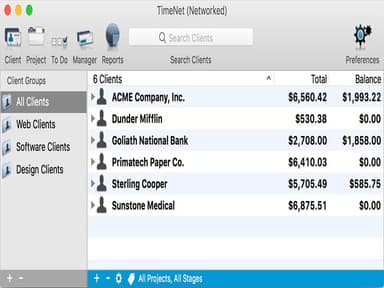
TimeNet features comprehensive project management tools, allowing users to create tasks, set deadlines, and allocate resources efficiently. Every client is organized as a folder containing their projects and invoices, tracked through custom completion stages. The Manager window handles bulk actions across multiple projects simultaneously, while QuickSearch instantly locates any record. To Do tracking keeps tasks prioritized and linked to active projects.
Time Tracking
TimeNet's time tracking solution allows users to track time spent on various tasks and projects, enhancing productivity. The Smart Timer runs from the global menubar, Dock icon, or system-wide keyboard shortcuts — accessible from any application. It automatically rounds time, detects idle time, and offers to deduct it. Both billable and non-billable hours are tracked separately across every project and client.
Invoicing
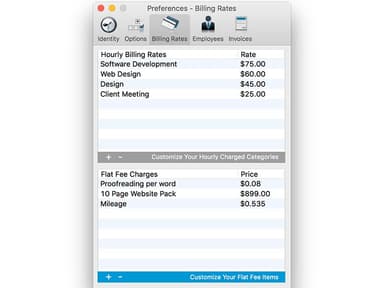
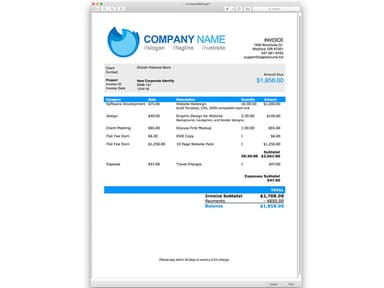
TimeNet provides professional and customized invoicing based on project details and billable hours. Over 20 fully customizable invoice templates are included, with estimates available from the same template system. Retainer payments entered in advance appear automatically on invoices, and flat or percentage discounts can be applied per project. Each client carries its own billing rate, tax rule, and currency setting.
Expense Tracking
Users can easily track project-related expenses, ensure a proper understanding of project costs and aiding in precise client billing. Mileage and other tax-related expenses are recorded directly within each project record and included in reports at billing and tax time. Payments received from clients are logged against the relevant project, keeping outstanding balances accurate and eliminating billable costs slipping through the cracks.
Customizable Templates
TimeNet offers customizable templates for invoices, estimates, and reports, allowing businesses to tailor documents to their branding and workflow requirements. The software includes more than 20 invoice templates with flexible formatting options, helping users create professional billing documents quickly while maintaining consistency across projects, clients, and financial reporting processes.
Detailed Reporting
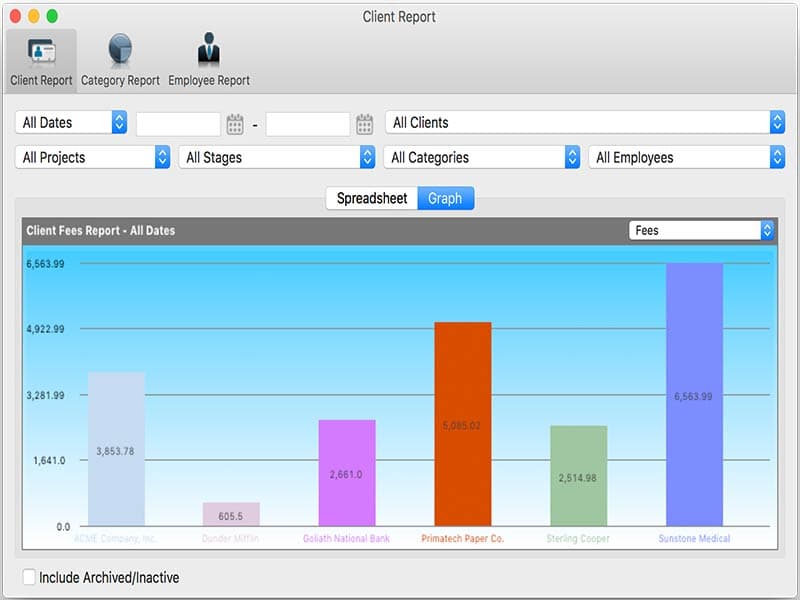
TimeNet provides detailed reporting features to help users gain insights into project performance, profitability, and team productivity. Flexible reports with graphs identify which clients owe money and which are most profitable. Reports are filtered by client, group, project stage, or status. Employee-level reporting shows where time is being spent and which employees are most profitable, enabling more informed business decisions.
Pros And Cons of TimeNet
Pros
Integration with Cloud-sync services
Billable and non-billable time tracking
Customizable invoices
Exclusively designed for Mac
Cons
Not compatible with Windows and mobile devices
It does not provide API access
TimeNet Pricing
TimeNet + MOMD Bundle |
|---|
$89.99 |
|
Disclaimer: The pricing details were last updated on Sep 14, 2026 from the vendor's website. Please contact us for a tailored pricing list.
TimeNet Reviews
Total 2 reviews
4
All reviews are from verified customers
Rating Distribution
5
Stars0%
4
Stars100%
3
Stars0%
2
Stars0%
1
Stars0%
Share your experience
IT, Marketing, 51-100 employees
Less than 6 months
“Reliable but with an outdated interface”
Pros
TimeNet has been a reliable tool for managing our project schedules and time tracking. I like the fact that the software offers integration with various third-party applications that has streamlined our workflows and improved overall efficiency.
Cons
The user interface of TimeNet feels a bit outdated.
Rating Distribution
Ease of use
6
Value for money
8
Customer Support
9
Functionality
9
Not Specified, 101-500 employees
More than a year
“Effective but with a challenging interface”
Pros
TimeNet is a great tool for keeping track of project timelines and team hours. The reporting features have helped us stay on top of project deadlines and budget. The integration with other platforms has made our project management more organized and streamlined.
Cons
Despite its advantages, TimeNets interface can be somewhat cumbersome and feels less modern compared to newer tools.
Rating Distribution
Ease of use
7
Value for money
8
Customer Support
8
Functionality
8
Frequently Asked Questions
Does TimeNet offer an API?
What languages does TimeNet support?
What other apps does TimeNet integrate with?
Timenet integrates with OneDrive, iCloud, and Dropbox.
Does TimeNet software support mobile devices?
No, it is not compatible with mobile devices. It also does not offer a standalone mobile app.
What types of pricing plans does TimeNet software offer?
TimeNet pricing starts at plans: TimeNet 6 Licence ($69.99) and TimeNet + Master of My Domain (MOMD) Bundle ($89.99). Request for a custom TimeNet price quote.
Who are the typical users of TimeNet software?
TimeNet software is used by freelancers and small to midsize teams in consulting, design, legal, creative services, and other professional services where project tracking and billing are required.
What languages does TimeNet software support?
The software supports the English language.
What level of support does TimeNet Software offer?
TimeNet project management provides support through email, a help desk, FAQs, and forums section for users to find answers to common questions and issues.