


Meevo
Last Updated
Key Takeaways
Generated from the text of customer reviews
Our Verdict
Overall Rating
Based on 45 users reviews
4.7
Rating Distribution
Positive
98%
Neutral
0%
Negative
2%
Starting Price
£79
per month

Meevo Specifications
- Retail POS Systems
- Sales Orders
- Invoicing
- Sales Tracking
Meevo Features
Marketing
Campaigns are built using client data filtered by visit history or birthdays. Automated prompts request 5-star ratings post-checkout for the reviews page. Loyalty programs award points for rebooking. The Emma integration provides automated campaigns and email analytics.
Inventory
Product barcodes are scanned via mobile devices to update data instantly. Multiple sizes are filed under a single variant screen. Individual floor locations can be tracked within the software. Purchase orders are built automatically based on stock levels.
Goals
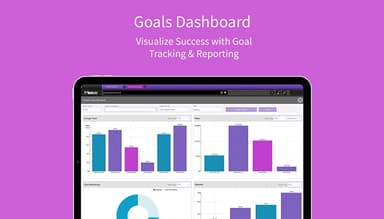
Monthly performance goals are assigned for the business and calculated down to the day. Employees track individual achievements on personal dashboards. Staff actuals are compared with departmental targets for retail sales and visit frequency to identify top performers.
Managing Employees
A digital time clock prompts employees to log shifts and breaks. The scheduling manager uses simple copy-and-paste commands to set weekly hours. Pay increases are scheduled in advance, and staff profiles are shared across all locations.
Smart Center
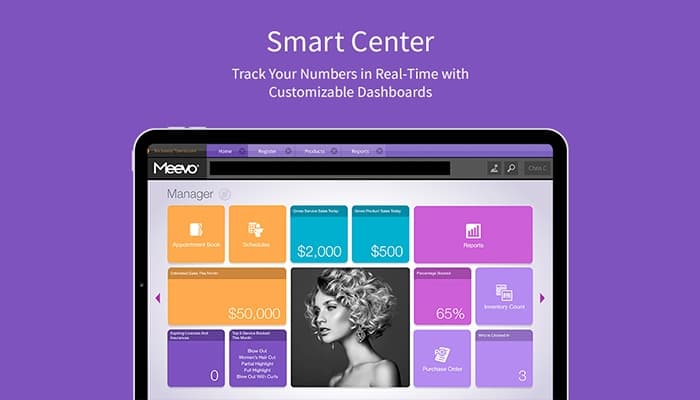
Custom dashboards are organized with real-time data specific to each user's role. Smart tiles display live metrics tracking key performance indicators and employee statistics. Aggregated data tiles allow owners to track business across multiple locations in one view.
Booking
Reservations are made in a quick manner using the main appointment book. Users can drag and drop the appointment to move them to another slot or reschedule them. An automated waitlist engages clients via text to fill openings. Automated notifications are sent for appointment reminders.
Pros And Cons of Meevo
Pros
Straightforward interface helps new hires get comfortable fast
Users can book appointments and receive payments from one device
Built-in reports give owners detailed insight into business performance
Drag and drop functionality makes rescheduling easy
Multi-location management keeps all sites visible from one login
Cons
Some workflows require too many clicks to complete basic tasks
Payroll settings cannot be adjusted for individual staff mid-payroll period
Built-in email marketing tool does not provide advanced marketing features
Meevo Pricing
Grow | Pro | Powerhouse |
|---|---|---|
£79 per month | £139 per month | £179 per month |
|
|
|
Disclaimer: The pricing details were last updated on Sep 14, 2026 from the vendor's website. Please contact us for a tailored pricing list.
Meevo Reviews
Total 45 reviews
4.7
All reviews are from verified customers
Rating Distribution
5
Stars80%
4
Stars18%
3
Stars0%
2
Stars0%
1
Stars2%
Share your experience
Healthcare, 51-100 employees
Less than a year
“MEEVO OKAY”
Pros
Meevo is working well for us. It offers so many different options and is easy to use and train on.
Cons
The colors in Meevo are darker compared to the original lighter ones.
Rating Distribution
Ease of use
10
Value for money
10
Customer Support
10
Functionality
10
Custom Product, 1-10 employees
Less than a year
“No body can do it better.”
Pros
Scheduling clients and handling transactions is very easy and simple in Meevo. It also allows easy rearrangement of appointments.
Cons
When using it as a time clock, we sometimes had to clock in twice.
Rating Distribution
Ease of use
10
Value for money
10
Customer Support
10
Functionality
10
Healthcare, 1-10 employees
More than a year
“Great Software”
Pros
Having used other online systems, I find Meevo to be very user-friendly. The guided walk-through steps and excellent reporting system are highly appreciated.
Cons
It would be great if they introduced a built-in referral program instead of a points system.
Rating Distribution
Ease of use
10
Value for money
10
Customer Support
10
Functionality
9
Frequently Asked Questions
Does Meevo offer an API?
No, Meevo does not offer an API.
What language does Meevo software support?
Meevo primarily supports English language.
What other apps does Meevo software integrate with?
Meevo integrates multiple systems including Online Booking, Walk-In Manager, eGift, Docs and Forms, Client Intake Forms, Self Check-In Kiosk, and Emma.
Does Meevo software have a mobile app?
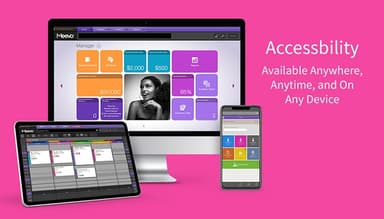
Yes, Meevo does offer a mobile app for iOS and Android users.
What types of pricing plans does Meevo software offer?
Meevo pricing starts with the Grow plan at £79/month, followed by the Pro plan at £139/month and the Powerhouse plan at £179/month. Request a personalized Meevo cost estimate for your business.
Who are the typical users of Meevo software?
Meevo software is suitable for a range of salons and spa businesses, including hair salons, beauty salons, day spas, nail salons, and barbershops.
What level of support does Meevo software offer?
Meevo offers support via phone, self-help community site access, live chat, and contact form.