

TouchBistro
Last Updated
Overview
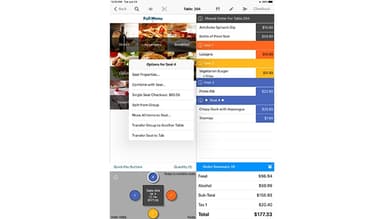
TouchBistro POS software enhances restaurant operations with intuitive order management, payment processing, and inventory tracking. While it requires initial training, its powerful features streamline daily tasks, making it a useful tool for efficient restaurant management.
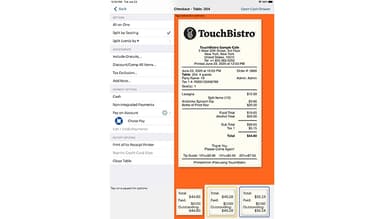
TouchBistro Specifications
- Sales Orders
- Invoicing
- Sales Tracking
- Customer Relationship Management (CRM)
What Is TouchBistro?
Overview
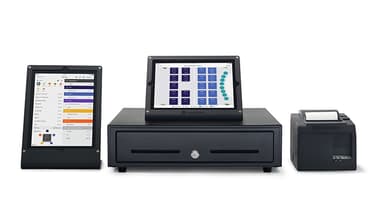
The TouchBistro POS system is a cloud-based software designed specifically for the restaurant industry. It caters to various food service establishments such as full-service restaurants. The software offers solutions that streamline operations, enhance customer service, and improve overall efficiency by addressing problems such as order inaccuracies, inventory mismanagement, and slow payment processing. TouchBistro POS supports restaurateurs in managing their businesses effectively, ensuring smoother workflows and better guest experiences.
TouchBistro Pricing
TouchBistro software offers three categories of features, and customers can pick and choose what they want in their package:
- Front Of House Solutions: Starting at $69/month, offering POS, customer facing display and payments
- Back Of House Solutions: Starting at $19/month, offering a kitchen display system and profit management.
- Guest Engagement Solutions: Starting at $50/month and offering online ordering, reservations, loyalty, marketing, and gift cards.
*Disclaimer: The pricing is subject to change
TouchBistro Integrations:
TouchBitsro seamlessly integrates with various popular business applications. These include:
- Quickbooks
- Sage Intacct
- Xero
- Craftable
- MarketMan
- Barclaycard
- WorldPay
Who Is TouchBistro For?
Bistro POS is designed for businesses of all sizes across the restaurant industry, such as:
- Full-service restaurants
- Fine dining
- Family style
- Multi-unit
- Quick service restaurant
- Fast casual
- Bar and club
- Brewery and winery
Is TouchBistro Right For You?
TouchBistro is an excellent option for restaurants due to its comprehensive features. It provides valuable insights for informed decision making and enhances overall productivity. It is flexible and scalable, and places a heavy emphasis on data security, being PCI-compliant.
Still not sure if TouchBistro is right for you? Get in touch with our customer support team at (661) 384-7070, and it will help you make the best decision.
TouchBistro Features
Reporting and Analytics
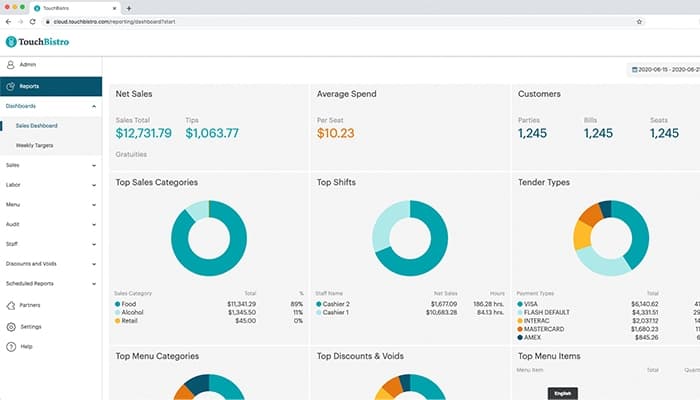
TouchBistro provides detailed insights into sales, inventory, and customer behavior. This enables restaurant owners to make data-driven decisions, optimize operations, and identify trends.
Staff Management
This feature helps schedule shifts, track employee hours, and manage payroll. It simplifies workforce management, reduces labor costs, and ensures compliance with labor laws, contributing to a more organized and efficient workplace.
Payment Processing
The software supports multiple payment methods, including credit cards, mobile payments, and gift cards. This speeds up transactions, reduces wait times, and enhances customer satisfaction by providing convenient and secure payment options.
Profit Management
TouchBistro helps monitor expenses, revenue, and profit margins. By analyzing financial performance, restaurant owners can identify cost-saving opportunities and make strategic decisions to increase profitability and sustain business growth.
Gift Cards
The software enables restaurants to sell and redeem gift cards seamlessly. This promotes customer loyalty, attracts new customers, and provides an additional revenue stream, benefiting the business with increased sales and brand exposure.
Pros And Cons of TouchBistro
Pros
Cheap to set up
User friendly
Customizable
Robust suite of tools
Mobile app
Cons
Customer support could be better
System can lag at times
Training required to start using
TouchBistro Reviews
Total 26 reviews
2
All reviews are from verified customers
Rating Distribution
5
Stars15%
4
Stars4%
3
Stars4%
2
Stars15%
1
Stars62%
Share your experience
Not Specified, N/A employees
“still being charged after closing”
Pros
While I was using the system it worked really well. Adding chairs to tables was easy and being able to swipe left to remove items made things very simple.
Cons
After recently shutting down my business, I need to say that closing my account with them has been an absolute nightmare. I called in early December before we closed to tell them I wanted to cancel. Then on January 17, I called again to ask why I was still being charged and a manager said my case had been escalated. I woke up this morning to yet another charge. When I called again, I was told I'm still third in line just to have an agent assigned. So even though I supposedly "closed my account," it is still being treated as active which means I have to keep paying until they finally get around to actually shutting it down. And after that, they still have to do an investigation before deciding if I'll be refunded or not.
Rating Distribution
Ease of use
3
Value for money
2
Customer Support
2
Functionality
2
Not Specified, N/A employees
“helpful support and simple system”
Pros
Whenever I need help their customer support comes through with the right answers. The system is also very simple to work with which makes the whole experience even better.
Cons
One thing that can be frustrating is how much information they throw at you. While a lot of it is useful some of it just feels unnecessary and ends up being more noise than value.
Rating Distribution
Ease of use
10
Value for money
10
Customer Support
10
Functionality
10
Not Specified, N/A employees
“constant crashes at the register”
Pros
At this price nothing about this point of sale system feels worth paying for. There are definitely much better alternatives out there.
Cons
It kept freezing constantly and I had to restart the point of sale system all the time. On top of that, the button layout was a complete mess.
Rating Distribution
Ease of use
4
Value for money
5
Customer Support
4
Functionality
4
Frequently Asked Questions
Does TouchBistro offer an API?
Yes, TouchBistro offers an API.
What language does TouchBistro support?
TouchBistro supports English.
What other apps does TouchBistro integrate with?
TouchBistro integrates with QuickBooks, Barclaycard and Worldpay.
Does TouchBistro support mobile devices?
Yes, TouchBistro supports iPad.
What types of pricing plans does TouchBistro offer?
Pricing starts at $19/month. You can get a tailormade quote catering to your business.
Who are the typical users of TouchBistro?
The typical user of TouchBistro is the restaurant industry.
What level of support does TouchBistro offer?
TouchBistro offers email, live chat, phone support, Knowledge Base and FAQs.