


Last Updated
Key Takeaways
Generated from the text of customer reviews
Our Verdict
Sage CRM Specifications
- Contact Management
- Lead Management
- Opportunity Management
- Sales Forecasting
Sage CRM Features
Sales Force Automation
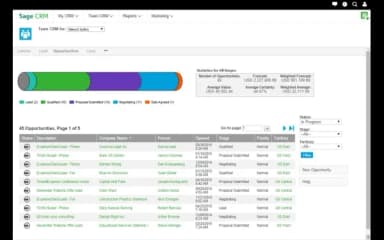
Sage CRM software's sales module covers lead and opportunity management, pipeline tracking, quote generation, and sales forecasting. Quotes created within Sage CRM pull pricing from the integrated Sage 100. In addition, configurable pipeline stages and weighted forecasting give sales managers a working view of pipeline health without manual report building.
Marketing Automation
The marketing module supports campaign creation, audience segmentation based on CRM contact data, email campaign execution through Mailchimp integration, and campaign performance tracking within the CRM. Contact lists can be built from existing customer and prospect records, with campaign activity (opens, clicks, and unsubscribes) logged against the originating contact record for follow-up by the sales team.
Customer Service Management
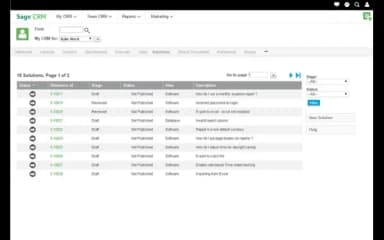
The service module tracks customer cases from opening through to resolution, with Service Level Agreement (SLA) monitoring, escalation rules, and a searchable knowledge base for recurring issue types. Service teams access the same contact record as sales, giving agents visibility into a customer's order history, open quotes, and previous interactions before handling a case.
Reporting And Dashboards
Pre-built and customizable reports cover sales pipeline performance, campaign results, service case volumes, and customer activity. Dashboard widgets display key metrics at the team and individual level, with at-risk customer views surfacing accounts that have not been contacted within a defined period. Data can be exported to Excel for analysis outside the platform.
Workflow Customization
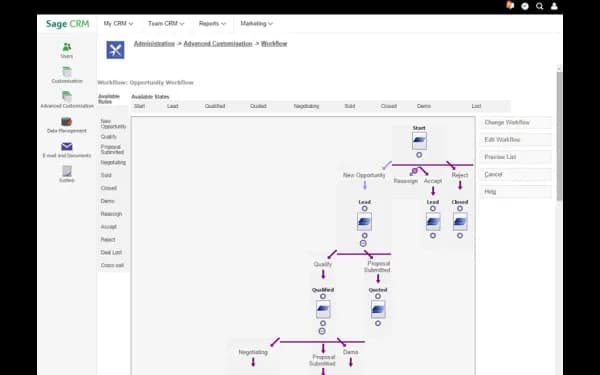
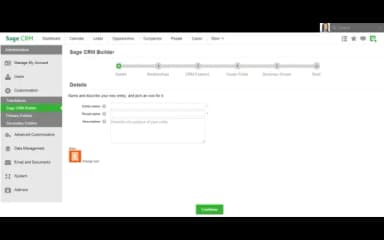
Workflow rules in Sage CRM can be configured using SQL and JavaScript. This allows systems administrators and integration teams to build routing logic, approval chains, automated notifications, and field update rules that match specific business processes.
Pros And Cons of Sage CRM
Pros
Shared document access helps keep teams aligned
Integrated accounting speeds up sales and supply operations
Market tools help target and reach customers easily
Cons
Billing features might need some improvement
Contracts module may lack subtotal displays
Sage CRM Reviews
Total 53 reviews
3.5
All reviews are from verified customers
Rating Distribution
5
Stars28%
4
Stars26%
3
Stars21%
2
Stars15%
1
Stars9%
Share your experience
Ian
Construction, 11-50 employees
Less than a year
“Excellent reporting tools!”
Pros
The reporting tools are absolutely first-rate, they've become indispensable for our team. We rely on them daily to dive deep into our key business operations, giving us the clear, detailed insights we need to make smart decisions and track our performance with precision
Cons
It feels a bit outdated to me compared to modern accounting software and training new team members on it can be challenging.
Rating Distribution
Ease of use
7
Value for money
10
Customer Support
10
Functionality
9
Kasondra
Marketing and Advertising, 500+ employees
More than a year
“constant performance updates”
Pros
Sage CRM platform is simple to use and constantly gets updates that improve its performance.
Cons
I feel like having the ability to sync directly with Outlook would be a really helpful feature.
Rating Distribution
Ease of use
8
Value for money
8
Customer Support
8
Functionality
7
Sheral
Real Estate, 11-50 employees
More than a year
“An awkward interface that made management difficult”
Pros
Nothing much to say here as I always preferred other CRM systems over SAGE and was really eager for our company to switch to a different platform.
Cons
The interface felt awkward and managing my contact database was difficult too. Also manually sorting clients into different tiers based on their engagement level just to target active contacts became a repetitive chore.
Rating Distribution
Ease of use
2
Value for money
3
Customer Support
4
Functionality
4
Frequently Asked Questions
Does Sage CRM offer an API?
Yes, Sage CRM offers API access.
What language does Sage CRM support?
Sage CRM supports multiple languages, including English, French, German, and Spanish.
What other apps does Sage CRM integrate with?
Sage CRM integrates with Sage 100, Sage 300, Microsoft Exchange Online, and Mailchimp.
Does Sage CRM offer a mobile app?
No, Sage CRM doesn't offer a native mobile app.
How much does Sage CRM cost?
Sage CRM starts at €50 ($57.68) plus VAT/user/month. Pricing is customizable, and a 30-day free trial is available. Get in touch with us for a personalized Sage CRM cost estimate.
Who are the typical users of Sage CRM?
Sage CRM is used by professionals working across healthcare, manufacturing, financial services, hospitality, professional services, nonprofits, and construction.
What level of support does Sage CRM offer?
Sage CRM offers assisted support through live chat, along with Training, Community Hub, and Year-end Center resources. Sage also provides support via a help center and contact number.