


Fathom AI
Last Updated
Overview
Fathom AI is a free app that records, transcribes, and summarizes Zoom, Google Meet, and Microsoft Teams meetings, letting you focus on conversations. It auto-generates call notes and syncs with Salesforce, HubSpot, or Close CRM. While customization for notes and recording pages is limited, AI-driven speaker insights are significant advantages.

Fathom AI Specifications
- Activity Tracking
- Reporting and Analytics
- Collaboration Tools
- Customizable Dashboards
Fathom AI Features
Automated Meeting Transcription and Summaries
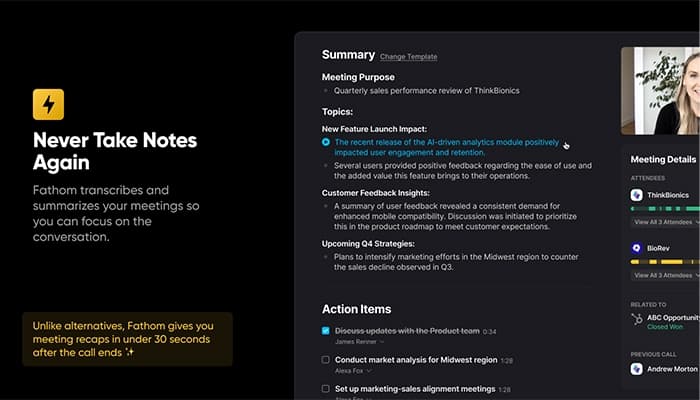
Capturing key insights from conversations is effortless with this feature. It provides real-time transcription and AI-generated summaries within 30 seconds after a meeting. So, it ensures complete focus on discussions without distractions by eliminating manual note-taking.
CRM Integration for Seamless Data Syncing
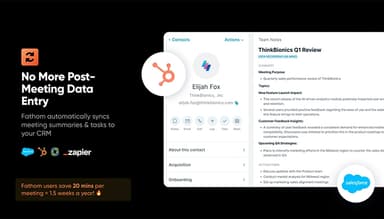
Manual data entry is no longer necessary as Fathom AI automatically syncs meeting summaries and tasks to CRM systems. This automation streamlines workflows, saving an estimated 20 minutes per meeting, translating to significant time savings annually.
Clip Sharing for Contextual Communication
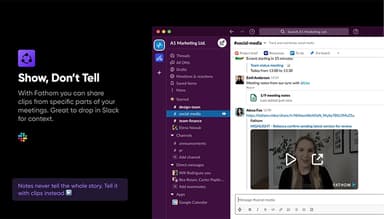
Providing clarity beyond traditional notes, Fathom AI allows the sharing of specific meeting segments as video clips. Ideal for platforms like Slack, it ensures accurate information is conveyed, maintaining full context in collaborative discussions.
AI Assistant for Instant Insights
A built-in AI assistant transforms call recordings into actionable insights, allowing quick information retrieval and automatic follow-ups. This functionality streamlines post-meeting tasks, acting as an intelligent search tool for key moments.
Seamless Integration with Productivity Tools
Meeting summaries and action items are now easy to transfer to essential platforms such as Slack, Google Docs, and Gmail. This compatibility ensures smooth collaboration across preferred task management and communication tools.
Pros And Cons of Fathom AI
Pros
Seamless integration with Google Calendar, Zoom, and Teams
Time-saving automated notetaking
Multi-language support for mixed conversations
Team collaboration and meeting review features
User-friendly and easy to set up
Cons
Lacks industry-specific compliance resources
No undo option for sent recordings or summaries
Fathom AI Reviews
Total 14 reviews
4.9
All reviews are from verified customers
Rating Distribution
5
Stars93%
4
Stars7%
3
Stars0%
2
Stars0%
1
Stars0%
Share your experience
Health Wellness and Fitness, 1-10 employees
Less than 6 months
“I use it in every meeting for my business because it's superb”
Pros
The best part is its ease of use. It automatically loads for my Google Meet meetings and provides concise, accurate summaries and action points, saving me the time of sifting through paper notes later to see if I missed anything.
Cons
Desktop app defaults to Microsoft Edge. It would be more useful if Chrome were set as the default browser.
Rating Distribution
Ease of use
10
Value for money
10
Customer Support
10
Functionality
9
Marketing and Advertising, 11-50 employees
Less than 6 months
“We can fully focus on the conversations without worrying about notes”
Pros
Focusing on the conversation is much easier thanks to this tool.
Cons
The default settings that automatically send email notes to everyone in the meeting can be a bit overwhelming.
Rating Distribution
Ease of use
10
Value for money
10
Customer Support
10
Functionality
10
Oil and Energy, 1-10 employees
Free Trial
“Perfect for meetings”
Pros
It's so easy to use and eliminates the stress of taking notes during client meetings, allowing me to focus on the conversation.
Cons
No faults found any faults yet. It's an automatic choice for virtual meetings.
Rating Distribution
Ease of use
10
Value for money
10
Customer Support
10
Functionality
10
Frequently Asked Questions
Does Fathom AI have a mobile app?
No, Fathom AI currently does not offer a mobile application.
Who are the typical users of Fathom AI?
Fathom AI provides solutions for various teams, including sales, customer success, founders, operations, management, product managers, and marketing.
Does Fathom AI offer an API?
No, Fathom AI currently does not offer an open API.
What types of pricing plans does Fathom AI offer?
Fathom AI offers a variety of pricing plans, including a Free plan, Premium at $19/per user/month, Team Edition at $29/per user/month, and Team Edition Pro at $39/per user/month. Request a detailed Fathom AI cost analysis to see which price model works best for your business.
What other apps does Fathom AI integrate with?
Fathom AI integrates with various third-party applications, including Mailchimp, HubSpot, Twilio, Zapier, Slack, Calendly, Databricks, and ServiceNow.
What language does Fathom AI support?
Fathom AI supports transcription in 28 languages, including German, Spanish, French, Russian, English, etc.
What level of support does Fathom AI offer?
Fathom AI provides support through a knowledge base, FAQs/forums, ticket submission, a chatbot, and email.