


Journey
Last Updated
Overview
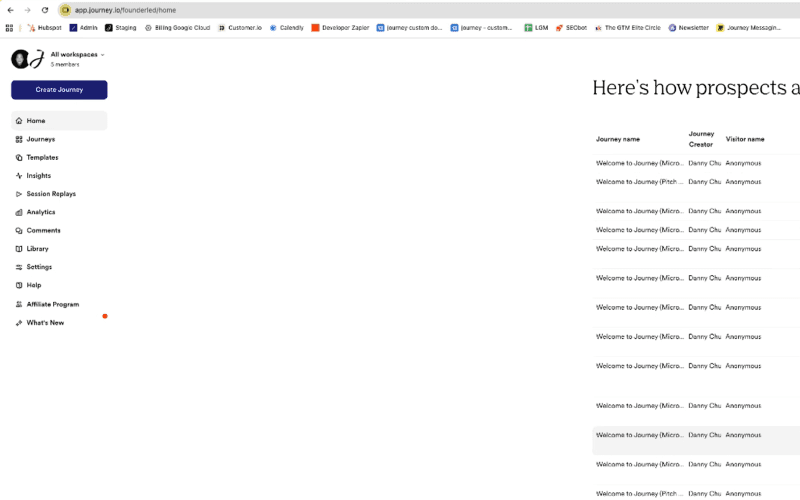
Journey helps B2B teams share proposals, follow-ups, and onboarding materials through a single branded link. While analytics focus solely on content engagement, the platform streamlines communication among marketers, founders, and sales teams. This enables polished, trackable, and efficient content delivery, enhancing buyer interactions and collaboration.
Journey Specifications
- Activity Tracking
- Reporting And Analytics
- Performance Tracking
- Email Integration
What Is Journey?
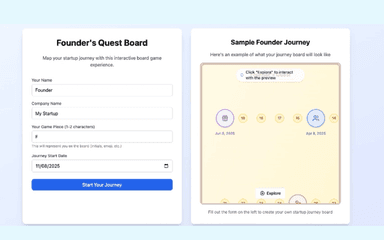
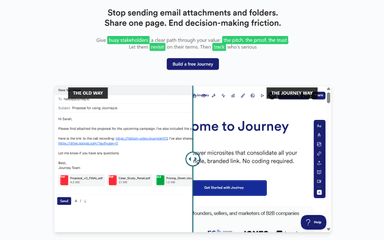
Journey is a dynamic digital sales room platform designed to help B2B teams deliver high-impact follow-ups, proposals, and onboarding flows through a single, branded link. It streamlines the sales process by consolidating scattered assets, like slide decks, Loom videos, and PDFs, into an interactive, scrollable microsite. Moreover, it allows businesses to track prospect behavior in real time and identify deal-closing signals using engagement analytics and AI-powered content. Sales teams can replace scattered emails with a polished, conversion-focused experience.
Journey Pricing
Journey pricing starts with the Start plan for $9/user/month with up to 2 journeys and access permissions. Further pricing tiers of the software are as follows:
- Grow: $29/user/month
- Scale: $59/user/month
- Enterprise: Custom pricing
Disclaimer: The pricing is subject to change.
Journey Integrations
Journey supports integrations with the following apps:
- Slack software
- Salesforce
- Segment
- Google Drive
- HubSpot CRM software
- Zapier software
- Gong software
Who Is Journey For?
Journey software is ideal for a wide range of industries and sectors, including:
- Transport and logistics
- Cybersecurity
- Human resources and staffing
- Healthcare
- Software as a Service (SaaS)
- Financial services
- Marketing and advertising
Is Journey Right For You?
Journey is the ultimate fit for lean B2B teams looking to elevate their storytelling and eliminate the friction of multi-link email follow-ups. Its standout feature is its AI-powered "Digital Sales Room," which allows users to generate professional-grade narratives and custom images in seconds. By providing deep insights into how decision-makers interact with your content, Journey ensures you never miss a follow-up opportunity. Overall, it is a powerful niche solution for those prioritizing design, speed, and actionable sales intelligence.
Are you still doubtful if Journey is what you need? Call us at (661) 384-7070 for further assistance.
Journey Features
Unified Content Link
This feature allows users to combine videos, PDFs, decks, and contracts into a single branded microsite. It delivers all content in a single, accessible location, improving buyer engagement, streamlining follow-ups, and providing a professional, polished experience without multiple emails or scattered files.
Engagement Analytics
Users can track how recipients interact with content through metrics such as time on page, scroll depth, and clicks. This insight helps teams understand engagement patterns, optimize content delivery, prioritize follow-ups, and refine messaging for stronger sales and onboarding outcomes.
No-Code Setup
Journey provides a drag-and-drop builder and ready-made templates that remove the need for coding or design skills. Teams can quickly assemble professional microsites, deliver polished proposals, follow-ups, and onboarding flows, and scale content creation without relying on technical or design support.
End-To-End Coverage
The software supports all stages of the customer journey, from sales outreach to onboarding and post-sale engagement. It centralizes content delivery across teams, ensures a consistent buyer experience, provides insights at every touchpoint, and reduces friction in communication and tracking.
Pros And Cons of Journey
Pros
Detailed engagement analytics and insights
Tracks views and completion rates
Enhances follow-ups and prospecting efforts
Cons
Minor design customization constraints
May require an initial learning period for some users
Journey Reviews
Total 10 reviews
4.9
All reviews are from verified customers
Rating Distribution
5
Stars90%
4
Stars10%
3
Stars0%
2
Stars0%
1
Stars0%
Share your experience
Mid Market, 51-100 employees
“The analytics are a game changer!”
Pros
Let me start with the biggest win: the insights are massive. Seeing page views, percent of Journey completed and how long people spent on each page makes a real difference. Timing matters and knowing if or when customers are looking at your content can completely change your follow-up. The experience for recipients is excellent too. There's a PDF download option but PDFs feel flat and have zero wow factor. Journey takes things beyond that ordinary format. I've used it for prospecting, multi-threading and call recaps and being able to include documents and video is incredibly valuable. I even used it during a job search by building a Journey around my background and sales philosophy. It got me better response rates than sending video introductions alone.
Cons
There are already plenty of strong customization options but the one thing I'd still love to see on the roadmap is more control over fonts and small design details like that.
Rating Distribution
Ease of use
10
Value for money
10
Customer Support
10
Functionality
10
Small Business, 11-50 employees
“customer experience is great”
Pros
Tackles a really important part of the sales cycle by giving customers one place where all the relevant information lives. That has been a real game changer for the overall customer experience.
Cons
I haven't come across anything about it that I've disliked.
Rating Distribution
Ease of use
10
Value for money
10
Customer Support
9
Functionality
10
Mid Market, 51-100 employees
“all sales content in one place”
Pros
Having everything gathered in one place has been a big upgrade. I used to send prospects PDFs, links and case studies in separate emails all through the sales process which got messy fast. With Journey, I can post all of that content in a single spot they can access whenever they need it. It saves prospects time because they are not digging through old emails or trying to remember what I already sent and it also makes their internal conversations much easier.
Cons
At the beginning, it felt a little overwhelming but it didn't take much time to get the hang of it.
Rating Distribution
Ease of use
10
Value for money
10
Customer Support
10
Functionality
10
Frequently Asked Questions
Does Journey offer an API?
Information regarding an API is currently unspecified by the vendor.
Does Journey have a mobile app?
No, Journey does not have a mobile app.
Who are the typical users of Journey?
Journey features are primarily used by organizations serving industries and sectors such as healthcare, marketing and advertising, cybersecurity, software as a service (SaaS), human resources and staffing, transport and logistics, and financial services.
What types of pricing plans does Journey offer?
Journey pricing comprises four plans, i.e., the Start plan at $9/user/month, followed by Grow at $29/user/month, Scale at $59/user/month, and the Enterprise plan with custom pricing, along with a 14-day free trial offered with the first three plans. Get in touch for a personalized Journey cost estimate.
What level of support does Journey offer?
Journey provides support through FAQs, a dedicated customer success manager (for the Enterprise plan), and a resource center.
What language does Journey support?
Journey primarily supports the English language.
What other apps does Journey integrate with?
Journey integrates with Zapier software, Salesforce, HubSpot CRM software, Gong software, Google Drive, Segment, and Slack software.