


AllMeds
Last Updated
Overview
AllMeds is a comprehensive electronic health record (EHR) and practice management (PM) solution designed specifically for surgical practices. While customer support could be improved, the software enhances revenue cycle management and streamlines clinical workflows and documentation processes, leading to more efficient practice operations.
AllMeds Specifications
- Appointment Management/Scheduling
- e-Prescriptions
- Lab Integration
- Patient Portal
What Is AllMeds?
Overview
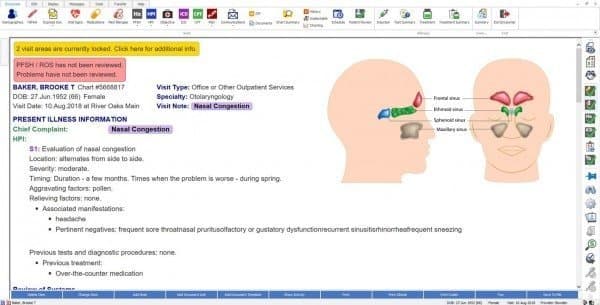
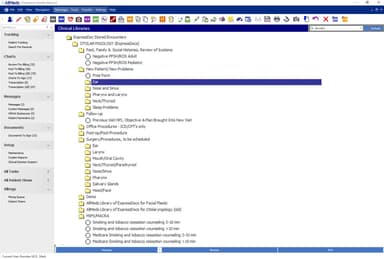
AllMeds is an integrated software solution combining electronic health records, practice management, and revenue cycle management, tailored for surgical specialties. Its ExpressDocs™ feature enables providers to document standard office tests and complete encounters, including chart notes, matched codes, communications, and task distribution.
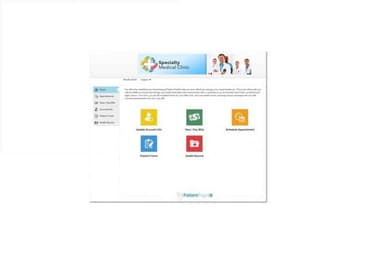
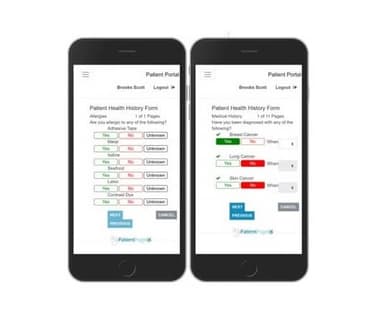
The patient portal allows patients to securely input their information from any device, while AllMeds's ExpressHx™ feature offers a bubble-sheet scanning solution for in-office use. These tools enhance efficiency by automatically integrating data into the EMR, increase accuracy by eliminating handwritten forms, and reduce pre-encounter paperwork.
What Is AllMeds Best For?
A notable feature of AllMeds medical software is its integrated eRx solution, which enhances the prescribing process within specialty practices. This feature streamlines the prescription workflow directly from the EHR system, reducing medication errors. It also offers customizable medication lists tailored to specific specialties, enabling providers to quickly find and select common scripts with greater accuracy.
AllMeds Pricing
AllMeds Integrations
The vendor has not provided details regarding the software's third-party integrations.
How Does AllMeds Work?
Here's how you can make use of the software's features:
- Log into your AllMeds account and access the patient's records
- Utilize ExpressDocs™ to document standard patient discussions, including chart notes, diagnoses, and procedure flows
- Use the integrated eRx solution to prescribe medications directly from the EHR
- Update patient histories and records using ExpressHx™ and the patient portal for secure input
- Manage appointments, billing, and revenue cycle through the practice management module
- Generate reports and analytics to monitor practice performance and make data-driven decisions
Who Is AllMeds For?
AllMeds is specifically designed for:
- Surgical Specialists
- Independent Specialty Practices
Is AllMeds Right For You?
AllMeds is ideally suited for specialty practices that seek a comprehensive and tailored solution for managing EHR and practice management. The system's automation capabilities, such as ExpressDocs, streamline administrative tasks, and its integrated eRx solution and patient management tools enhance operational efficiency and reduce errors.
Additionally, the software prioritizes the security of patient data by employing robust encryption methods and access controls to ensure that sensitive information is protected from unauthorized access and breaches.
Still not sure if it's the right choice for you? Contact us at (661) 384-7070 and let our experienced team assist you in making an informed decision.
AllMeds Features
Practice Management
The practice management module offers advanced tools for managing appointments, billing, and revenue cycles. The integrated billing solutions streamline the revenue cycle from patient check-in to collection management, and the reporting modules enable practices to gain insights into their business and financial reports and make data-driven decisions.
Interfaces
AllMeds PM offers interfaces for many of today's most common practice systems to enhance efficiency. These interfaces connect with specialty instruments, diagnostic equipment, lab services, PACS systems, practice management systems, and hospital information systems.
E-Prescribing
The integrated e-prescription module allows providers to prescribe medications, and it includes decision-support tools and contraindication alerts to reduce medication errors. Additionally, the solution supports compliance with Meaningful Use and other federal requirements, offering both individual and batch-signing functions to enhance workflow efficiency.
Coding Modules
AllMeds EMR features exclusive coding modules to improve the billing process by linking appropriate CPT codes. CodeSYNC suggests acceptable treatments that are applicable at the time of service. SureCode helps avoid bundling and unbundling issues by running CPT/ICD-10 encoded encounters against a comprehensive coding library, which ensures fewer rejections based on national standards.
Pros And Cons of AllMeds
Pros
Autofill speeds up data entry
Great for specialty practices
Accurate billing and coding tools
Cons
Interface feels a bit outdated
Slow customer support responses
Limited documentation for use
AllMeds Reviews
Total 29 reviews
3.9
All reviews are from verified customers
Rating Distribution
5
Stars21%
4
Stars59%
3
Stars10%
2
Stars7%
1
Stars3%
Share your experience
Opthalmology, 10-49 employees
“I love AllMeds”
Pros
None of them come close to AllMeds EHR on customization highlights and an electronic restorative record system.
Cons
It can fit any practice no matter what the field is. All-in-one software!
Rating Distribution
Ease of use
10
Value for money
9
Customer Support
10
Functionality
10
Becker Medical Care, 2-9 employees
“Satisfied with the functionality”
Pros
The billing and scheduling features of AllMeds EHR make it easy for our limited staff to run the practice smoothly.
Cons
The software should also include more documentation options for general physicians.
Rating Distribution
Ease of use
9
Value for money
9
Customer Support
9
Functionality
8
Small Business , 10-49 employees
“I enjoy using ALLMeds”
Pros
Its a very easy to use and a pretty simple software for EHR.
Cons
Not a lot, but it can lag a bit.
Rating Distribution
Ease of use
7
Value for money
8
Customer Support
8
Functionality
8
Frequently Asked Questions
Who are the typical users of AllMeds EHR Software?
The software assists surgical specialists and independent specialty practices.
What level of support does AllMeds offer?
AllMeds software offers live chat, phone and email support.
Is AllMeds free?
No, AllMeds is not offered for free.
Is AllMeds Software cloud-based?
AllMeds EHR Software offers both cloud-based and on-premises deployment options.
Who can benefit from using AllMeds EHR Software?
Healthcare providers across surgical medical specialties can benefit from using AllMed medical software.