


SendHub
Last Updated
Overview
SendHub centralizes business text messaging, providing tools for managing SMS/MMS, automations, and shared inbox conversations. While it does not include advanced call routing features, the platform enables teams to manage text-based customer interactions efficiently.

SendHub Specifications
- Call Reporting And Analytics
- Integration With Help Desk And Support Systems
- Interactive Voice Response (IVR)
- Call Recording
SendHub Features
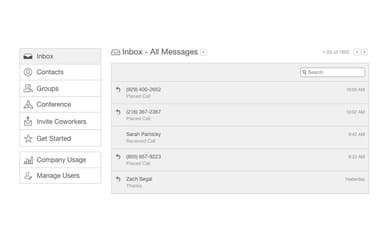
SendHub Inbox
The platform’s Inbox centralizes all business text messaging, making it easy to manage conversations in one place. Teams can collaborate on messages, assign conversations, and ensure no customer inquiry is missed. With real-time notifications and multi-user support, businesses gain efficiency and transparency in managing communications.
Analytics And Reporting
The software provides detailed analytics to track messaging performance and engagement. Users can generate reports on delivery, responses, and campaign effectiveness to make informed decisions. These insights help teams optimize strategies and measure the impact of their communication efforts.
Message Templates
This feature allows teams to create and save reusable message templates for frequent communications. It reduces manual typing, ensures consistency, and speeds up outreach. Templates can be personalized, making customer interactions faster and more professional.
Merge Fields
The platform’s merge fields enable dynamic personalization by automatically inserting contact-specific details into messages. This ensures messages feel personal and relevant to each recipient. By streamlining customization, teams can save time while maintaining high-quality communication.
Groups And Unlimited Keywords
This feature helps businesses organize contacts into groups and grow their subscriber lists using unlimited keywords. Users can set up text-to-join campaigns and manage large audiences efficiently. It simplifies targeting, segmentation, and marketing efforts for more effective messaging campaigns.
Pros And Cons of SendHub
Pros
Helpful analytics aid in tracking SMS engagement
Contacts and message search are straightforward
Easy text messaging improves team communication
Cons
No built-in CRM functionality included
MMS features may require extra setup
SendHub Reviews
Total 10 reviews
4.6
All reviews are from verified customers
Rating Distribution
5
Stars70%
4
Stars20%
3
Stars10%
2
Stars0%
1
Stars0%
Share your experience
Mid Market, 51-100 employees
“simple to send attachments”
Pros
Something I appreciate most is being able to attach files even to a simple message. The inbound and outbound sections handle attachments really well too.
Cons
I honestly haven't run into any issues. Everything has worked well and the overall experience has been very positive.
Rating Distribution
Ease of use
10
Value for money
9
Customer Support
10
Functionality
9
Internet, 11-50 employees
“handy integrations”
Pros
The integration works really well, with several options like Slack and Drive and the interface is fairly user friendly as it avoids feeling too complicated despite the number of features offered. SMS delivery is quick, file attachments are supported and the pricing feels quite reasonable too.
Cons
The only real limitation is that it's mostly focused on SMS right now. It would be much better if they added WhatsApp and other communication channels as well.
Rating Distribution
Ease of use
10
Value for money
9
Customer Support
10
Functionality
9
Small Business, 11-50 employees
“reliable SMS marketing platform”
Pros
Message delivery almost never fails which has been a huge plus. When I first connected this software to my existing codebase, the process was very simple because the API documentation is detailed and simple to follow. It works as an excellent SMS marketing solution for both small businesses and larger companies. Setup is one of its strongest points and the features line up well with what users actually need. The analytics, integration APIs and SMS dashboard all feel thoughtfully built and well designed.
Cons
It would be better if they offered a small amount of free trial credits instead of making users go through a lengthy demo request process. A lot of people prefer to test a SaaS product quickly before deciding to buy. The interface could also use a visual refresh since the current design feels a bit old fashioned.
Rating Distribution
Ease of use
10
Value for money
8
Customer Support
10
Functionality
10
Frequently Asked Questions
What language does SendHub support?
SendHub primarily supports English.
What types of pricing plans does SendHub offer?
SendHub offers five pricing plans, including Lite ($19/month), Lite+ ($37/month), Starter ($52/month), Basic ($100/month), and Custom (tailored pricing). Get a detailed SendHub cost breakdown tailored to your specific requirements.
Who are the typical users of SendHub?
SendHub features are used by organizations across industries and sectors, including nonprofits, real estate, recruiting, healthcare, heavy equipment, and food and beverage.
Does SendHub have a mobile app?
Yes, SendHub offers a dedicated mobile app for iOS devices.
What level of support does SendHub offer?
SendHub offers support through a contact form, phone, and email.
What other apps does SendHub integrate with?
SendHub supports integration with platforms, such as JazzHR, Mailchimp software, Slack software, Webex Calling, and Shopify software.
Does SendHub offer an API?
Yes, SendHub offers an API.