


FlowPath
Last Updated
Overview
FlowPath CMMS helps your team streamline workflow management with seamless efficiency. It is structured to empower the user to have strong control over their workflow, which results in enhanced productivity. You and your team can coordinate easily to accomplish organizational goals.
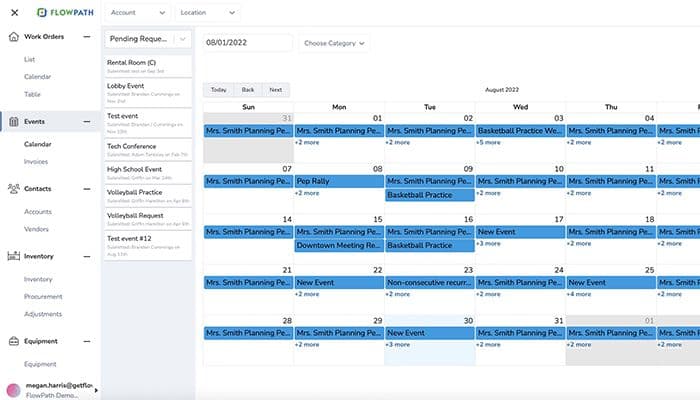
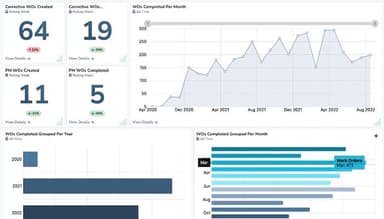

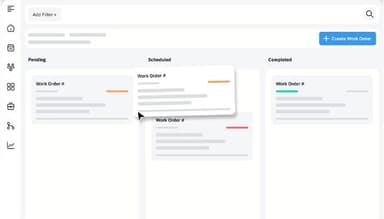
FlowPath Specifications
- Work Order Management
- Maintenance Logs
- Purchasing
- Incident Management
What is FlowPath?
Overview
FlowPath software is a multipurpose facilities management system designed to transform team collaboration and task performance to achieve optimal operational results. This software smooths processes and enhances productivity. FlowPath is equipped with intuitive task management features, advanced automation capabilities, and strong analytics tools. It enables your team to work smarter and achieve goals with ease and success.
FlowPath Pricing
FlowPath pricing plans offer three different options which are:
- Core CMMS: $399/month (Monthly billing)
- Pro CMMS: $999/month (Annual billing)
- WorkSpace CMMS: Starting from $2,499/month and $50/Location (Annual billing)
Disclaimer: The pricing is subject to change.
FlowPath Integrations
FlowPath allows your business to successfully integrate with:
Who Is FlowPath For?
FlowPath software has a diversified range of users, which are given below:
- Freelancer
- Small size businesses
- Medium size businesses
- Large enterprises
- Public Administrations
Is FlowPath Right For You?
FlowPath is the ideal software designed for work order, inventory, and maintenance management. It is suitable for any business size and consists of a variety of features that help an organization reach optimized results. This user-friendly system enjoys a good market position and will help your business streamline its operations. Lovett, BCycle, Atlanta Tech Village, State Fair Community College and many more are using this software successfully.
Are you still not sure if FlowPath is right for you? Call us at (661) 384-7070, and we will be glad to guide you more.
FlowPath Features
Work Order Management
FlowPath enables you and your team to create, assign, track and complete tasks in an effective way. It also helps you schedule, prioritize, and report, ensuring that work orders are completed efficiently.
Inventory Management
This feature helps you and your team to track and manage inventory positions. You will be able to monitor your stock level and inventory activities. Overall, this feature will ensure the optimization of operational efficiency.
Maintenance Management
FlowPath helps you track maintenance activities related to your equipment. It also enables you and your team to plan preventive maintenance tasks and create work orders for repairs. This system will help you monitor maintenance activities, resulting in reduced downtime and improved asset life.
Preventive Maintenance
FlowPath enables the user to schedule and manage maintenance tasks regularly in order to prevent breakdowns and reduce downtime. Its set of tools will help you to analyze maintenance performance through various reports.
Reporting And Analytics
You will be able to generate and analyze reports to gain insight into your operations. This important feature helps you make better decisions by identifying areas for improvement, resulting in efficient operations and better results.
Pros And Cons of FlowPath
Pros
Easy accessibility from any device
User-friendly
Excellent customer support
Helps in appreciable cost reduction
Cons
No API offered
Pricing on the higher side
FlowPath Reviews
Total 51 reviews
4.7
All reviews are from verified customers
Rating Distribution
5
Stars75%
4
Stars25%
3
Stars0%
2
Stars0%
1
Stars0%
Share your experience
Education, 500+ employees
Less than a year
“Huge WIN for our organization!!!!”
Pros
It's really intuitive, consolidates all information, and offers excellent customization options.
Cons
I haven't encountered any issues yet! I've used several different applications before, and this one stands out as the best.
Rating Distribution
Ease of use
10
Value for money
10
Customer Support
10
Functionality
10
Education, 500+ employees
Less than a year
“Best tool in the toolbox”
Pros
FlowPath is accessible from any device with internet connectivity. There's no need to purchase an app; it's always with you on your phone.
Cons
Embracing change can be challenging, but the similarities and convenience of FlowPath far outweighed any concerns about switching. I was particularly worried about losing our 67,000 work orders from the previous system, but they're all intact and easily accessible.
Rating Distribution
Ease of use
10
Value for money
10
Customer Support
10
Functionality
10
Not Specified, 101-500 employees
More than a year
“A Fantastic All-up CMMS”
Pros
The team is agile, the interface is intuitive, work structure options are flexible, and it's Simple to use and teach!
Cons
None at all; this product is truly fantastic!
Rating Distribution
Ease of use
10
Value for money
10
Customer Support
10
Functionality
10
Frequently Asked Questions
Does FlowPath offer an API?
No, FlowPath does not offer an API.
What language does FlowPath support?
FlowPath supports the English language.
What other apps does FlowPath integrate with?
FlowPath seamlessly integrates with various third-party applications such as Microsoft Outlook, Zapier, Coupa, Slack, ProCore and ServiceTitan.
Does FlowPath support mobile devices?
Yes, the software supports Android, iPhone and iPad.
What types of pricing plans does FlowPath offer?
FlowPath cost has three packages. Core CMMS: $399/ Month, Pro CMMS: $999/ Month and WorkSpace CMMS: Starting from $2,499/ Month and $50/ Location.
Who are the typical users of FlowPath?
Typical users of FlowPath are freelancers, small businesses, medium-sized businesses, large enterprises, and public administrations.
What level of support does FlowPath offer?
FlowPath offers support through the Help Desk/ Email, FAQs/ Forum, Chat and Knowledge Base.