


Maintenance Care

Last Updated
Overview
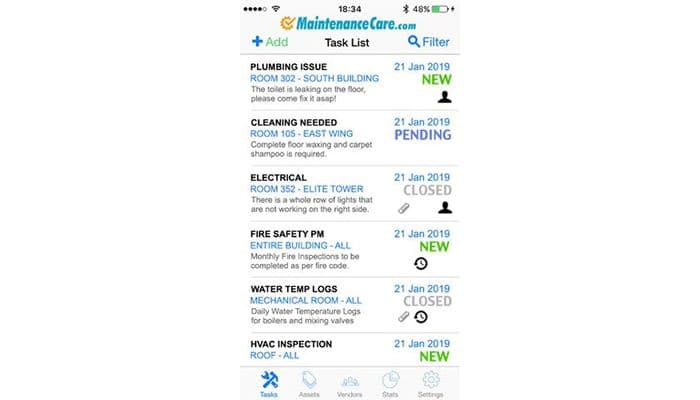
Maintenance Care CMMS simplifies facility maintenance with intuitive task tracking and reporting solutions. It offers features like asset tracking, preventative maintenance, work orders, and more. Its robust features support efficient maintenance management and smooth operations for businesses of any size. Transform your business with Maintenance Care.
Maintenance Care Specifications
- Work Order Management
- Maintenance Logs
- Purchasing
- Incident Management
Maintenance Care Features
Work Orders
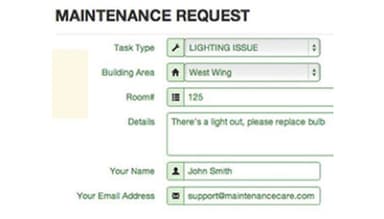
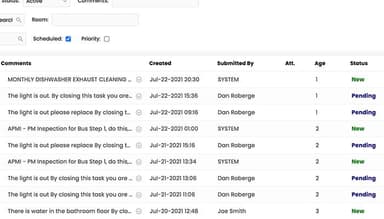
Efficiently create, assign, and track maintenance tasks. Maintenance Care enables users to achieve higher operational efficiency. It improves workflow management, reduces downtime, and enhances accountability throughout the maintenance process. This feature ensures instant communication for work orders and requests with notifications and updates.
Document Storage
The software enables users to centralize maintenance-related documents such as manuals, schematics, and safety protocols. It facilitates easy access to critical information and streamlines documentation management. Maintenance Care complies with state-of-the-art encryption and safety protocols to keep data safe and secure.
Parts and Inventory
With Maintenance Care, users can efficiently manage inventory levels, track stock movements, and streamline parts procurement processes. It minimizes stockouts, optimizes inventory levels, and ensures the timely availability of necessary parts, reducing downtime and associated costs. From inventory tracking to price tracking, it simplifies the process but ensures accuracy.
Room Booking
By using this feature, users can simplify the scheduling of facilities and equipment for maintenance activities or other purposes. It helps businesses improve resource utilization, prevent conflicts in room bookings, and enhance overall operational efficiency.
Pros And Cons of Maintenance Care
Pros
No major learning curve
Easy to deploy
A robust suite of tools for inventory management
Interface is clean and easy to navigate
Cons
Some features have limited customization options
Invoicing tools could be improved, as per Maintenance Care reviews
Maintenance Care Reviews
Total 270 reviews
4.7
All reviews are from verified customers
Rating Distribution
5
Stars75%
4
Stars19%
3
Stars6%
2
Stars0%
1
Stars0%
Share your experience
Not Specified, 101-500 employees
Less than a year
“really helpful for repeat orders”
Pros
One thing that stands out about this tool is how natural it feels to work in. I'm able to pull up and sort all of our closed work orders fast, without dealing with extra steps and that makes everyday order handling a lot less stressful. It's been even more useful when the same products come back over and over, since I can keep better track of everything and manage repeat orders much more efficiently.
Cons
My biggest issue is that our company's inventory system doesn't seem to carry over into it. At this point, I'm still not sure if that's a problem with this software, something related to Syspro, or just a question I need to bring to customer support. Based on what my former manager told me, it sounded like it just couldn't be done, so that part has definitely been frustrating.
Rating Distribution
Ease of use
9
Value for money
8
Customer Support
7
Functionality
7
Education Management, 101-500 employees
Less than 6 months
“handles high-volume work fast”
Pros
this tool made dealing with a big number of requests a lot more manageable for me. It helps me keep up with each task as it comes in and I can reply in real time without feeling buried. The whole setup feels very simple to use, so working in it every day has been really enjoyable.
Cons
Honestly, I haven't come across any real downsides with this software. I use it daily and it's been something I genuinely like having as part of my routine.
Rating Distribution
Ease of use
10
Value for money
10
Customer Support
10
Functionality
10
Hospital & Health Care, 101-500 employees
Less than 6 months
“all-in-one maintenance that delivers”
Pros
Having my work orders and preventive maintenance tasks all in one spot has made things a lot more manageable. One of the first things that stood out was how fast I could get comfortable with the system and the price felt reasonable compared to some of the other products I checked out. Whenever something comes up, the support team has been quick to respond and actually helpful which has made a big difference.
Cons
One issue that keeps coming up is how careful I have to be when creating assets and detsets, because after they're saved there are very few ways to remove them. That gets even more annoying in bigger facilities where the number of detsets is capped, so fixing setup mistakes can turn into extra work. Printing anything made with a table matrix has also been tough since there's no PDF option to make that process simpler.
Rating Distribution
Ease of use
9
Value for money
9
Customer Support
10
Functionality
7
Frequently Asked Questions
Does Maintenance Care offer an API?
Yes, Maintenance Care offers an API.
What language does Maintenance Care support?
Maintenance Care supports the English language.
What other apps does Maintenance Care integrate with?
The software integrates with Zoho CRM, Slack, QuickBooks, and several other apps.
Does Maintenance Care support mobile devices?
Yes, Maintenance Care supports Android and iOS devices.
What types of pricing plans does Maintenance Care offer?
Pricing starts at $100/month. You can get a specific quote for Maintenance Care pricing that caters to your business.
Who are the typical users of Maintenance Care?
The typical users of Maintenance Care are healthcare, education, manufacturing, utilities, and so on.
What level of support does Maintenance Care offer?
Maintenance Care supports email, phone support, chat, and FAQs as customer support channels.