


Last Updated
Overview
Kronologic software automates meeting scheduling using AI, reducing delays and manual follow-ups. However, its heavy reliance on automated processes may not suit teams needing more direct control. Overall, streamlining high-intent buyer engagement helps boost response rates and accelerate pipelines effectively.
Kronologic Software Specifications
- Real-Time Communication
- File Sharing & Management
- Document Management
- Task & Project Management
What Is Kronologic Software?
Kronologic is a cloud-based scheduling solution designed for sales and marketing professionals seeking to optimize meeting workflows. Leveraging AI to automate scheduling helps teams manage high-intent leads efficiently, ensuring faster follow-ups and reduced delays. Catering primarily to B2B industries, Kronologic addresses challenges such as missed opportunities due to slow response times and the inefficiencies of manual scheduling. Its approach transforms the lead engagement process, helping businesses boost their pipeline success rates.
Kronologic Software Pricing
The software offers four packages:
- Individual: $6/month
- Small Team: $112/user/month
- Teams: $1000/teams of 10/month
- Enterprise: custom quote provided
Disclaimer: Prices are subject to change.
Kronologic Software Integrations
Kronologic software seamlessly integrates with various popular business applications, including:
- Webex
- Salesforce
- Google Meet
- HubSpot
- Microsoft Dynamics 365
- Zoom
- Teams
- Outreach
Watch a free Kronologic software demo to learn more about its integrations.
Who Is Kronologic Software For?
The software is designed for businesses of all sizes across various industries and sectors, such as:
- Technology
- Professional services
- Events and marketing
Is Kronologic Software Right For You?
Recognized as a leader in AI scheduling, Kronologic software empowers teams to focus on meaningful interactions rather than administrative tasks. It enhances workflows and increases productivity and revenue by a significant percentage. The software is also scalable and secure. Some of its users include global brands like Okta, PayScale, BrightTalk, and Thomson Reuters.
Still unsure if Kronologic software is right for you? Contact our customer support team at (661) 384-7070, and they will help you make a confident decision.
Kronologic Software Features
Kronologic Email
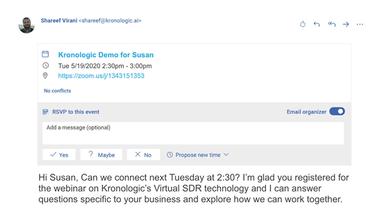
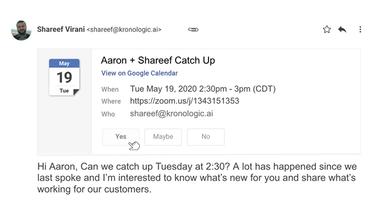
Kronologic email uses AI-driven scheduling to propose meetings directly within email conversations. Recipients can accept or modify meeting times with a single click, eliminating back-and-forth communication. This feature boosts meeting acceptance rates and accelerates lead conversions, simplifying the scheduling process.
Kronologic Invite
This feature automates meeting invitations by integrating with sales workflows. It proactively schedules meetings during critical engagement points, such as demo requests or webinar sign-ups, ensuring timely follow-up. Reducing manual efforts helps sales teams secure high-intent buyers and improve pipeline efficiency.
Kronologic for Reps
Designed for sales representatives, the software streamlines scheduling by automating responses to scheduling conflicts and rescheduling no-shows. It increases response rates and engagement while shortening sales cycles. Reps can focus on selling instead of administrative tasks, maximizing productivity.
Pros And Cons of Kronologic Software
Pros
Offers a user-friendly interface
Meetings created within seconds without the need for email communication
New features are regularly added
New features are regularly added
Cons
There could be more integrations
Initial training is required, according to software users
Dashboard layouts could be better
Kronologic Software Reviews
Total 19 reviews
4.4
All reviews are from verified customers
Rating Distribution
5
Stars58%
4
Stars26%
3
Stars11%
2
Stars5%
1
Stars0%
Share your experience
Kimberly H.
Human Resources, 500+ employees
More than a year
“Great features and reliable tool”
Pros
AI in the program helps us set up and organize meetings for our team without all the back and forth emails. It's a huge time-saver.
Cons
The integration of Outlook popup reminders could be improved. It's not quite sufficient and I think making it better would definitely enhance client satisfaction.
Rating Distribution
Ease of use
10
Value for money
10
Customer Support
10
Functionality
9
Anonymous
IT, 500+ employees
More than a year
“Good scheduling tool for work tasks”
Pros
It makes scheduling appointments without coming off as spammy, which is a big plus.
Cons
It didn't account for the time zone of either myself or the customer, which led to some appointments being scheduled for 7 AM.
Rating Distribution
Ease of use
6
Value for money
6
Customer Support
6
Functionality
6
Anonymous
IT, 500+ employees
More than a year
“Excellent tool for customer engagement and saving time”
Pros
The tool is super simple, customizable and does a great job of helping us engage with customers.
Cons
The one feature I would like to see added is the ability to integrate Outlook pop up reminders.
Rating Distribution
Ease of use
10
Value for money
10
Customer Support
10
Functionality
8