


Last Updated
Overview
Elevate your patient care with CompuGroup Medical, a cloud-based EMR and practice management system. Tailored for various specialties, the user-friendly interface and customizable templates streamline documentation. Experience comprehensive billing, patient portal access, and proactive SAM features. Ready to transform your practice? Explore CGM pricing and request a demo today!
CompuGroup Medical (CGM) EMR Specifications
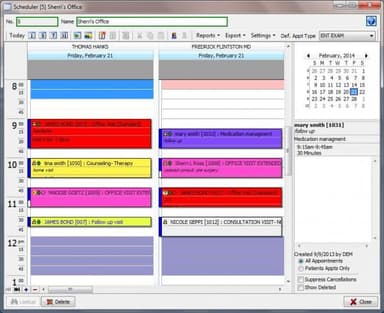
- Appointment Management/Scheduling
- e-Prescriptions
- Lab Integration
- Patient Portal
CompuGroup Medical (CGM) EMR Features
Document Management
Manage and organize patient records, medical documentation, and administrative files within a centralized document management system. This feature ensures secure storage, easy retrieval, and efficient collaboration, reducing the time spent on paperwork and enhancing overall practice organization.
e-Prescribing
Experience the convenience of electronic prescribing with CGM software. Streamline the prescription process, reduce errors, and enhance patient safety by electronically sending prescriptions to pharmacies. This feature improves workflow efficiency and contributes to better medication management and adherence.
Patient Portal
Empower patients with direct access to their health information through the patient portal feature. Enhance communication, streamline appointment scheduling, and provide a secure platform for patients to view test results and exchange messages with healthcare providers. This patient-centric feature contributes to improved engagement and satisfaction.
Billing And Collections
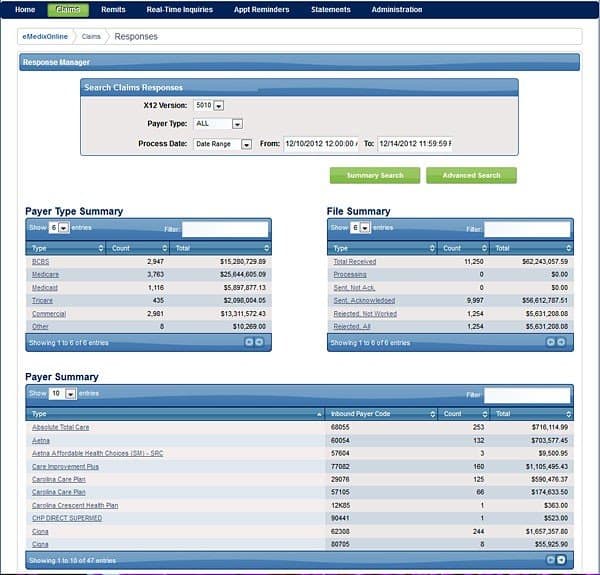
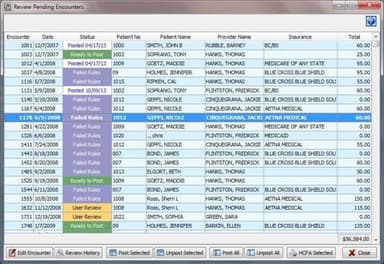
Optimize your revenue cycle with CGM's comprehensive Billing and Collections feature. From automated claims management to streamlined billing workflows, this functionality consolidates multi-channel billing into a seamless application. Improve billing accuracy, save time and resources, and ultimately enhance the financial health of your practice.
Custom Workflows
Tailor CGM software to fit seamlessly into your unique workflow with the custom workflows. Adapt templates, combine modules, and streamline features to meet your organization's needs. This flexibility ensures that the software aligns with your established practices, reducing disruptions and enhancing overall efficiency.
Pros And Cons of CompuGroup Medical (CGM) EMR
Pros
The adaptive learning feature helps enhance efficiency and contributes to a more personalized approach to patient care
Charting with or without an internet connection ensures flexibility and accessibility
Integrated practice management functions in one platform helps enhance coordination among front office staff, clinicians, and billing teams, streamlining overall operations
The software allows timely follow-ups, electronic orders, and result management positively impacts patient satisfaction and outcomes.
The easy customization and versatile design ensure the software meets unique organizational needs, providing a secure and highly adaptable healthcare solution.
Cons
Some users may experience an initial learning curve in fully utilizing some features
The reliance on internet connectivity for real-time note synchronization could be considered a limitation
Additional features or services from third parties may incur incremental costs
CompuGroup Medical (CGM) EMR Reviews
Total 50 reviews
4
All reviews are from verified customers
Rating Distribution
5
Stars42%
4
Stars34%
3
Stars12%
2
Stars6%
1
Stars6%
Share your experience
David
HTI Medical Billing, 101-500 employees
“Unbeatable customer service”
Pros
I dont think there are any other software companies out there whose customer support is as great as this one. They always respond and are ready to troubleshoot whenever you require it. It is pretty easy to learn, and it mostly takes a single session of training for my clients to use it.
Cons
It would be nice if the paper super bills could be replaced by using tablets or iPads.
Rating Distribution
Ease of use
8
Value for money
8
Customer Support
8
Functionality
9
Ann
James G. Ralston MD, N/A employees
“Easy to use”
Pros
It is easy to use and can be customized to suit my practice's needs. The initial training sessions and ongoing learning modules are really helpful too.
Cons
I have nothing negative to say about the software except that the customer care department could be a bit more responsive.
Rating Distribution
Ease of use
10
Value for money
9
Customer Support
10
Functionality
8
CINDY
GULF STATES REHAB, 1-10 employees
“Satisfied customer!”
Pros
It has increased my workflow efficiency as it is very simple and user-friendly. I like that all the billing files are completely customizable.
Cons
There is nothing that I do not like about this product, no complaints from me or my staff.
Rating Distribution
Ease of use
8
Value for money
10
Customer Support
8
Functionality
8
Frequently Asked Questions
What level of support does CGM Software offer?
CGM software offers support through phone, email, fax, and online resources.
Who are the typical users of CGM Software?
The typical users of CGM software are healthcare providers and organizations across various specialties and sizes. This includes individual practitioners, medical clinics, community health centers, Federally Qualified Health Centers (FQHCs), and larger health systems.
What languages does CM Software support?
CGM software supports English, French, Chinese, Spanish, German, and many more.
Does CGM EHR have an app?
Yes, CGM EHR offers a mobile app.
Is CGM EMR free?
CGM EMR offers custom plans. Contact us to know more about them.
What other apps does CGM Software integrate with?
The vendor has not specified particular/ third-party apps that CGM integrates with. However, it can connect with other CGM products like CGM clinical.
Does CGM Software offer an API?
Yes, CGM software offers an API.