


Last Updated

Overview
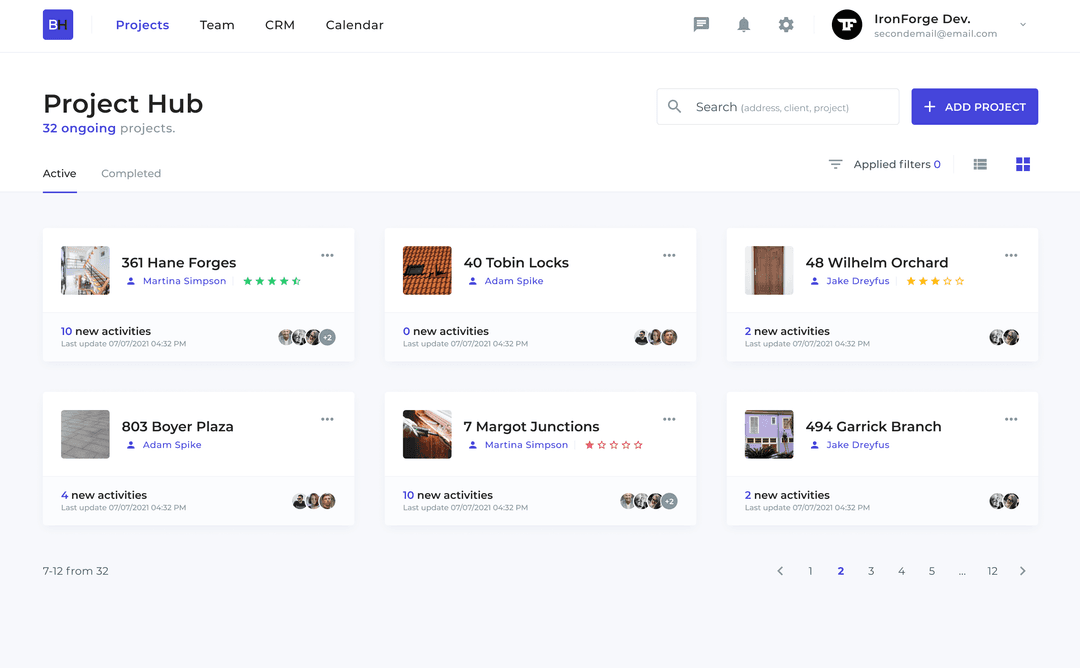
BuildersHub offers a comprehensive construction management platform, streamlining timelines, team coordination, and analytics. However, documentation gaps may hinder user workflows. Nonetheless, its real-time messaging and centralized document hub help teams stay aligned, manage projects efficiently, and improve overall productivity across residential and commercial construction projects.
Be the first one to leave a review!
No review found

Starting Price
$99
per month
BuildersHub Specifications
- Document Management
- Alerts/Notifications
- Timeline & Scheduling
- Progress Tracking
What Is BuildersHub?
BuildersHub is a cloud‑based construction management platform designed to help contractors, builders, and construction professionals streamline project workflows from bidding through closeout. The software offers features such as timeline & scheduling, document hub, team coordination, and analytics & reports.
BuildersHub simplifies how construction teams plan, execute, and oversee work, making it easier to coordinate tasks, share updates, and keep projects on schedule and within scope.
How Much Does BuildersHub Cost?
BuildersHub pricing starts at $99/month for its Build plan. It also offers two additional plans as well, including:
- Launch - $0
- Scale - $299/month
For BuildersHub, in addition to the base subscription pricing, additional costs may apply depending on AI feature usage, number of active projects or users, storage requirements and optional engagement or analytics tools, generally aligning with industry-standard ranges for advanced construction management features.
- Implementation and onboarding: $1,000–$5,000 (one-time) - Project setup, workflow configuration, role permissions, and initial admin training tailored to construction operations
- Data migration and document setup: $500–$3,000 - Importing existing project files, drawings, subcontractor records, and historical job cost data
- Advanced financial and cost control modules: $25–$75/user/month - Budget tracking, job costing, change order management, and forecasting tools beyond core task management
- Integrations and API access: $300–$2,000/year - Connecting accounting systems, payroll platforms, CRM tools, or document storage solutions
Disclaimer: The pricing is subject to change.
BuildersHub Integrations
Who Is BuildersHub For?
BuildersHub software serves a wide range of industries and sectors, including:
- Construction
- Real estate development
- Residential building
- Commercial building
- Project management
- Architecture and design
- Facility management
Is BuildersHub Right For You?
Are you looking for a construction management platform that unifies project workflows, enhances communication, and keeps teams aligned from bid to closeout? BuildersHub helps address common pain points like scattered project data and disjointed team coordination, making it easier to deliver projects on time with fewer delays.
The platform emphasizes secure data handling and scalable operations, ensuring that your construction data stays protected as your business grows.
Still not sure if BuildersHub is right for you? Contact our customer support team at (661) 384‑7070, who will help you make the best decision BuildersHub features and more.
BuildersHub Features
Timeline And Scheduling
Visual timelines, milestones, and scheduling tools empower managers to track project progress effortlessly. By clearly displaying deadlines and dependencies, this feature helps teams stay organized, anticipate bottlenecks, and maintain consistent progress toward project goals, ensuring timelines are met efficiently.
Real-Time Messaging
BuildersHub enables instant communication across teams, ensuring every member receives timely updates and notifications. This feature keeps field crews, office staff, and subcontractors aligned, reducing delays, preventing miscommunication, and allowing managers to respond swiftly to issues as projects progress.
Team Coordination
Task assignment and crew management tools help teams operate seamlessly. By clearly defining responsibilities and scheduling work for subcontractors, this feature reduces confusion, boosts efficiency on job sites, and enables managers to monitor progress across multiple projects simultaneously.
Document Hub
Centralized document storage allows users to upload, share, and manage files securely. With version control and approval workflows, this feature ensures teams work with the latest documents, reduces errors caused by outdated plans, and enhances collaboration between contractors and clients.
Analytics And Reports
Comprehensive dashboards provide insights into project performance, costs, and team productivity. This feature allows managers to make data-driven decisions, identify trends, and optimize operations, ultimately improve resource allocation, minimize delays, and increase profitability across construction projects.
BuildersHub Reviews

No reviews yet!
Be the first to review this product
Frequently Asked Questions
What language does BuildersHub support?
BuildersHub supports the English language.
Does BuildersHub offer an API?
Yes, BuildersHub provides API access.
What types of pricing plans does BuildersHub offer?
BuildersHub pricing starts at $99/month for its Build plan, with additional plans including Launch ($0) and Scale ($299/month). Request a custom BuildersHub price quotation.
What other apps does BuildersHub integrate with?
BuildersHub integrates with Stripe and Google Maps.
Does BuildersHub have a mobile app?
No, BuildersHub does not have a mobile app.
What level of support does BuildersHub offer?
BuildersHub provides support via email.
Who are the typical users of BuildersHub?
BuildersHub serves a wide range of industries, including construction, real estate development, residential and commercial building, project management, architecture and design, and facility management.