

Last Updated

Overview
CMIS construction software provides a complete management solution, empowering businesses to streamline complex workflows through a single-entry design. Although some users believe the interface could be more intuitive, its powerful integration of project management and accounting functions ensures seamless operations. This makes CMIS a valuable tool for financial control.
CMIS Specifications
- Project Planning and Scheduling
- Bid Management
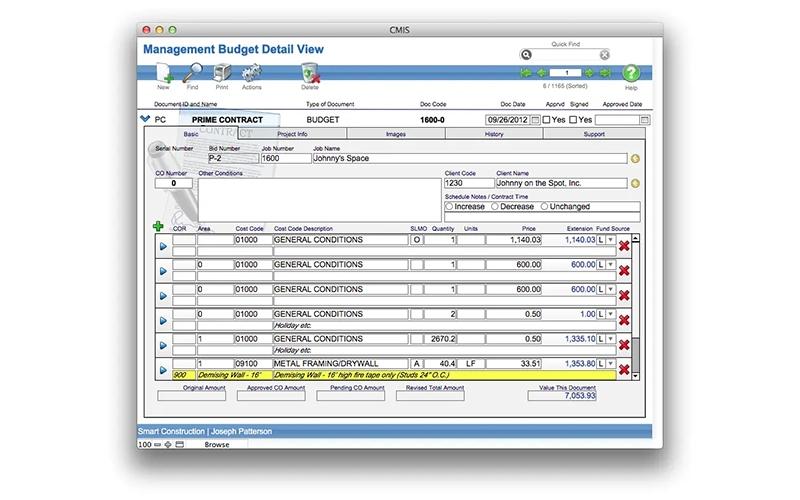
- Budget Management
- Reporting and Analytics
What Is CMIS?
The CMIS software addresses fragmented data with a ‘Just do it once’ philosophy. This integrated design automatically populates information across all modules. Its powerful features like ‘Work In Process’ reporting and integrated financial management provide real-time visibility for construction firms of all sizes, leading to improved project oversight and efficiency. By centralizing these functions, the software transforms disparate data into actionable intelligence.
CMIS Pricing
Disclaimer: The pricing is subject to change.
CMIS Integrations
The software supports a key integration with a third-party service:
- AFX research
Who Is CMIS For?
CMIS is ideal for a wide range of industries and sectors, including:
- General contractors
- Subcontractors
- Home builders
- Banks
- Credit unions
- Fund disbursement organizations
- Construction lender
Is CMIS Right For You?
By blending intuitive project management with comprehensive accounting, CMIS stands out as a powerful resource management solution. This scalable software is an ideal choice for contractors and lenders seeking a highly tailored system that can grow with their business and technical needs. Its single-entry design and over 2,000 customizable settings ensure the software adapts to your unique business processes.
Still not sure about CMIS? Contact our support team at (661) 384-7070 for further guidance.
CMIS Features
Logs
This module provides full creation and tracking of all critical project documents, including submittals, RFIs, and Change Order Requests. This ensures all communications are always in writing and at your fingertips, providing a clear path to resolution for any disputes.
MAA (Management, Administration, and Accounting)
The financial heart of the platform, this module fully integrates project management and accounting. It produces and tracks contracts, changes, and summary cost reports, ensuring real-time entries and preventing overpayments to suppliers, while managing your overall CMIS price.
Payroll
The software offers a comprehensive payroll service that handles a wide range of pay types, from piecework to salary. It supports unlimited pay rates, benefits, and deductions per employee, making this feature a powerful tool for construction firms of all sizes.
Projects
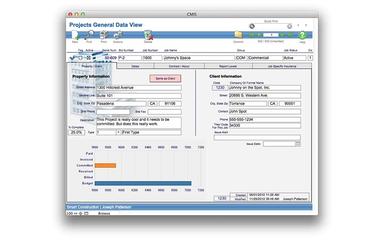
This CMIS feature provides comprehensive tracking and monitoring of all project aspects, from initial bids to warranty issues. With the ability to track nearly 1,000 data points, it ensures true real-world accounting and up-to-date Work In Process reporting for a clear picture of job standing.
Estimating
Users can create proposals and cost estimates using various tools, including quantity take-off templates and RFPs. This functionality allows for tracking of multiple estimate versions as a project's scope evolves, helping manage your CMIS cost and secure new business with professional quotes.
Pros And Cons of CMIS
Pros
User-friendly customer interface
Excellent support and customer service
Seamless tech-to-business strategy integration
Cons
Use may depend on the content management system, as it’s not universally supported
The interface could be improved to be more intuitive for new users
Requires significant time for setup
CMIS Reviews
Total 9 reviews
4.1
All reviews are from verified customers
Rating Distribution
5
Stars11%
4
Stars89%
3
Stars0%
2
Stars0%
1
Stars0%
Share your experience
mohit t.
Small-Business, 11-50 employees
“Finding the sweet spot between tech & business”
Pros
I love how this tool connects technology with our business strategy. It ensures that any tech initiatives we put in place actually align with our company's goals and drive real business results.
Cons
The rapid pace of tech changes makes it hard to keep up sometimes. Having to constantly learn new methods and adapt to evolving technologies can feel overwhelming and I find myself struggling to stay up-to-date with all the changes.
Rating Distribution
Ease of use
7
Value for money
8
Customer Support
8
Functionality
7
Dhiraj N.
Small-Business, 11-50 employees
“Streamlined Cemetery Operations”
Pros
What I appreciate most are the customer interface features that make it so much easier to serve people and make everything more accessible. The plot management system stands out too , it's incredibly detailed but surprisingly easy to navigate.
Cons
Setting everything up at first was pretty time-consuming and honestly felt overwhelming. You really need to invest a lot of time learning how to use it before you can get the most out of it. Having a solid support team that's patient with you during this process is really important.
Rating Distribution
Ease of use
7
Value for money
7
Customer Support
7
Functionality
7
Darian P.
Small-Business, 11-50 employees
“Strong CRM for business growth”
Pros
This tool brings all customer management into one place and streamlines everything. It's made our operations way more efficient and has really helped drive business growth.
Cons
Getting up to speed takes time and you'll need proper training, which can get expensive.
Rating Distribution
Ease of use
9
Value for money
7
Customer Support
8
Functionality
8
Frequently Asked Questions
What other apps does CMIS integrate with?
CMIS integrates with AFX Research for automated title updates.
What types of pricing plans does CMIS offer?
The CMIS price starts from $3,500. Request a personalized CMIS pricing quote for your business.
What level of support does CMIS offer?
CMIS offers customer portal access, FAQ and knowledge base, feature requests, incident reporting, and training videos.
Does CMIS have a mobile app?
No, CMIS does not have a mobile app.
Does CMIS offer an API?
No, CMIS does not offer an API.
What language does CMIS support?
CMIS is primarily available in English.
Who are the typical users of CMIS?
CMIS is typically used by general contractors, subcontractors, home builders, banks, credit unions, fund disbursement organizations, and construction lenders.