

Last Updated

Overview
ConstructEx connects architects, contractors, and stakeholders through one secure platform, reducing risks and delays. It takes some initial training to fully adapt, but once in place, it greatly simplifies collaboration. If you’re managing projects where accuracy and transparency matter, ConstructEx can keep your team aligned and informed.
ConstructEx Specifications
- Subcontractor Management
- Contract Management
- Document Management
- Change Order Management
What Is ConstructEx?
ConstructEx by Newforma is a cloud-based construction administration platform designed to streamline communication and document management. The software connects the entire project team, from architects to contractors, ensuring all stakeholders have access to current information, thus preventing costly errors and delays. It is built for complex projects requiring meticulous record-keeping and a clear audit trail.
Key ConstructEx features include centralized RFI (Request for Information) and submittal management, which help reduce turnaround times and minimize project risks.
ConstructEx Pricing
ConstructEx Integrations
Who Is ConstructEx For?
ConstructEx software is designed for businesses across various industries and sectors, such as:
- Architecture
- Engineering
- Construction
Is ConstructEx Right For You?
If you are looking for a reliable platform for your construction business, ConstructEx software may be right for you. It centralizes communication, tracks project workflows, reduces risks, and offers a single, auditable record of contract administration. This helps boost accountability and efficiency, making it ideal for complex construction projects that require structured, transparent collaboration.
Are you still unconvinced that ConstructEx is the best option? Call (661) 384-7070 to talk to our support staff for expert advice.
ConstructEx Features
Submittals And RFIs
ConstructEx simplifies submittals and RFIs by streamlining workflows with automated notifications, status tracking, and built-in markup tools. Teams can collaborate seamlessly, manage access permissions, review comments, and maintain a full archive, ensuring faster responses, better accountability, and project-wide transparency.
Centrally Manage Project Documents
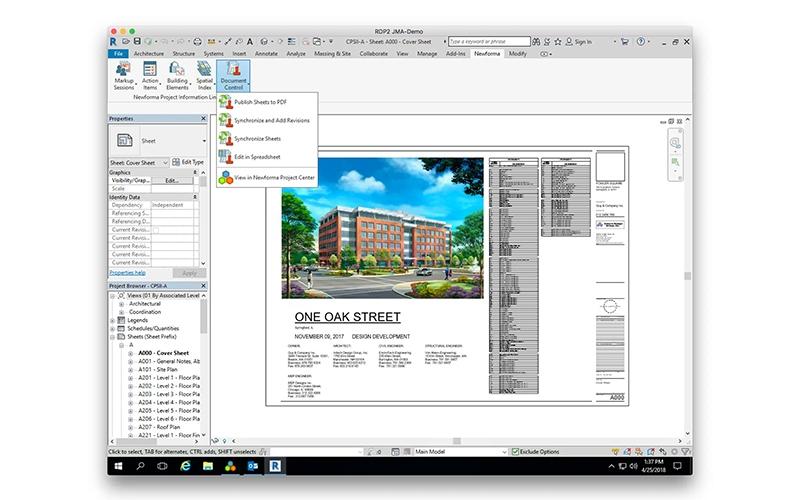
With ConstructEx, teams can store, share, and update drawings, specifications, and critical files from a single secure hub. Version control, permissions, mobile access, and automated approvals guarantee everyone works with the latest documents while simplifying external sharing and organized project collaboration.
Field Mobile Applications
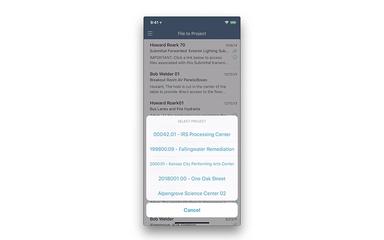
The ConstructEx mobile apps connect office and field staff in real-time for streamlined reporting, inspections, and quality control. Field teams can capture notes, photos, and markups on devices, sync instantly, and track punch lists or compliance tasks from any location.
Project Team Communications
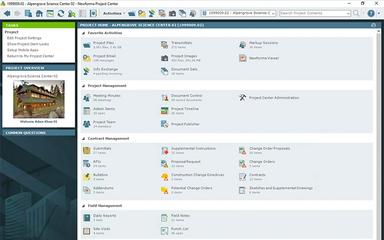
ConstructEx centralizes communication with tools like Meeting Minutes and Message Forums that record discussions, agendas, and notifications. Teams can collaborate, track updates, and mark up drawings, while archived forums ensure transparency, organization, and accountability throughout every phase of the project.
Pros And Cons of ConstructEx
Pros
Provides reliable tools for tracking and exporting
Can be adapted easily for various tasks
Functions effectively as a data storage system
Cons
The search tool provides limited detail
Offers more features than are actually necessary
ConstructEx Reviews
Total 13 reviews
3.9
All reviews are from verified customers
Rating Distribution
5
Stars46%
4
Stars31%
3
Stars8%
2
Stars0%
1
Stars15%
Share your experience
Diaferia A.
Individual & Family Services, 101-500 employees
More than a year
“better project completion”
Pros
What I value most is how it keeps projects on track and moving forward efficiently. It's been instrumental in helping us deliver better results, more consistently.
Cons
There's a slight learning curve at the beginning before you can start using it comfortably.
Rating Distribution
Ease of use
9
Value for money
10
Customer Support
10
Functionality
9
Ryan L.
Architecture & Planning, 11-50 employees
More than a year
“slow, clunky, crash-prone”
Pros
I'd say the biggest advantage is that it costs less than many competing options.
Cons
Pages take too long to load and getting around the system feels sluggish. It also requires too many repetitive, unsimple steps to complete basic tasks. Report customization is very limited and crashes are pretty much expected when using the markup tools.
Rating Distribution
Ease of use
2
Value for money
2
Customer Support
2
Functionality
1
Christopher P.
Construction, 101-500 employees
More than a year
“Bulk transmittals done right”
Pros
Sending large batches of drawings or other project issuances to team members through transmittals works really well.
Cons
Getting around the system takes a bit of learning at first but it doesn't take long to figure out.
Rating Distribution
Ease of use
9
Value for money
10
Customer Support
10
Functionality
10
Frequently Asked Questions
Does ConstructEx offer an API?
Yes, ConstructEx offers an API.
Who are the typical users of ConstructEx?
Typical users of ConstructEx are businesses across various industries and sectors, such as construction, engineering, and architecture.
Does ConstructEx have a mobile app?
Yes, it offers a mobile app.
What language does ConstructEx support?
ConstructEx supports English and French languages.
What types of pricing plans does ConstructEx offer?
ConstructEx price follows a one-time pricing model with no recurring fees, offering unlimited users and fully customizable workflows. Contact us for a personalized ConstructEx cost estimate.
What other apps does ConstructEx integrate with?
ConstructEx integration details are not provided by its vendor.
What level of support does ConstructEx offer?
ConstructEx offers support through phone, email, online form, help center, FAQs, and knowledge base.