Last Updated
Overview
Goldenseal is an all-in-one estimating, job costing, and accounting software for construction and remodeling businesses. Although it lacks a mobile app and cloud access, forcing field crews to rely on desktop-only workflows, its one-time purchase and integrated estimate-to-invoice tracking make it a practical choice for contractors avoiding recurring subscription costs.
Goldenseal Specifications
- Budget Management
- Bid Management
- Contract Management
- Change Order Management
What Is Goldenseal?
Goldenseal is an all-in-one business management, accounting, and estimating software program developed by Turtle Creek Software for small businesses, especially construction and remodeling companies. Instead of using separate software for estimates, accounting, project schedules, invoices, and customer details, a business can keep those records in Goldenseal. For example, a contractor can create an estimate for a kitchen renovation and convert it into a project. They can then track labor and material costs, manage change orders, invoice the client, and review the project's profitability within the same software. Goldenseal describes this as integrated software, meaning data entered once can be reused across business functions.
What Is Goldenseal Best For
One of the Goldenseal standout features is its 'Smart Dimensions' estimating tool. Traditional estimating software requires you to manually calculate and enter every single material quantity (like counting every single stud, sheet of drywall, or gallon of paint). Goldenseal works backward. You only enter basic measurements, like the length, width, and height of a room. The software’s smart dimensions engine automatically calculates the exact volume, surface area, perimeter, and required materials for that space based on built-in construction templates. If you change the size of the room, the software automatically recalculates all the material costs, labor hours, and project schedules instantly. Residential remodelers and construction contractors can generate a highly accurate, professional bid in a fraction of the time, protecting their profit margins from human error.
How Much Does Goldenseal Cost?
Goldenseal pricing starts at $495 for the Basic Version, which includes estimating and project management. The vendor also offers a offers a free working demo. Further pricing tiers of the software are as follows:
- Full Version - $895
- Full Multi-User Version, 2 Users - $1,295
- Full Multi-User Version, 5 Users - $1,695
- Full Multi-User Version, 10 Users - $2,195
- Full Multi-User Version, 20 Users - $3,095
An additional license for a second platform (Mac or Windows) can be added for $100. Beyond Goldenseal's license price, businesses should still budget for setup time and, where needed, outside bookkeeping or IT help:
- Onboarding And Setup: $300–$1,500, covering chart of accounts, cost code structure, and starter database configuration
- Data Migration: $0–$4,000, higher for multiple years of job history or migrating from another accounting system
- Multi-Location Configuration: $250–$2,500 for a local network, up to $1,500–$5,000+ if remote access or VPN setup is required
- Administrator Training: $500–$3,000, covering estimating, job costing, and payroll workflows
- Ongoing Management: $500–$3,500/year in internal labor for report review and cost updates
Disclaimer: The pricing is subject to change.
Goldenseal Integrations
The information regarding software integration with third-party apps is not publicly available.
How Does Goldenseal Work?
Here's how you can access the platform and start using its features:
- Install Goldenseal on Mac or Windows and open your company file
- Enter business data using browser windows for prospects, customers, and jobs
- Convert a prospect record into a customer once a project is confirmed
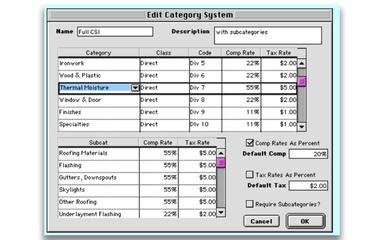
- Build cost estimates using pre-loaded starter files for your trade, like framing or drywall
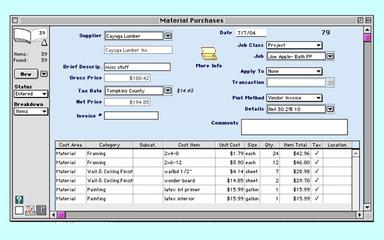
- Track job costs by allocating every expense to a specific project or overhead account
- Process payroll and general accounting transactions within the same file
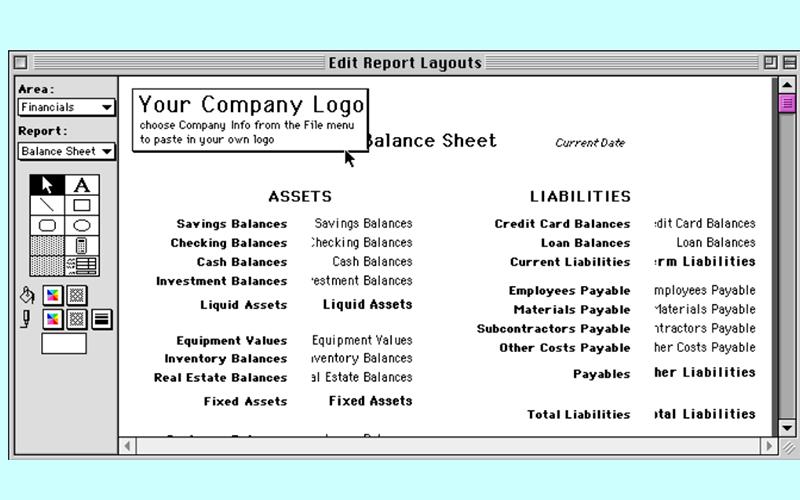
- Generate reports to review job profitability and business performance
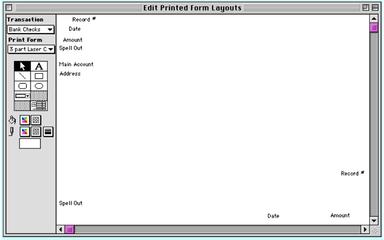
- Print invoices, contracts, and other business forms directly from the software
Who Is Goldenseal For?
It is primarily intended for small to mid-sized businesses, particularly:
- Remodelers and renovation contractors
- Custom home builders and general contractors
- Subcontractors
- Architects and designers
- Property owners and property-related businesses
- Retail and service businesses
- Professionals and small manufacturers
Goldenseal Use Cases
Based on our analysis of Goldenseal features and platform capabilities, we have identified key scenarios where this software is a strong fit for:
Trade Contractors Preparing Bids And Proposals
Contractors, remodelers, painters, drywall businesses, and other trades first have to quote the work before winning the job. And a quote needs to cover materials, labor, subcontractors, equipment, overhead, and profit. If at that time, the estimate is too low, the contractor may win the job but lose money later. If it is too high or takes too long to prepare, the business may lose the opportunity to a competitor. The software inputs basic measurements and converts them directly into exact material and labor quantities. This stops underbidding and speed delays by instantly matching your dimensions to an all-inclusive cost total, letting you send accurate quotes to clients before competitors can respond.
Contractors Tracking Job Profitability Mid-Project
Winning a project is not the same as making a profit. Because labor, most of the time, takes longer than expected, materials sometimes cost you more. If costs are only reviewed after the project ends, the business may discover the loss too late to correct it. The software assigns active expenses by project category and compares them directly against your stored original estimate. This stops surprise losses by letting you see budget overruns in real-time as work proceeds, giving you the visibility to fix labor or material mistakes before issuing the final invoice.
Contractors Losing Track Of Which Job Ate Up Labor Costs
For contractors and service businesses, employee time is both a payroll obligation and a direct cost of delivering work. A business needs to pay people correctly, but it also needs to know which project consumed labor and whether the project is still profitable. If payroll is separated from job records, labor costs can be missed or assigned incorrectly. The software calculates employee wages while automatically attaching their hours and full payroll burdens directly to specific project budgets. This stops missed labor expenses by automatically adding wages and extra hiring costs right into your job-cost reports, letting you see exactly how much money employee time is draining from your project profits.
Small Retailers And Contractors Selling Materials Or Parts
Some small businesses sell products as well as project work—for example, a contractor selling materials, a repair company charging for parts and labor, or a small retailer taking phone and internet orders. These businesses need to calculate selling prices, track stock quantities, issue receipts, and bill customers, but may not need a full-scale point-of-sale system. The software calculates sales prices and tracks stock quantities on the exact same screen where you bill your clients. This handles low-volume material sales and parts orders without forcing you to buy an expensive storefront register system, keeping your inventory counts and customer receipts directly tied to your business books.
Is Goldenseal Right For You?
Goldenseal is right for you if you are a small to mid-sized construction contractor, remodeler, or property manager who wants a single, all-in-one program to handle estimates, job costing, and accounting without paying a monthly subscription fee. However, it does not have native iOS or Android mobile apps. So, if your field crews need to log hours, take photos, or view blueprints directly from their smartphones while on-site, then it is not the right option for you.
The software stores your entire business database entirely on your computer's local hard drive or local office network, rather than hosting it on cloud servers. This means your financial data cannot be hacked over the internet. Because there is no web login or cloud database to breach, cybercriminals cannot access your client's records or financial history remotely. You retain absolute physical custody and ownership of your data.
Still doubtful if Goldenseal software is the right fit for you? Connect with our customer support staff at (661) 384-7070 for further guidance.
Goldenseal Features
Construction Estimates
This module provides fast, accurate bidding using smart dimensions. Contractors just have to enter basic room measurements (like wall length or floor area), and the system automatically calculates complex math like drywall surface area. It includes a built-in cost database of over 2,000 pre-loaded construction unit costs that can auto-update based on real vendor pricing. It benefits most architects, and remodelers who need to generate precise project bids quickly without manually calculating every single raw material quantity.
Accounting
The software has a complete, integrated job-costing and business accounting suite. It handles accounts payable (A/P), accounts receivable (A/R), billing, check writing, inventory, job costs, and payroll. This one is not like generic accounting apps, Goldenseal tracks construction-specific money, like withholding 'retainage' (holding back a percentage of a sub's pay until the job is done) and tracking complex worker’s comp insurance rates based on the specific type of labor being done that day. It automatically connects your office expenses to your active projects. The moment you write a check or pay an invoice, that money is deducted from that specific job's budget, showing you your exact profit margins in real-time.
Project Management
This product gives you an instant action plan the moment a job is approved. It takes your estimate and instantly turns it into a literal shopping list of materials to order, writes up the legal contract clauses based on the work items, and builds a visual timeline calendar of the project. Because of that your projects cannot be delayed. Your team in the field knows exactly what materials to buy, what tasks to do first, and what deadlines must be met to keep the client happy.
Business Management
It gives you an organizational hub for your office. It tracks how potential clients found your business (like a Google ad vs. a flyer), stores their contact details, tracks sales commissions for your employees, and manages your daily appointment calendar. It is valuable for company owners and sales reps because it gives them a single repository to evaluate marketing success, follow up with potential clients, and organize their operational schedule alongside active job files.
Rental Property Management
The software can give you a landlord ledger integrated with your main business. What it does is track which tenants are in which units, when their leases expire, what security deposits they paid, and automatically prints their monthly rent statements. That keeps your property income organized in the exact same place as your construction or maintenance expenses, saving you from using two different software programs.
Allowance
The platform has a budget placeholder for parts of a project that aren't picked out yet. If you are building a kitchen, but the client hasn't picked out their stove yet, you can put a generic '$1,000 stove allowance' into the budget. This lets you give them a total price now, and you can adjust the final cost later once they pick the exact stove. It helps builders who need to sign a contract before the client finishes making all their design choices.
Pros And Cons of Goldenseal
Pros
One-time purchase helps avoid a recurring subscription fee
Works offline, so users do not need a constant internet connection
Runs on both Mac and Windows for greater device flexibility
Cons
Update downloads require an annual fee after the first year
Multi-user setup requires manual network configuration before teams can collaborate
Goldenseal Reviews
Total 1 reviews
3
All reviews are from verified customers
Rating Distribution
5
Stars0%
4
Stars0%
3
Stars100%
2
Stars0%
1
Stars0%
Share your experience
Stephanie C.
Enterprise, 500+ employees
“Has potential to be a decent software”
Pros
The software runs pretty fast and stays stable throughout use. I found it really easy to pick up. Not hard at all.
Cons
I can't believe there's no support for multiple accounts under the main one.
Rating Distribution
Ease of use
6
Value for money
6
Customer Support
6
Functionality
4
Frequently Asked Questions
What other apps does Goldenseal integrate with?
The vendor has not listed any available third-party integrations for this software.
Does Goldenseal have a mobile app?
No, Goldenseal does not have a mobile app.
What level of support does Goldenseal offer?
Goldenseal offers support via email.
Does Goldenseal offer an API?
No, Goldenseal does not offer an API.
What language does Goldenseal support?
Goldenseal supports the English language.
What types of pricing plans does Goldenseal offer?
Goldenseal price starts at $495 for the Basic Version, which includes estimating and project management. A free working demo is also available. Full Version costs $895, while multi-user plans range from $1,295 for 2 users to $3,095 for 20 users. Contact us for a custom Goldenseal cost estimate.
Who are the typical users of Goldenseal?
Typical users of Goldenseal include remodelers, construction contractors, architects, retailers, and service businesses.