


Last Updated

Overview
OpenSpace software delivers advanced reality capture and construction management tools, enabling precise project tracking and collaboration through AI-powered technology. Designed for efficiency, it enhances visibility and accountability across teams. Limited offline functionality can affect remote site use, but exceptional documentation capabilities significantly streamline workflows and decision-making processes.
OpenSpace Specifications
- Document Management
- Progress Tracking
- Mobile App
- Reporting and Analytics
OpenSpace Features
OpenSpace Capture
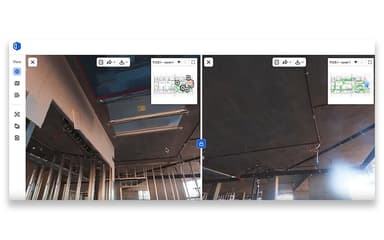
Visual Intelligence starts with OpenSpace Capture—the fastest, most seamless way to get a complete visual record of your job. Document 25K sq. ft. in 10 minutes and view your 360° captures in about 15 minutes. Spatial AI automatically timestamps and maps every image to the right plan location. Use Split View to compare any two time periods side by side, and Reveal Mode to see exactly what was in place before work was covered over.
OpenSpace Air
Use drones to start capturing from day zero—supporting work from bidding through closeout and turnover. Capture with any drone and flight planning software, and process imagery into high-quality orthomosaics, 3D meshes, and point clouds in hours, not days. Elevation views, 2D and 3D measurements, plan overlays, and exports for survey, civil, and GIS workflows keep every stakeholder working from the same picture. Virtual control points keep imagery aligned every time.
OpenSpace BIM+
User-friendly 3D tools that bring BIM coordination to the field—no BIM expertise needed. Import the latest BIM model directly from Autodesk and compare design intent to work-in-place in a single view. BIM Element Overlay places specific model elements directly into captured site imagery, and Field Notes export via BCF to compatible coordination tools.
OpenSpace Track
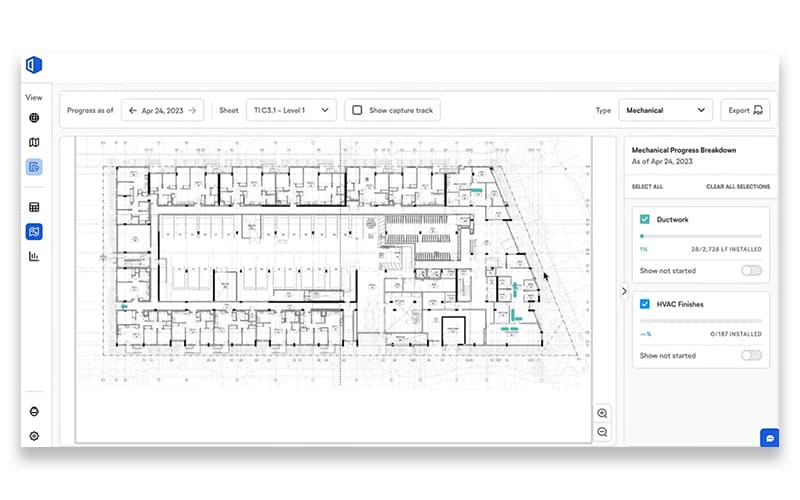
Combines OpenSpace Capture, analytics, and verified progress tracking in a single, trusted platform. Track percent complete, planned vs. actual, and rate of work by trade, floor, or zone. Flexible, customizable, and BIM-informed (but not required), it delivers 95% accurate, human-verified progress reports that hold up for pay applications and schedule sign-off—built for general contractors, owners, and trades.
OpenSpace Field
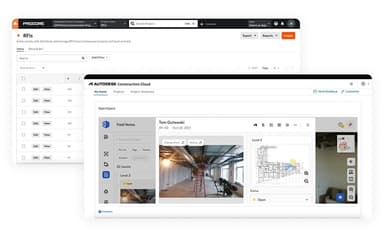
An image-based task management solution built for the field. AI Autolocation automatically pins every observation to the right spot in the plan, and AI Voice Notes turn what you say into a structured, assigned note in seconds. Deep two-way integrations with Procore and Autodesk keep observations, issues, and statuses current across both systems—no double entry.
Field Notes
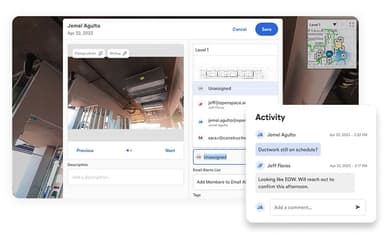
Capture on-site observations directly from your phone during a 360 capture or use AI Voice Notes to quickly log an issue anytime. OpenSpace automatically timestamps and pins every note to the right spot on your plan. Create Autodesk Issues or Procore Observations and Punch List items right in OpenSpace with Integrated Field Notes. Two-way sync keeps everything aligned in both places. Use My Field Notes to see everything assigned to you in one place.
Pros And Cons of OpenSpace
Pros
Captures 360° imagery to document overlooked details
Improves understanding of site clearances and tolerances
Advanced modeling capabilities for realistic spatial representation
Cons
Desktop sync software needs improvement
No option to adjust capture frequency
OpenSpace Reviews
Total 7 reviews
4
All reviews are from verified customers
Rating Distribution
5
Stars43%
4
Stars29%
3
Stars14%
2
Stars14%
1
Stars0%
Share your experience
John C.
Small-Business, 11-50 employees
“Great dealership management solution”
Pros
I can map a site in under 30 minutes depending on the size, which saves me tons of time.
Cons
I haven't encountered any problems so far, though we've only tested it a handful of times.
Rating Distribution
Ease of use
5
Value for money
7
Customer Support
7
Functionality
6
Anonymous
Enterprise, 500+ employees
“Excellent Tool for Construction Tracking”
Pros
It is really helpful for tracking every phase from earthwork all the way to completion. I can pull it up when coordinating between trades or giving updates to my managers. Makes it easy to view the project remotely without having to be on site.
Cons
Tracking different areas separately is a real pain point for me. When I try to view outdoor spaces or anything outside the main drawing, it just doesn't function properly. The sitework gets mixed up with first floor data which makes no sense for my workflow. I really need each floor and designated area to have its own separate tracking system - right now everything gets jumbled together and it's frustrating to sort through.
Rating Distribution
Ease of use
7
Value for money
8
Customer Support
8
Functionality
6
Sarah B.
Enterprise, 500+ employees
“Perfect for Remote Work”
Pros
I really appreciate how it handles live data visualization from observations, simulations and mission planning operations. The interactive presentation features make working with dynamic datasets much more engaging and effective.
Cons
I honestly can't think of any major downsides, this is a solid product overall!
Rating Distribution
Ease of use
9
Value for money
9
Customer Support
9
Functionality
9
Frequently Asked Questions
Does OpenSpace have a mobile app?
Yes, OpenSpace offers a dedicated mobile application for iOS and Android devices.
Does OpenSpace offer an API?
Yes, OpenSpace offers an API.
What other apps does OpenSpace integrate with?
OpenSpace integrates with Revizto, Procore, Autodesk Construction Cloud, and PlanGrid.
What types of pricing plans does OpenSpace offer?
The OpenSpace price layout is based on chosen products and annual construction volume, offered through annual subscriptions tailored to business needs. Request a detailed OpenSpace cost breakdown for your organization today.
Who are the typical users of OpenSpace software?
Typical users include general contractors, owners, and professionals in the trades sector.
What level of support does OpenSpace offer?
OpenSpace provides dedicated onboarding and customer success managers, access to OpenSpace Academy, and support via email, chat, a help center, support form, and FAQs.
What language does OpenSpace support?
OpenSpace supports English, Japanese, German, and Dutch.