


Act! Software
Last Updated
Overview
Act! Provides a trusted CRM and marketing solution that streamlines work and stresses on client relationships, promoting intelligent marketing, effective sales, and personalized customer experiences. While Act! may not have a wide range of features, it prioritizes providing key functionality that fulfills the requirements of its users effectively.
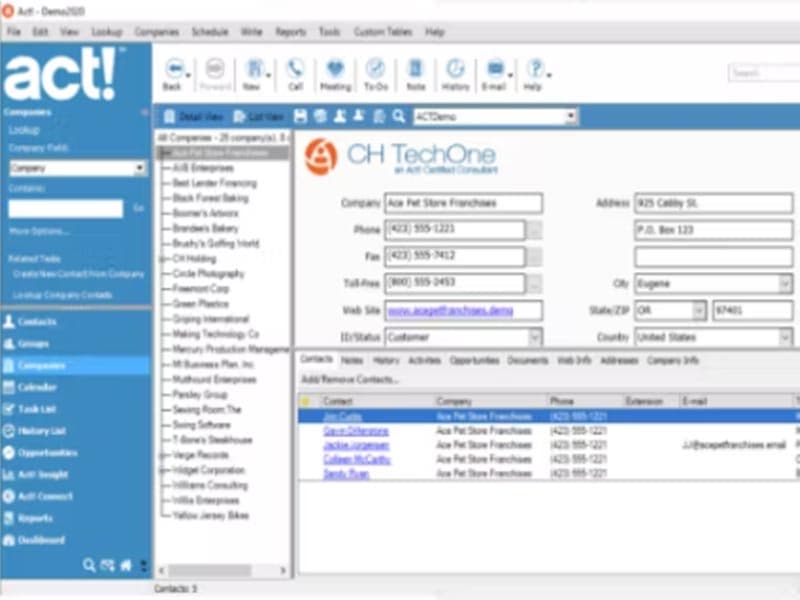
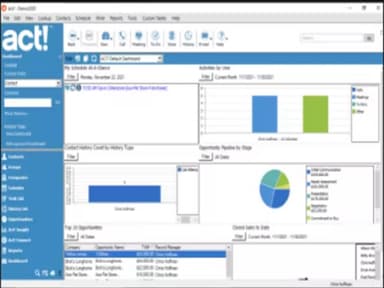
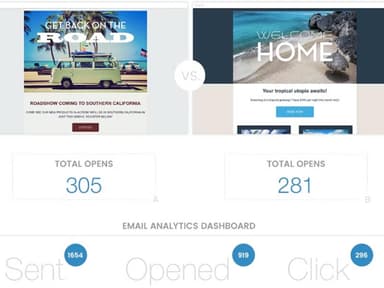
Act! Software Specifications
- Contact Management
- Lead Management
- Opportunity Management
- Sales Forecasting
What is Act! Software?
Act! is a leading CRM software that helps small and midsize businesses market better, sell more, and create customers for life. It is an all-in-one platform that provides users with everything they need to effectively manage their customers and business. From contact management and task management to marketing automation and sales reporting (and mobile app functionality), users can access their data anywhere, at any time.
The powerful Act! CRM and marketing automation software offers customizable features to suit your specific business or industry needs. You can deploy and access the application in a way that best suits your preferences. With an Act Premium subscription, you have limitless possibilities to get the most out of the interface.
Act! Pricing
Act! Demo
Act! Reviews
The Act! CRM software has received many positive reviews, with users praising its features and benefits. Users like the software for its ease of use, affordability, and ability to help businesses increase sales and improve customer relationships. You can read a number of verified Act! CRM reviews in our dedicated Reviews section.
Our Thoughts
Act! is an ideal software for small to medium-sized businesses. It offers a complete set of essential features for managing your customers and business effectively. The software is easy to use, and its affordable price makes it great value for your money. So, if you are looking for a CRM application that can help you increase your sales and improve your customer relationships, Act! is worth considering.
Act! Software Features
Act! Contact Management
The Act! CRM software provides users with a complete contact management system. This feature lets users keep track of their customers' contact information, including names, phone numbers, email addresses, and postal addresses. The software also allows users to create custom fields to track information important to their business.
Act! Task Management
The application comes equipped with a task management system. This feature allows users to create and manage tasks for their team members. The utility also includes a to-do list, a calendar, and an option to set reminders.
Act! Marketing Automation
The Act! CRM software package also entails a marketing automation system. With this feature, users can create and manage marketing campaigns. The marketing automation system includes a contact management system, email marketing system, and social media integration.
Act! ROI Tracking & Sales Reporting
The Act! Software, further, boasts an impressive ROI tracking system. With this feature, users can track the return on investment (ROI) of their marketing campaigns. The software also includes a sales reporting system. This feature lets users track their sales performance and generate sales reports.
Act! Sales Pipeline Management
The sales pipeline management feature in Act! CRM is designed to help users track their sales opportunities. This feature provides users with a complete view of their sales pipeline, including the stages of each opportunity and the estimated value of each deal.
Pros And Cons of Act! Software
Pros
The easy-to-use interface simplifies complex tasks
Excellent for managing extensive contact databases
Can import large data without losing records
Simplifies remote task management effortlessly
Cons
Manual syncing is required for multiple emails
Limited to four contacts per company
Act! Software Reviews
Total 64 reviews
4.5
All reviews are from verified customers
Rating Distribution
5
Stars59%
4
Stars31%
3
Stars6%
2
Stars3%
1
Stars0%
Share your experience
Real Estate, 1-10 employees
More than a year
“A time-tested crm for precision marketing”
Pros
As a real estate broker I have relied on this CRM since the late 90s. I tested another system back then but it did not work for me. I have spent decades building a comprehensive database of property owners, addresses and sales across over 50 neighborhoods and I mainly use it for precision direct mail campaigns to find new listings.
Cons
I used to subscribe to their premium U.S based support but I believe that's no longer an option. Sometimes it is challenging to communicate with the overseas support team and they are not always able to fix my problem. I frequently have to hang up and call back, hoping to connect with someone who can actually help me.
Rating Distribution
Ease of use
10
Value for money
10
Customer Support
6
Functionality
10
Non-Profit Organization Management, 1-10 employees
More than a year
“excellent contact management system”
Pros
This is an excellent contact management system we have used for years. The setup is also simple, the interface is also user friendly and its wide range of features simplifies managing all our professional relationships.
Cons
I did need to contact support a few times while moving my license to a new computer but they made the process fairly simple.
Rating Distribution
Ease of use
10
Value for money
6
Customer Support
10
Functionality
9
Investment Banking, 1-10 employees
More than a year
“loyal user since the beginning”
Pros
I have been a user since the original creators launched it and was even an early investor in the company.
Cons
Software updates are usually a hassle. Every year when I renew my subscription, I run into problems trying to get the latest version installed.
Rating Distribution
Ease of use
10
Value for money
10
Customer Support
10
Functionality
10
Frequently Asked Questions
Does Act! offer an API?
Yes, the software offers an API.
What languages does Act! support?
The software supports American English, Australian English, UK English, French, Canadian French, German, and Dutch.
What other apps does Act! integrate with?
The software integrates with Sage 50 CRM and Outlook.
What types of pricing plans does Act! Offer?
The software offers two Premium pricing plans to choose from: Cloud-Based plan for $30/user/month, and an On-Premises plan for $37.50/user/month. Both the plans are billed annually. The software also offers four other pricing plans: AMA Basic (included in premium), AMA Select for $79/account/month, AMA Complete for $199/account/month and AMA Advanced for $399/account/month. Reach out to us for a personalized Act! pricing quote.
Who are the typical users of Act!?
The typical users of the software include sales teams, marketers, customer service representatives, and support staff.
What level of support does Act! offer?
The platform provides phone, email, form, and knowledge base support.