


Nutshell
Last Updated
Key Takeaways
Generated from the text of customer reviews
Nutshell is a B2B CRM platform for small and mid-size sales and marketing teams across professional services, construction, healthcare, retail, and technology. Users highlight ease of use and support quality as strengths, while reporting depth and mobile app functionality are cited as concerns. Nutshell recently launched Smart Sequences, a drag-and-drop multi-path email automation tool. It adjusts follow-ups based on each contact’s behavior.
Our Verdict
The platform is built for small to mid-size B2B teams that want CRM and marketing in one platform without a complex setup. Pipeline management, email marketing, and AI-assisted activity logging are covered across five pricing tiers that are generally deemed to be fairly priced. Teams that need advanced reporting or EU data residency will find gaps. For the right-sized team, it is a practical choice.
Overall Rating
Based on 11 users reviews
4.5
Rating Distribution
Positive
91%
Neutral
9%
Negative
0%
Starting Price
$19
per user per month
Nutshell Specifications
- Contact Management
- Lead Management
- Deal Pipeline Management
- Email Integration
What Is Nutshell?
Nutshell is an all-in-one Customer Relationship Management (CRM) platform built for B2B sales, marketing, and customer engagement teams. It covers pipeline management, contact tracking, email marketing, SMS, web chat, and quotes within a single platform. AI-powered tools handle call transcription, email drafting, lead research, and activity summaries to reduce manual work. Teams that typically juggle separate tools for sales and marketing use Nutshell to manage both from one place.
What Is Nutshell Best For?
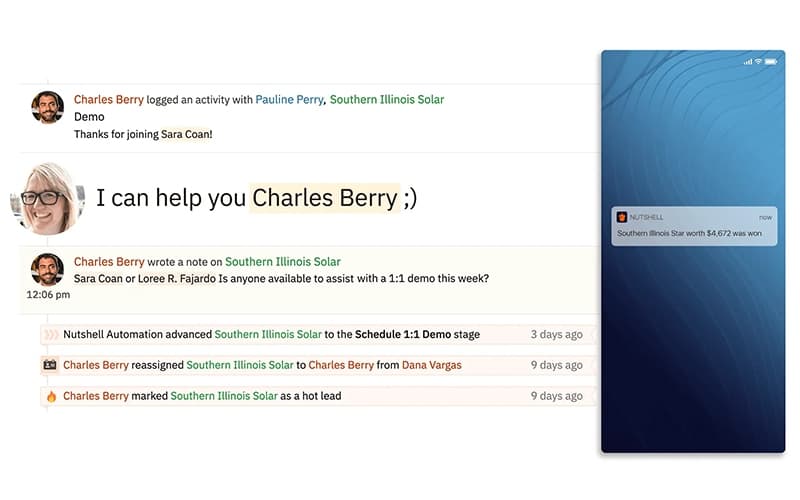
Nutshell is noted for its AI and Sales Intelligence suite, Nutshell AI, which covers call and meeting transcription, lead research and scoring, email reply drafting, and activity logging within the CRM. It summarizes and saves call and meeting transcripts, and automatically saves notes on the customer timeline. Leads are researched and scored so reps can see who to prioritize. AI lead recaps condense a lead’s emails, activities, and tasks into one summary and suggest the next action to move it forward.
How Much Does Nutshell Cost?
Nutshell pricing starts at Foundation at $19/user/month and offers unlimited contacts and storage, along with email and calendar sync. Other plans include:
- Growth: $32/user/month
- Pro: $49/user/month
- Business: $67/user/month
- Enterprise: $89/user/month
The software also offers a 14-day free trial and add-ons. Add-ons include:
- Marketing Pro: $49/month
- Engagement Pro: $16/user/month
- Email Marketing: $5/month
- SMS: $15/month
- Nutshell IQ: $37/month
- Proposals And Invoices: $79/month
In addition to the base subscription costs, organizations should account for the following potential expenses:
- Implementation: $500–$5,000 for SMBs; $5,000–$15,000 for more complex CRM deployments
- Data Migration: $1,000–$10,000, depending on the volume of contacts, historical sales data, and data-cleaning requirements
- User And Admin Training: $500–$5,000, depending on team size and training requirements
- Customization And Workflow Configuration: $1,000–$10,000 for custom pipelines, automated workflows, reporting, and sales processes
- CRM, ERP, And API Integrations: $2,000–$15,000, depending on the number and complexity of integrations
Reviewers generally describe Nutshell as affordable relative to enterprise CRM alternatives. Many note strong value given the range of features included at lower plan tiers. Some mention that costs increase meaningfully when scaling to plans with advanced AI and automation features.
Disclaimer: The pricing is subject to change.
Nutshell Integrations
Nutshell integrates with the following 5,000+ third-party applications, including:
- QuickBooks
- Slack Software
- Asana
- BigCommerce
- Zapier
- Calendly
- CallHippo
How Does Nutshell Work?
Here's how you can get started with Nutshell software after signing up:
- Import existing contacts and companies from a spreadsheet or connected tool
- Set up a sales pipeline by defining stages that match how the team moves deals forward
- Add leads to the pipeline and assign them to the relevant team member or stage
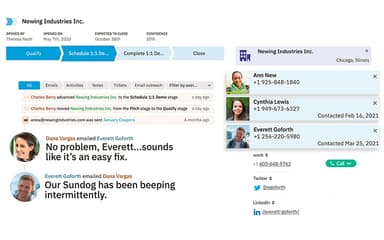
- Sync Gmail or Outlook so emails log automatically against the right contact record
- Enable AI Meeting and Call Summarization to transcribe calls and generate action items
- Build email marketing campaigns using the drag-and-drop builder and send to segmented contact lists
- Set up automated follow-up sequences, task reminders, and lead routing rules
- Monitor pipeline performance and deal forecasts through the built-in reporting dashboards
Who Is Nutshell For?
Nutshell is suitable for organizations across a range of industries and sectors, including:
- Professional services
- Construction
- Healthcare
- Retail and consumer goods
- Information technology and software
- Marketing and advertising
Nutshell Use Cases
Based on our analysis of user reviews and Nutshell features, we have identified key scenarios where this platform may be a strong fit for B2B sales and marketing teams:
1. Small B2B Teams Managing Leads Across Spreadsheets And Email
Teams tracking leads in spreadsheets and follow-ups in separate email threads may lack a shared view of where deals stand. Conversations stay in individual inboxes, and context gets lost in the absence of someone. It can be difficult to see the pipeline without asking around. Nutshell can centralize contacts, deal stages, and communication history in one place. The whole team can work from the same record instead of piecing things together. Reviewers have noted that the move from spreadsheets to a structured pipeline was faster than they expected.
2. Sales And Marketing Teams Operating Without A Shared System
When sales and marketing run on separate tools, there may not be a consistent record of how a lead moved from campaign to close. Marketing may have limited visibility into what happened after a lead was handed over, and sales may be missing information on what the lead has already received. Nutshell combines CRM, email marketing, and engagement in one platform. Both teams can work from the same contact records and activity history, without needing to sync data across systems.
3. Businesses Outgrowing Basic CRM Capabilities
Small and mid-size companies may outgrow basic CRM tools as their sales and marketing needs become more complex, without yet needing a full enterprise marketing stack. Nutshell builds on core CRM functionality with email marketing, audience segmentation, campaign automation, and engagement tracking. This gives growing teams a middle ground where they can manage deals and expand their marketing efforts from the same platform.
4. Sales Reps Handling Large Lead Volumes And Follow-Ups
A rep managing a high volume of leads manually may miss a follow-up. Without something prompting the next action, deals can sit untouched, potentially until the prospect goes cold or moves on. Nutshell's pipeline view and automated activity reminders can help surface the next step for each lead. Some users have noted that visibility into pending actions is one of the more immediate differences after switching.
Is Nutshell Right For You?
If you are looking for a platform that combines sales, email marketing, and customer engagement in one place, Nutshell might be a good fit. Its five plans support teams of different sizes, while its acquisition by WebFX adds access to digital marketing services. Additionally, the platform is SOC 2 Type 1 attested and provides data protection provisions addressing the General Data Protection Regulation (GDPR) and California Consumer Privacy Act (CCPA). The vendor also won a Gold Stevie Award in the Relationship Management Solution category at the 2023 American Business Awards.
However, Nutshell may be less suitable for organizations requiring highly customized workflows, advanced reporting, or granular compliance audit trails for EU-regulated markets. Teams operating across multiple regions may also find its localized language and compliance capabilities limited.
Still not sure about Nutshell? Contact us at (661) 384-7070 for further guidance.
Nutshell Features
Nutshell IQ
Nutshell IQ, available as an add-on, features add prospecting capabilities within the CRM. Its suite of tools includes ProspectorIQ for finding new prospects, VisitorIQ for identifying companies that are visiting a business website, and PeopleIQ for finding additional contacts at existing customer companies. These tools can help sales teams research prospects and keep all the following activities connected to their CRM records.
Visual Pipeline Management
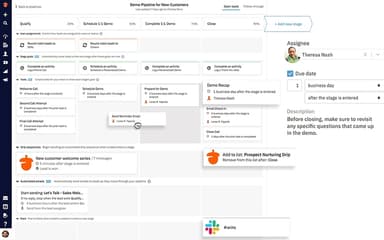
The pipeline view is available in four formats: Kanban, list, map, and chart. Each format shows the current stage of every active lead in real time, and reps can switch between views depending on how they prefer to track deals.
Automated Sales Sequences
This feature sends follow-up emails to leads on a set schedule without manual input at each step. When a lead replies, the sequence stops automatically so reps are not sending outreach to someone already in conversation.
Accurate Sales Forecasting
Revenue estimates are generated based on the current value and stage of deals in the pipeline. Figures update as deals move, are won, or are lost, giving sales leaders a running picture of expected revenue without building separate reports.
Lead Attribution And ROI Tracking
Lead Attribution connects closed deals back to the maarketing and sales activities that generated them. Teams can see which campaigns or outreach efforts produced revenue and use that data to guide decisions about future spend.
Team Performance Reports
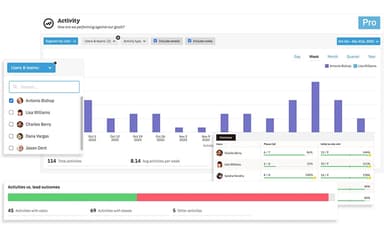
These reports track activity volume per rep, including calls made, emails sent, and deals moved. Each rep's output sits alongside their quota so managers can compare individual performance against targets at any point in the period.
Personalized Meeting Scheduler
Branded booking pages connect to a rep's calendar and let prospects pick a time directly. When a booking is made, the meeting is created automatically in the CRM and added to the calendar without manual follow-up.
AI-Powered Data Enrichment
Social profiles and company information are pulled from the web automatically and added to contact records in the CRM. Reps get additional context on new leads without having to research each one manually before reaching out.
Pros And Cons of Nutshell
Pros
Visual pipeline shows exactly where each deal stands at a glance
AI call summaries reduce post-call note-taking time significantly
Built-in email marketing lets teams run campaigns without switching tools
Contact management keeps every interaction and detail in one place
Free live support is included with every subscription plan
Cons
Reporting lacks the depth needed for complex multi-dimensional analysis
Mobile app has fewer capabilities than the desktop version
Email sync can occasionally create duplicate or incorrect lead records
Nutshell Pricing
Foundation | Growth | Pro | Business | Enterprise |
|---|---|---|---|---|
$19 per user per month | $32 per user per month | $49 per user per month | $67 per user per month | $89 per user per month |
|
|
|
|
|
Disclaimer: The pricing details were last updated on Sep 25, 2026 from the vendor's website. Please contact us for a tailored pricing list.
Nutshell Reviews
Total 11 reviews
4.5
All reviews are from verified customers
Rating Distribution
5
Stars64%
4
Stars27%
3
Stars9%
2
Stars0%
1
Stars0%
Share your experience
Non-Profit Organization Management, N/A employees
Less than 6 months
“Perfect boards and email tracking”
Pros
Right away, the email management tools and the board feature became my favorite parts of the platform. Being able to view all my contacts in one place and stay organized with follow-ups and communication has been incredibly helpful. The interface is user-friendly, the customer support has been consistently reliable and it really feels like I'm getting great value for the money.
Cons
At this point, I honestly haven't come across anything I dislike. I'm actually surprised by how quickly I adjusted to the platform and how convenient the switch was from the other CRM tools I used before.
Rating Distribution
Ease of use
10
Value for money
10
Customer Support
10
Functionality
10
Mental Health Care, N/A employees
Free trial
“WORTH IT!!”
Pros
Between the team collaboration, lead management, email management, customer support and great security, this software checked all the boxes for me. It felt absolutely worth the money.
Cons
I really didn't run into any major problems with it. If I had to name one minor downside, it would be the user interface but aside from that, everything else was top-notch.
Rating Distribution
Ease of use
8
Value for money
9
Customer Support
9
Functionality
8
Health, Wellness and Fitness, N/A employees
Less than 6 months
“reliable lead tracking”
Pros
It simply does what it's supposed to do. There aren't a bunch of flashy extras but if all you need is a clear, easy way to track leads and manage prospects, it fits the job well.
Cons
At times, it feels a little outdated, almost like older enterprise SaaS tools. The platform does include more modern capabilities but the interface could use a refresh to make those features easier to find and use.
Rating Distribution
Ease of use
9
Value for money
8
Customer Support
8
Functionality
8
Frequently Asked Questions
What level of support does Nutshell software offer?
Nutshell offers support via live chat, call, and contact form.
Does Nutshell software have a mobile app?
Yes, Nutshell does offer a mobile app for iOS and Android users.
What other apps does Nutshell software integrate with?
The software integrates with various third-party platforms, including QuickBooks, Slack Software, Asana, BigCommerce, Zapier, Calendly, and CallHippo.
Who are the typical users of Nutshell software?
Nutshell is suitable for organizations across a range of industries and sectors, including professional services, construction, healthcare, retail and consumer goods, information technology and software, and marketing and advertising.
What language does Nutshell software support?
Nutshell primarily supports English language.
Does Nutshell offer an API?
Yes, Nutshell does offer an API.
What types of pricing plans does Nutshell software offer?
Nutshell offers five subscription plans: Foundation ($19/user/month), Growth ($32/user/month), Pro ($49/user/month), Business ($67/user/month), and Enterprise ($89/user/month). A 14-day free trial is available, along with optional add-ons ranging from $5/month to $79/month. Request a personalized Nutshell cost estimate for your business.