

Vtiger CRM
Last Updated
Key Takeaways
Generated from the text of customer reviews
Vtiger CRM is a cloud-based platform that brings sales, marketing, and customer support data together. Many users value its customization options, which help businesses adapt the platform to their workflow. However, some reviewers report that advanced setup and configuration can take time. A recent update introduced Agent Builder, allowing users to create AI agents to support business processes.
Our Verdict
Vtiger CRM is a suitable choice for small to midsize teams that want one system across customer-facing departments. It suits IT service firms, agencies, and building-sector businesses seeking flexible CRM tools at competitive pricing, though implementation and add-on costs can increase the overall investment. We recommend it for budget-conscious teams that have someone available to oversee setup and rollout.
Vtiger CRM Specifications
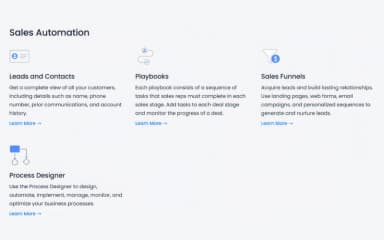
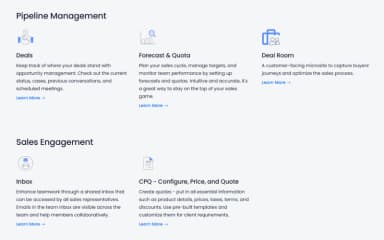
- Contact Management
- Lead Management
- Opportunity Management
- Sales Forecasting
What Is Vtiger CRM?
Vtiger CRM is a customer relationship management platform designed to help businesses manage customer interactions throughout the sales process and beyond. Built on an open-source foundation, it offers tools for sales automation, customer support, and reporting. Its customization options allow organizations to adapt workflows to their needs, while shared customer data helps teams coordinate activities and maintain consistent records across departments.
What Is Vtiger CRM Best For?
The platform stands out for its custom 'Prompt Builder,' which allows admins to create AI prompts using CRM data to generate tailored emails, case summaries, and suggested responses. Teams can build prompts without coding by selecting relevant data fields and writing instructions in plain language. This helps sales, marketing, and customer support teams reduce repetitive writing and tailor AI-generated responses to specific customer interactions. Admins can also preview prompt outputs using different CRM records to check their relevance.
How Much Does Vtiger CRM Cost?
Vtiger CRM pricing starts at $5/user under the One Pilot plan. It offers features such as idle alerts, profile scoring, email campaigns, and autoresponders. The vendor also offers a 15-days free trial. Further pricing tiers of the software are:
One Growth
- Standard User: $15/user/month
One Professional
- Standard User: $42/user/month
- Single App User: $28/user/month
One Professional
- Standard User: $58/user/month
- Single App User: $42/user/month
One AI
- Standard User: $66/user/month
- Single App User: $50/user/month
In addition to the base subscription cost, organizations should account for these additional expenses:
- Implementation: $1,995 for Vtiger’s one-week implementation service, which includes implementation and data migration from supported CRM
- Training: $75 for a single 60-minute training session, $450–$900 for individual or administrator training packages, depending on the package selected
- Premium Support: 25% of the subscription fee annually for eligible organizations with 50 or more users
- Custom Integrations And Development: $1,000–$10,000 for projects requiring API integrations, custom workflows, or additional development, depending on technical complexity
Disclaimer: The pricing is subject to change.
Vtiger CRM Integrations
The software connects with various business applications, including:
- Google Meet
- Zoom Meetings
- Microsoft Teams Phone
- Cisco Webex
- Gmail
- Google Workspace software
How Does Vtiger CRM Work?
Follow the steps below to understand how the software typically works:
- Log in to Vtiger CRM to access a unified dashboard displaying all your customer data in one spot
- Configure permissions, customize pipeline stages, and connect business tools to get started
- Automatically capture new leads and route them directly to the right sales reps
- Track deal progress, log client interactions, and set automated reminders
- Run targeted email campaigns for specific customer segments and monitor engagement metrics
- Handle support tickets across channels while checking customer histories to solve issues faster
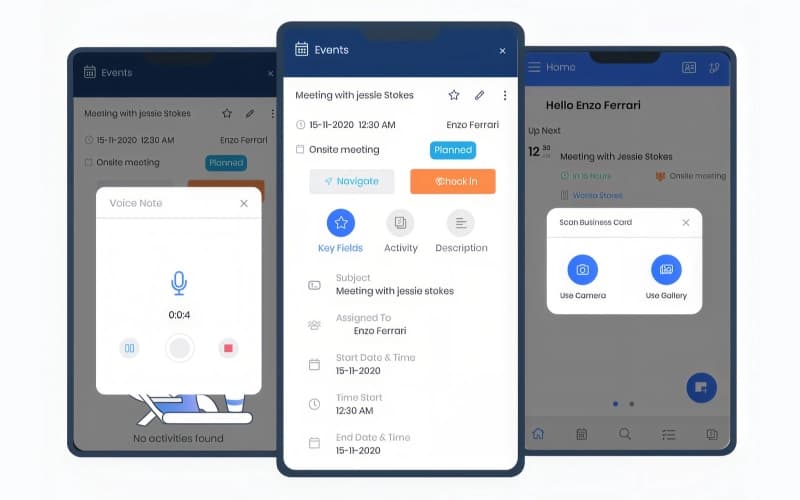
- Collaborate using shared activity feeds, or capture field notes and business cards on mobile
- Build custom reporting dashboards to track overall sales performance and marketing results
Who Is Vtiger CRM For?
Vtiger CRM is ideal for a wide range of industries and sectors, including:
- Information technology
- Marketing
- Construction
- Building materials
- Industrial automation
- Luxury goods
Vtiger CRM Use Cases
Based on our analysis of Vtiger CRM's current tools and offerings, we have identified the following key business scenarios where it is well suited:
IT Services Teams Managing High Support Ticket Volumes
IT services teams handling large ticket queues need to resolve issues within agreed service-level targets. Vtiger CRM allows teams to set response and resolution times based on case priority, send alerts as deadlines approach, and escalate cases at risk of missing their targets. These tools help managers identify delays and prioritize urgent issues. Reviewers also value the ticket interface and notifications for supporting SLA management.
Small Marketing Agencies Standardizing Workflows Before Hiring
Small marketing agencies preparing to expand need consistent processes that new employees can follow. Vtiger CRM's custom modules and project management features allow agencies to organize recurring work, such as website updates, SEO tasks, and client support. By documenting processes and configuring the platform around them, teams can establish repeatable workflows before bringing in additional staff.
Building Contractors Coordinating Field And Office Teams
Building contractors often need field crews and office staff to access the same project documents and customer records. Vtiger CRM provides document storage and sharing, call logging, and mobile apps for accessing information while away from the office. These capabilities help teams keep project-related information organized and maintain communication between field and office staff.
Building Materials Suppliers Managing CRM Costs
Building materials suppliers need CRM tools that support their workflows without stretching their budgets. Vtiger CRM offers customization options, inventory management, and configure-price-quote (CPQ) capabilities to help suppliers manage product records, customer inquiries, and quotations. Businesses can adapt modules to their processes, although the level of customization and any additional costs should be assessed before implementation.
Is Vtiger CRM Right For You?
If you want marketing, sales, and support teams working together, Vtiger CRM offers a 360-degree view of customer data. It works for any team size or industry and is trusted by 400,000+ businesses, including D-Link, Breezway, and Pactia.
Its data security compliance covers GDPR and the ISO/IEC 27000 family. Vtiger has been named in the Gartner Magic Quadrant for Sales Force Automation seven times in a row. If you need one adaptable CRM for customer-facing teams, it is worth considering.
Still unsure whether Vtiger CRM software is the right fit for you? Contact us at (661) 384-7070 for further guidance regarding its functionality.
Vtiger CRM Features
Contact Management
Vtiger's contact management feature centralizes customer profiles using the unified One View system. It captures leads from webforms, social media, and third-party apps while enabling lead scoring for targeted marketing. Teams can log interactions, communicate via email or phone, tag colleagues using @Mentions, and automatically merge duplicate records.
Appointment Scheduling
This feature simplifies booking by letting contacts schedule meetings directly on published calendars. Users can define availability, set buffer times, and share page links via email, websites, or social media. Vtiger sends automatic email reminders, auto-assigns available team members, and syncs events to the CRM calendar.
Reports and Analytics
Vtiger consolidates CRM data into detailed tabular, pivot, and visual chart reports. Users can schedule automated email updates, export data to CSV or Excel, and pin frequently viewed charts to dashboards. Teams can also share charts in comments using @Mentions to streamline internal performance collaboration.
Social Module
The social module enables teams to schedule posts, manage customer interactions, and track reviews across Facebook, Instagram, Twitter, and Google My Business. Users can compose multi-channel messages and respond to comments directly within the CRM. They can also set up automated record creation and monitor industry trends using Search Streams within Vtiger.
Pros And Cons of Vtiger CRM
Pros
Enables users to analyze and improve teams and pipeline performance
Quotes and invoices can be easily saved for later reference
Offers a good choice of customization features
Software is very intuitive
Modules can be mixed and matched
Cons
Users cannot drag/drop task bars in the Gantt chart
There could be better formatting of reports
Email templates would be more useful with a better design
Vtiger CRM Pricing
One Pilot | One Growth | One Professional | One Enterprise | One AI |
|---|---|---|---|---|
$5 per user | $15 per user per month | Starting at $28 per user per month | Starting at $42 per user per month | Starting at $50 per user per month |
|
|
|
|
|
Disclaimer: The pricing details were last updated on Sep 29, 2026 from the vendor's website. Please contact us for a tailored pricing list.
Vtiger CRM Reviews
Total 99 reviews
3.9
All reviews are from verified customers
Rating Distribution
5
Stars24%
4
Stars49%
3
Stars23%
2
Stars2%
1
Stars1%
Share your experience
Computer Software, 51-100 employees
Less than 6 months
“An affordable and user-friendly platform”
Pros
Vtiger CRM stands out as an incredibly cost-effective solution that doesn't compromise on usability. Its intuitive design makes it accessible for teams at any skill level, while still providing the powerful features needed to manage customer relationships effectively.
Cons
I noticed it has some integration restrictions and can be slow at times.
Rating Distribution
Ease of use
9
Value for money
8
Customer Support
8
Functionality
8
Information Technology and Services, 1-10 employees
More than a year
“Brings sales, marketing and support together”
Pros
this tool brings sales, marketing and support together in one place. It is simple to use, customizable and we can access it from any device since it is cloud-based.
Cons
Setting up some of the more advanced features can get pretty complicated. The free version also comes with major limitations.
Rating Distribution
Ease of use
7
Value for money
8
Customer Support
8
Functionality
8
Management Consulting, 1-10 employees
Less than a year
“Easy to set up”
Pros
I really like how easy it is to set up and adapt to different ways of working.
Cons
It's been good for my needs so far. Since I am on the free plan, my options are limited but I will probably need to upgrade my subscription soon.
Rating Distribution
Ease of use
10
Value for money
7
Customer Support
10
Functionality
10
Frequently Asked Questions
What is Vtiger CRM used for?
Vtiger tracks and manages all stages of the customer journey from one centralized dashboard.
Is Vtiger CRM free?
It isn't fully free, but Vtiger offers a free option alongside paid cloud tiers.
Is Vtiger an open-source CRM?
Yes, Vtiger has an open-source version which has logged millions of downloads on platforms like GitHub and SourceForge.
What AI capabilities does Vtiger CRM feature?
It offers generative AI, predictive insights, and next best actions.
What applications does Vtiger integrate with?
Vtiger integrates with over 500 third-party business applications, such as Google Workspace, Webex, Google Meet, and Zoom Meet.