


Empower EMR
Last Updated
Overview
Empower EMR is a physical therapy software built to streamline daily practice workflows. While users appreciate its AI-powered tools and customizable workflows, some note that the initial setup process can be time-consuming. Overall, it’s a specialty-focused solution that helps outpatient physical therapy providers optimize operational efficiency and improve patient outcomes.
Overall Rating
Based on 3 users reviews
4.3
Rating Distribution
Positive
100%
Neutral
0%
Negative
0%
Starting Price
Custom Pricing
Empower EMR Specifications
- Appointment Management/Scheduling
- E-prescriptions
- Lab integrations
- Patient Portal
Empower EMR Features
Patient Portal
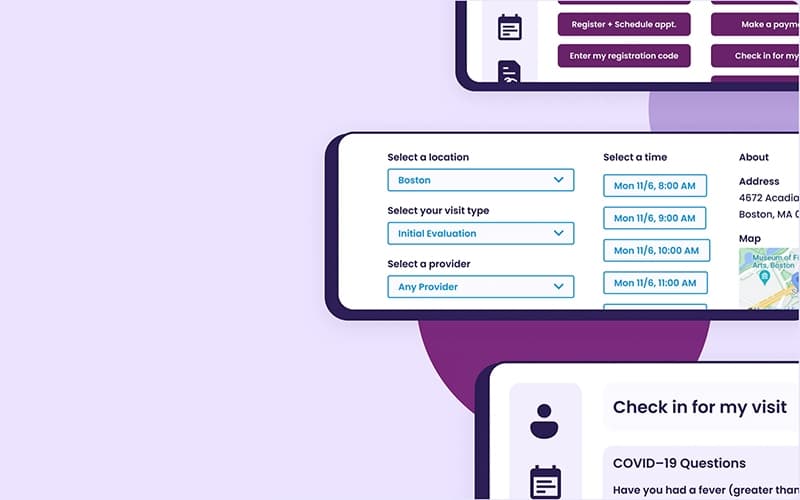
Empower EMR’s patient portal feature allows patients to register and schedule appointments online 24/7 through the practice’s existing website. Its self-service platform enables new and returning patients to complete intake and book visits at their convenience, reducing calls and paperwork for front desk staff. This streamlined process enhances patient satisfaction and improves overall clinic efficiency.
Documentation
The software simplifies clinical documentation with customizable templates designed specifically for physical therapy workflows. It supports faster notetaking through flexible formats that accommodate different treatment styles and preferences. Empower EMR also includes built-in compliance tools such as alerts and reporting features to help maintain alignment with Medicare and payer standards. These features enable accurate documentation while supporting efficiency and audit readiness.
Home Exercise Program
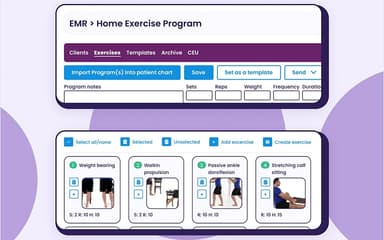
This feature includes a built-in library of thousands of exercises, each with images and videos to support patient understanding. It allows providers to quickly create and assign personalized home exercise programs using intelligent search tools. With these programs, PT practices can promote consistent at-home participation and improve patient engagement.
Billing
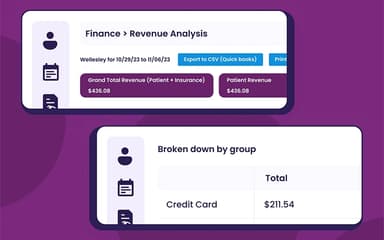
Physical therapists can manage billing in-house using Empower EMR’s comprehensive built-in software or choose to outsource to a preferred billing partner. The software includes claim scrubbing tools that help ensure accurate coding, reduce errors and speed up payment processing. Overall, the platform simplifies billing and improves revenue cycle management for a smoother financial workflow.
Scheduling
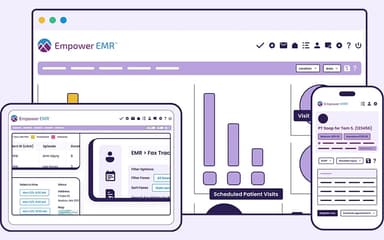
Empower EMR offers a highly visual and interactive scheduling system that provides at-a-glance details about patient appointments and practice availability. The system helps manage patients, meetings, and calendars with color-coded cues to improve organization and productivity. It also includes automated email and text reminders to reduce cancellations and no-shows. Moreover, the scheduling module integrates seamlessly with the EMR for smooth daily operations across providers and locations.
Pros And Cons of Empower EMR
Pros
Supports both in-house and outsourced billing
Integrates marketing and check-in modules
Customizable platform designed for PT workflows
Regular software updates improve functionality
Helpful and responsive customer support team
Cons
Some users find setup process complex
Limited integrations with third-party tools
Customizations can take time to implement
Empower EMR Pricing
PremiumPremium Plan Features | Premium PlusPremium Plan Features, Plus: |
|---|---|
Custom Pricing | Custom Pricing |
|
|
Disclaimer: The pricing details were last updated on Sep 14, 2026 from the vendor's website. Please contact us for a tailored pricing list.
Empower EMR Reviews
Total 3 reviews
4.3
All reviews are from verified customers
Rating Distribution
5
Stars33%
4
Stars67%
3
Stars0%
2
Stars0%
1
Stars0%
Share your experience
Hospital & Health Care, N/A employees
“easy to use tool”
Pros
It is easy for me to use. It gives me the chance to keep up with changes in insurance compliance rules.
Cons
Great tool but it is not as advanced as other software programs that include an eligibility checker in the system.
Rating Distribution
Ease of use
8
Value for money
9
Customer Support
9
Functionality
8
Hospital & Health Care, N/A employees
“Customizable documentation improves efficiency”
Pros
We really appreciate the customization features for documentation as they let us tailor everything to fit our specific workflow. It's made our work more efficient and keeps everything organized exactly how we need it.
Cons
I have no negatives to share. We have been very happy with this software and the staff.
Rating Distribution
Ease of use
10
Value for money
10
Customer Support
10
Functionality
10
Hospital & Health Care, 11-50 employees
“simplifies clinic scheduling and billing”
Pros
This tool has helped our outpatient physical therapy clinic get organized, manage billing and set up text reminders for patients. Before it our old scheduling system was confusing and hard to use. The login platform is simple for me to access from different places. I love being able to check tomorrow's schedule from home while logging in remotely from my laptop.
Cons
It is easy for me to press just one button to schedule or delete a patient's information. I wish there was a simple undo button. Since there is so much information on a page, it's easy for me to make mistakes at times. I also wish it were easier for me to make administrative changes. I'm not sure if it's just our settings but only one of our coworkers can change things like passwords.
Rating Distribution
Ease of use
8
Value for money
9
Customer Support
9
Functionality
8
Frequently Asked Questions
What level of support does Empower EMR provide?
Empower EMR offers support through live chat, a comprehensive knowledge base, and online contact forms.
Who are the typical users of Empower EMR?
The typical users of Empower EMR include PT practices of all types and sizes.
What languages does Empower EMR support?
Empower EMR supports the English language.
Does Empower EMR have a mobile app?
No, Empower EMR does not offer a mobile app.
How much does Empower EMR cost?
The software offers two flexible and customizable pricing options: Premium and Premium Plus. Contact us today to request a personalized Empower EMR cost breakdown for your practice.
Is Empower EMR free?
No, Empower EMR is not free.
What other apps does Empower EMR integrate with?
Empower EMR supports seamless integration with platforms such as PredictionHealth.
Does Empower EMR offer an API?
No, Empower EMR does not offer an API.
What are the key features of Empower EMR?
The key Empower EMR features include a user-friendly interface, automated reminders, efficient clinic management, patient portal, billing, and scheduling.