


Nosh EMR
Last Updated
Overview
Maximize nutrition and dietetics practice efficiency with Nosh EMR. This comprehensive platform excels in electronic health records, scheduling, and billing, ensuring streamlined clinical workflows for healthcare providers. Cultivate practice excellence with advanced capabilities. Check out its key features and discover its potential for your practice.
Nosh EMR Specifications
- Appointment Management/Scheduling
- e-Prescriptions
- Lab Integration
- Patient Portal
Nosh EMR Features
Patient Portal
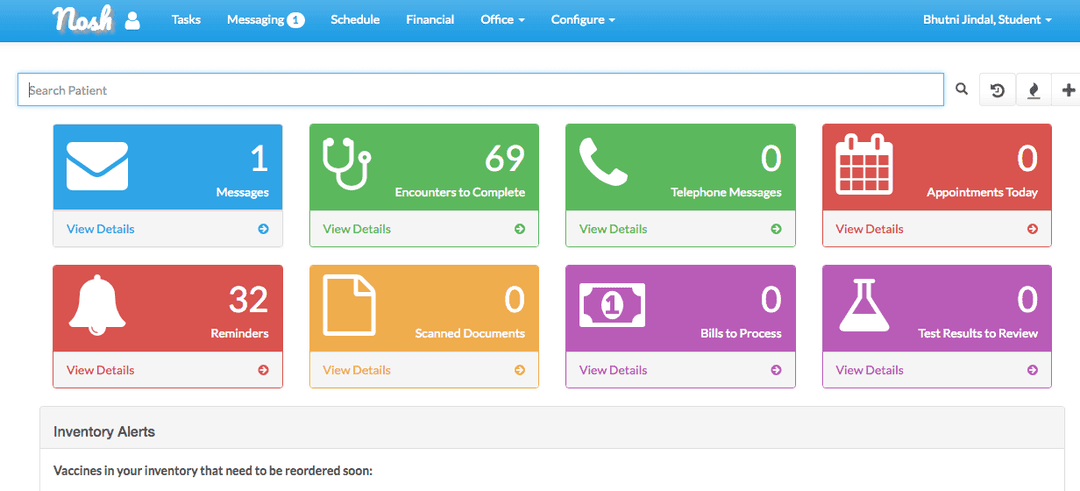
Nosh EMR is divided into portals, including a patient portal, an assistant portal, and a billing user portal (for accountants). The patient portal on Nosh EMR allows patients to secure messaging and schedule appointments with their healthcare providers or doctors, as well as review lab results, and documents. Users can also fill out personalized forms directly integrated into the patient encounter in a single click.
Customizable Medical Charts
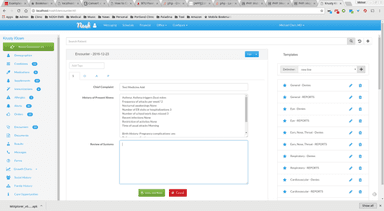
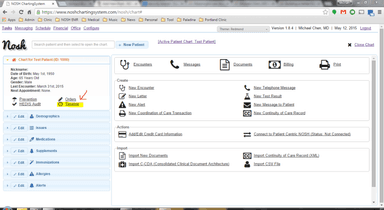
Customizable charts and graphs on Nosh EMR include in-depth information regarding patient demographics, active issues, medications, supplements, allergy lists, and past encounters. Healthcare practitioners have access to an organized document-handling system, where they can create personalized templates for patient HPI (history of illness), ROS (review of systems), and PE (physical examination).
Medical Records
Customizable reports allow for more accurate and relevant reports leading to patient encounters. With medical records, physicians can tailor the history of illness, physical examination, and review of systems templates to fulfill their needs. In addition, personalized electronic forms can be delivered and completed via the patient portal and stored in the patient’s records.
Practice Management
On Nosh EMR, claims can be compiled and exported in either PDF or text files for ease of storage or uploading to a claims clearinghouse such as Office Ally. Practice management tools allow physicians to track remaining balances to a claim and track revenues month-to-month or year-to-year.
Provider Ordering Features
The provider ordering feature on Nosh EMR is a computerized provider order entry (CPOE), which includes an e-prescribing function for patients via Dr. First that is separate from the Nosh ChartingSystem. Ordering features also allow for checks for medication interactions whenever a new prescription is made.
Pros And Cons of Nosh EMR
Pros
Improved patient care: By having all patient information in one place, healthcare providers can easily access and review relevant medical history and treatment plans, leading to more informed and personalized care
Enhanced efficiency: With Nosh EMR, healthcare providers can streamline their workflow by automating many administrative tasks, such as scheduling appointments and documenting patient visits.This can save time and reduce the risk of errors
Better communication: Nosh EMR includes tools for secure messaging between healthcare providers, which can facilitate communication and collaboration among team members
Enhanced security: Nosh EMR is designed with security in mind, including features such as encryption and access controls to protect patient data
Improved patient engagement: Nosh EMR includes patient portal features that allow patients to access their medical records, schedule appointments, and communicate with their healthcare providers.This can help patients feel more involved in their own care and improve their overall satisfaction
Cons
Cost: Implementing an EMR system can be expensive, as it requires an upfront investment in the software and any necessary hardware, as well as training for staff to use the system effectively
Complexity: EMR systems can be complex, with many different features and functions.This can require a significant investment of time and resources to set up and maintain the system
Change management: Transitioning to a new EMR system can be challenging for healthcare providers, as it may require significant changes to existing workflows and processes
Data migration and user adoption: Migrating existing patient records and data to a new EMR system can be a time-consuming and complex process.Some staff members may also resist using the new system, which can impact the overall effectiveness of the EMR
Technical issues and data privacy: Like any software, EMR systems may experience technical issues or glitches, which can disrupt workflow and impact patient care.There are also data privacy concerns, since the handling and storage of sensitive patient information raises concerns about data privacy and security
Nosh EMR Reviews
Total 18 reviews
3.3
All reviews are from verified customers
Rating Distribution
5
Stars17%
4
Stars33%
3
Stars28%
2
Stars6%
1
Stars17%
Share your experience
Hospital and Behavioral Health, 51-100 employees
“Perfect EMR fit for your practice”
Pros
Nosh EMR is a healthcare management software that offers us a comprehensive solution to streamline their workflow. By automating many administrative tasks, such as scheduling appointments, managing patient data, and documenting visits, Nosh EMR can significantly reduce the time spent on paperwork and free up resources for more important tasks.
Cons
Despite the benefits of EMR systems, technical issues or glitches may occur, causing delays or disruptions in the workflow. To avoid such issues, we have to ensure that we have adequate technical support and maintenance. This will help to minimize downtime and ensure that the system is always up and running smoothly.
Rating Distribution
Ease of use
7
Value for money
8
Customer Support
9
Functionality
9
Hospital and Behavioral Health, 51-100 employees
“Key to workflow optimization”
Pros
It can minimize the risk of errors that may occur due to manual data entry and other human errors. It lets us make better-informed decisions and provide more efficient care with accurate and up-to-date patient information.
Cons
I have one critical concern, that is the security and privacy of sensitive patient information. EMR systems store vast amounts of patient data, including personal information, medical history, and treatment plans. Therefore, it is essential to ensure that the system complies with data privacy laws and regulations and that the data is secure from unauthorized access or breaches.
Rating Distribution
Ease of use
10
Value for money
8
Customer Support
9
Functionality
9
Medical Wellness Facility, 51-100 employees
“Complete solution, but pricey”
Pros
NOSH EMR, a leading healthcare technology solution, has provided healthcare providers with a streamlined workflow by automating many administrative tasks, such as scheduling appointments and documenting patient visits. This not only saves time but also reduces the risk of errors that can occur when such tasks are performed manually.
Cons
However, implementing NOSH EMR can be costly, as it requires an upfront investment in the software and any necessary hardware, as well as training for staff to use the system effectively. Moreover, the customer support is also very bad. I have to message again and again to get one thing done.
Rating Distribution
Ease of use
8
Value for money
8
Customer Support
9
Functionality
7
Frequently Asked Questions
What level of support does Nosh EMR offer?
Nosh EMR provides support via email.
Does Nosh EMR support mobile devices?
Yes, Nosh EMR supports mobile devices.
How much does Nosh EMR cost?
Nosh EMR pricing plans vary based on the size and requirements of a practice.
What are the main features of Nosh EMR?
The primary features of Nosh EMR include a patient portal, charting, electronic faxing, e-prescribing, medication list management and lab interfacing.
What is Nosh EMR?
Nosh EMR, alternatively recognized as the New Open-Source Health Charting System, represents an open-source platform for charting and electronic medical record (EMR) management.