


PhysicianVisit Software
Last Updated
Overview
Navigating busy patient schedules and paperwork can overwhelm practices. PhysicianVisit software offers an intuitive platform designed to streamline workflows for healthcare providers. Exploring its secure telehealth capabilities and centralized electronic health records may help you deliver more coordinated care with greater ease.
PhysicianVisit Software Specifications
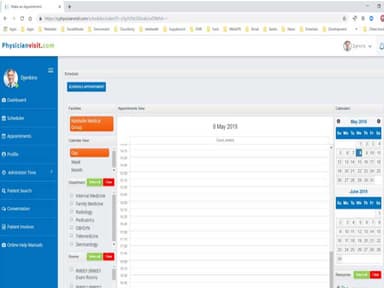
- Appointment Management/Scheduling
- e-Prescriptions
- Lab Integration
- Patient Portal
What Is PhysicianVisit Software?
Overview
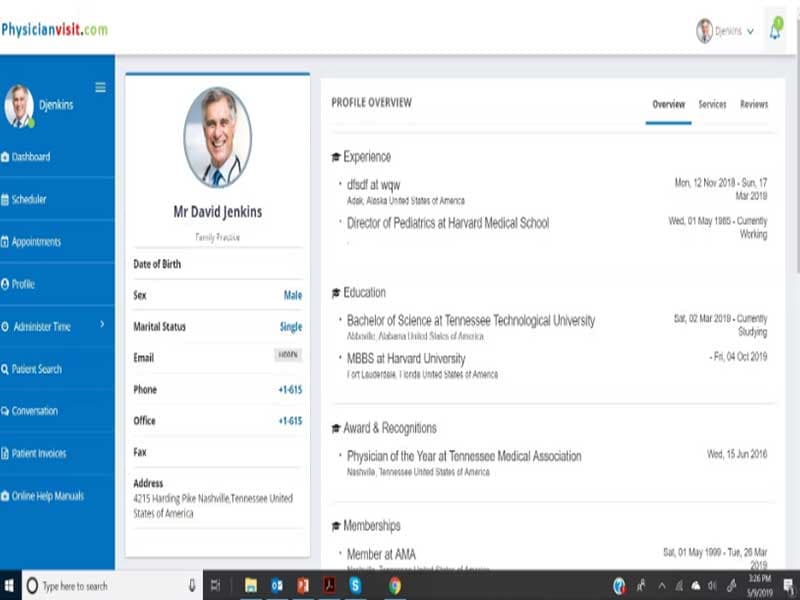
PhysicianVisit software is a cloud-based medical practice management and telehealth platform that offers diverse solutions to healthcare providers. It enables secure remote care, online appointment scheduling, and seamless patient-provider communications. As a single-platform solution, PhysicianVisit streamlines workflows to help practices improve efficiency. The software caters to the unique needs of medical offices, covering key areas like EHR, billing, and telemedicine software.
PhysicianVisit Software Pricing
PhysicianVisit Software Integrations
Information regarding its third-party integrations is not available.
Who Is PhysicianVisit Software For?
It is ideal for medical practices of all sizes, including solo and small group practices, urgent care clinics, and specialists. It caters to a wide range of specialties like primary care, therapy, and behavioral health. The solution scales to meet the needs of organizations across various sectors.
Is PhysicianVisit Software Right For You?
Is secure, compliant care without limits important to you? PhysicianVisit software is right for practices seeking a robust yet flexible telehealth partner.
Backed by bank-grade security practices, your patients' data is well protected. The software meets HIPAA requirements through robust compliance protocols. White-glove implementation services onboard you smoothly while ongoing support maintains standards.
Regarding scalability, the intuitive platform works just as hard at any size. From solo docs to extensive medical networks, customizable configurations scale functionality without sacrificing usability. Add providers, staff, or offices easily as your operation grows.
Still not sure if it's the right choice for you? Contact us at 661-384-7070 and let our experienced team assist you in making an informed decision.
PhysicianVisit Software Features
Telehealth And Telemedicine Capabilities
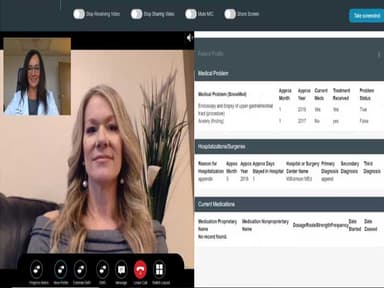
PhysicianVisit allows providers to conduct virtual visits, video conferencing and remote patient monitoring. This enables the delivery of care even when patients are not physically present.
Electronic Health Records
The software gives providers a centralized platform to document patient health information, treatment plans, medications, allergies, lab results, etc. in a digital medical record.
Secure Messaging And Appointment Scheduling
PhysicianVisit has a patient portal that allows two-way communication between providers and patients. Patients can also book, reschedule or cancel appointments online through this portal.
Integrated Practice Management
In addition to clinical functions, the software handles back-office tasks like billing, claims management and reporting. It offers an all-in-one solution to streamline workflows across clinical and administrative operations.
Pros And Cons of PhysicianVisit Software
Pros
One solution for telehealth and practice management with a user-friendly dashboards
Mobile-optimized for seamless access
Integrates top solutions in healthcare IT with fast implementation
Cons
Learning curve for some advanced modules
Limited third-party app marketplace, according to some user reviews
PhysicianVisit Software Reviews
Total 4 reviews
4.5
All reviews are from verified customers
Rating Distribution
5
Stars75%
4
Stars0%
3
Stars25%
2
Stars0%
1
Stars0%
Share your experience
Mid Market, 51-100 employees
“useful intent signals, limited lead detail”
Pros
Something that works well is the steady, controlled flow of relevant data which helps me keep the volume manageable while still getting information that matters. I mainly use it for intent data especially to track accounts that are active in my territory and that is really important for my sales efforts. The web visit and intent alerts are especially useful since I get daily emails with up-to-date intent activity for my assigned areas. That helps me stay focused on the accounts that should be prioritized in my market. From time to time, it also uncovers new leads that are not always easy to find on LinkedIn. Overall, it helps me sort through hundreds of accounts by highlighting recent and relevant intent data which makes it simpler to plan outreach around actual intent signals.
Cons
The biggest thing I would want improved is more accurate lead and contact-level information. For example, when there is a web visit, it does not necessarily connect that activity to a specific person. Most of what I see is still at the account level and while it does provide leads that seem relevant, it cannot directly link those people to the actual intent activity. I would rather have it connect the intent signals straight to an individual and show something like Dave Smith is researching x, y and z so I immediately know who to contact, instead of only telling me that eBay is researching a, b and c. At that point, I still have to spend extra time doing my own research to figure out the right person to reach out to within that company.
Rating Distribution
Ease of use
6
Value for money
7
Customer Support
5
Functionality
5
Healthcare, 1-10 employees
“REVIEW”
Pros
I can efficiently manage my schedule with both current and future patients quickly and timely.
Cons
Needs to list the states to which providers have license to provide care. So, patients who are traveling can locate you easier.
Rating Distribution
Ease of use
10
Value for money
10
Customer Support
9
Functionality
10
Healthcare, 1-10 employees
Less than a year
“Health Care Provider Review”
Pros
The software is easy to use, and it offers a mobile application.
Cons
Need to show provider multi state availability
Rating Distribution
Ease of use
9
Value for money
10
Customer Support
10
Functionality
10
Frequently Asked Questions
What languages does PhysicianVisit software support?
The platform supports the English language.
How does PhysicianVisit work?
Does PhysicianVisit software have an app?
Yes, it offers free patient and provider apps that run on iOS and Android operating systems.
Does PhysicianVisit software support mobile devices?
Yes, the software is responsive and can be accessed through mobile browsers. Native iOS and Android apps are also available.
What level of support does PhysicianVisit software offer?
PhysicianVisit offers 24/7 support through phone, email and online ticketing. Implementation specialists are also available.
How much does PhysicianVisit software cost?
The software offers tailored pricing, Contact us for a tailored quote.
Is PhysicianVisit software free?
No, PhysicianVisit is not free.