

Splash Event Management
Last Updated
Overview
Splash Event Management streamlines event plans by creating engaging, branded experiences that boost conversions throughout the event lifecycle. It enables teams to generate leads and foster customer relationships. While its reporting features lack versatility for deep insights, Splash Event Management still offers valuable analytical tools to improve future events.
Splash Event Management Specifications
- Budgeting Tools
- Attendee Communication
- Registration Management
- Venue and Resource Management
What Is Splash Event Management?
Overview
Splash Event Management software is a comprehensive event marketing platform for managing attendees, email communications, and workflows across multiple events. It allows administrators to set performance benchmarks, manage permissions, and synchronize data. Meanwhile, the software also ensures GDPR and CCPA compliance. Additionally, it offers data filtering tools for effective audience segmentation based on RSVP status.
Splash Event Management Pricing
The Splash Event Management cost structure works on a license-based subscription model. Splash Event Management pricing plans include:
- Free
- Pro
- Enterprise
Splash Event Management Integrations
Splash Event Management integrates with various third-party applications, including:
- Marketo
- Salesforce
- Slack
- HubSpot
- Zoom
- Zapier
- ON24
Who Is Splash Event Management For?
Splash Event Management facilitates various organizations, including:
- Enterprises
- IT
- Retail
- Financial services
- Higher education
- Non-profits
Is Splash Event Management Right For You?
As a considerable choice for event marketing, Splash Event Management is a scalable, flexible, and user-friendly platform. It offers complete control over every aspect of the attendee experience, from event page design to branded check-ins. All data remains accessible without restrictions, and reusable templates enhance productivity and efficiency for event teams. By providing several cutting-edge tools, Splash Event Management is a choice of leading organizations, such as TikTok, Amazon, Zoom, and others.
Do you still need to figure out Splash Event Management? Contact us at (661) 384-7070 and get expert support from our team for any further queries.
Splash Event Management Features
Event Design
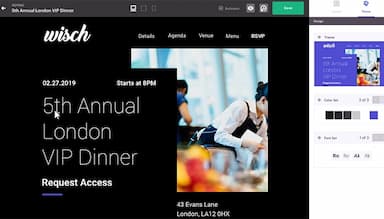
Splash Event Management helps create event charts with cutting-edge design and seamless branding. Its pre-built themes and automated tools ensure a consistent brand experience. It also transforms invites into attendees in just a few clicks, based on industry research for best results.
Guest Management
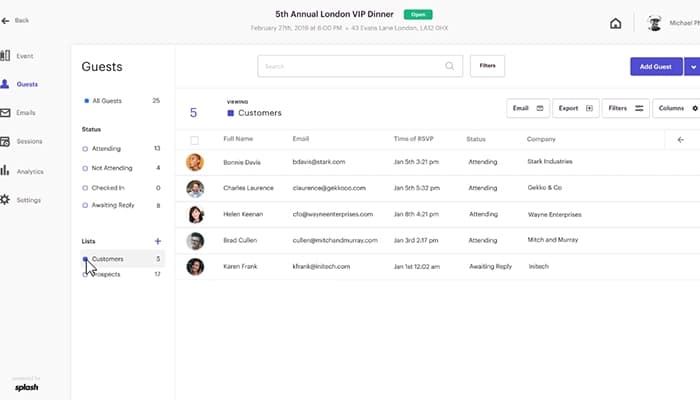
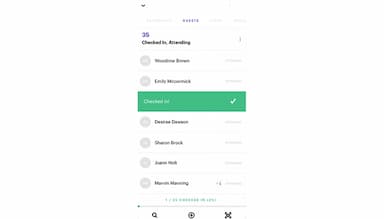
It is easy to organize guest lists into actionable segments. You can track responses, status updates, and registration details in real-time. Splash Event Management provides automated notifications, integrates with CRM, and grants collaborators view-only access in one streamlined system.
Ticketing
The software allows seamless pricing, currency, availability, and order limits customization. It supports donation-based and early bird tickets, integrates with Stripe for payment control, and syncs real-time updates. Custom URLs, discount codes, attendee management, and fast check-ins via QR codes enhance ticket handling across devices.
Invites and Reminders
Every Splash page includes pre-built email templates, from save-the-date to post-event follow-up. These emails automatically match the event page's branding for consistency. You can also personalize messages with dynamic guest information and schedule email sequences. Splash also supports tracking engagement metrics like opens and clicks for optimization.
Team Management
Splash Event Management provides management roles, each with unique permissions that are customizable for team needs. It offers comprehensive control event access to users based on departments or regions. Personal dashboards offer easy event management, while uploaded fonts, colors, and logos ensure brand consistency.
Pros And Cons of Splash Event Management
Pros
Users can easily duplicate and modify registration pages
It offers a wide range of customizable templates for event pages
Multi-format event support
User-friendly and efficient interface
Cons
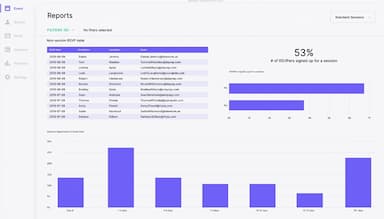
Limited reporting capabilities
Editing limitations
Splash Event Management Reviews
Total 20 reviews
4.5
All reviews are from verified customers
Rating Distribution
5
Stars65%
4
Stars25%
3
Stars10%
2
Stars0%
1
Stars0%
Share your experience
IT, 51-100 employees
More than a year
“Offers great integration options”
Pros
Integrating with my existing marketing tools was a breeze. Creating a webpage without coding skills felt easy, thanks to the simple interface that anyone can use. Plus, it works well with Slack.
Cons
The pricing can be a bit high for startups like ours, that are looking to dive fully into their event marketing needs.
Rating Distribution
Ease of use
10
Value for money
8
Customer Support
10
Functionality
10
Marketing, 11-50 employees
More than a year
“Awesome tool for marketers to create easy registration”
Pros
After spending time with Splash, the website editor became a powerful asset for promoting events and sharing updates. The registration setup is so easy and the built-in emailing system is super useful for staying connected with my attendees.
Cons
I think there are some drawbacks, like only being able to have one long website instead of multiple tables, which can get overwhelming when trying to include venue details, agendas, speakers, FAQs, etc. The registration system also supports only one type of registration, making it tricky for both in-person and virtual events.
Rating Distribution
Ease of use
6
Value for money
6
Customer Support
6
Functionality
8
Media, 500+ employees
More than a year
“It's great to customize this app however I want!”
Pros
The level of customization stands out as the best I've seen. Once the system is understood, managing everything independently is so simple. Tracking attendees and communicating via email is simple, making it an organized system.
Cons
At first, relying on customer support to resolve issues can be frustrating, especially when time is of the essence. But I suppose that's part of getting used to a new system. Overall, I have no major complaints!
Rating Distribution
Ease of use
10
Value for money
8
Customer Support
10
Functionality
8
Frequently Asked Questions
Does Splash Event Management offer an API?
Yes, Splash Event Management provides API access.
What language does Splash Event Management support?
Splash Event Management supports the English language.
What other apps does Splash Event Management integrate with?
Splash Event Management integrates with various third-party applications, including Marketo, Salesforce, Slack, HubSpot, Zoom, Zapier, and ON24.
What types of pricing plans does Splash Event Management offer?
The Splash Event Management pricing structure offers a free version and a Pro and Enterprise plan. Users can request a custom quote for the Splash Event Management cost.
Who are the typical users of Splash Event Management?
Splash Event Management serves diverse users, including enterprises, technology and software companies, retail businesses, financial services firms, higher education institutions, non-profits, and agencies.
What level of support does Splash Event Management offer?
Splash Event Management provides various support options, including email, a knowledge base, a community-based platform, and a help desk.