


Skedulo
Last Updated
Overview
Skedulo is an AI-powered SaaS solution for field service management that features a powerful mobile app. It streamlines scheduling, optimizes routes, and improves job completion rates. While initial job organization can be inefficient, it effectively supports diverse scheduling scenarios, enhancing workforce efficiency and customer satisfaction.
Skedulo Specifications
- Work Order Management
- Scheduling & Dispatching
- Mobile Access
- Customer Relationship Management (CRM)
What Is Skedulo?
Skedulo software is a leading platform for intelligent mobile workforce management. It enables enterprises to efficiently manage, schedule, dispatch, and track field resources. With native integrations for Salesforce and ServiceNow, along with an independent platform that connects to any system of record, Skedulo provides a versatile mobile workforce management solution suitable for enterprises and mid-market companies, seamlessly enhancing any tech stack.
Skedulo Pricing
- Schedulers
- Mobile workers
- COVID testing and vaccine administration
All plans are available at a custom quote. To make a suitable decision, get a detailed estimate of the Skedulo price.
Skedulo Integrations
The software comes with powerful integrations, including:
- Salesforce
- Zendesk
- Workday
- Microsoft Dynamics 365
- UKG
- Epic
- Employment Hero
- Lens API
Who Is Skedulo For?
Skedulo is designed to cater to various industries and sectors, including:
- Healthcare
- Nonprofit
- Residential services
- Real estate
- Energy and utilities
- Public sector
- Telecommunications
Is Skedulo Right For You?
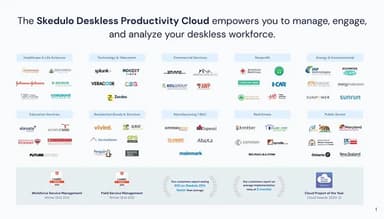
Skedulo is an effective software solution for managing and analyzing deskless workforces, covering 80% of global workers outside traditional offices. It simplifies scheduling, dispatch, and task management for both fixed-location and mobile teams, helping organizations like The American Red Cross and DHL efficiently manage over 35 million appointments worldwide.
Do you still need to figure out the Skedulo? Call our team at (661) 384-7070 for expert guidance on your questions.
Skedulo Features
Analytics
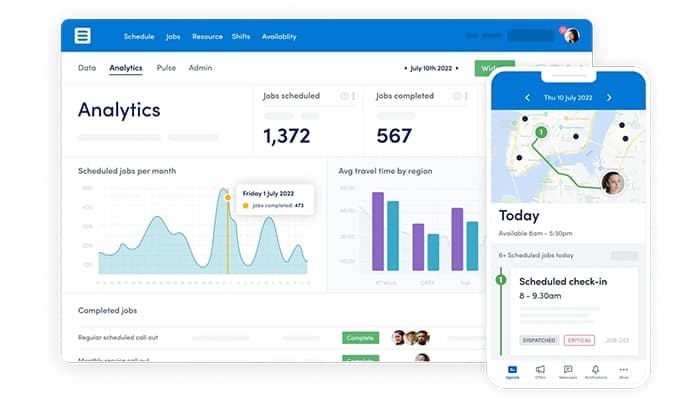
Skedulo's analytics provide deeper insights by integrating scattered data to track and enhance workforce productivity. This tool helps identify trends, supports informed decision-making, and enables swift actions to drive efficiency and improvement.
Shifts And Rostering
Skedulo streamlines deskless workforce management with a unified platform, offering a clear overview of fixed and field operations. It aligns tasks with staff skills and availability, enabling quick schedule adjustments to meet evolving demands.
Dynamic Messaging
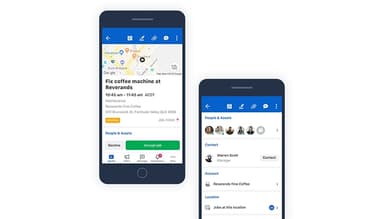
The software's mobile app enhances communication by enabling real-time messaging between mobile workers and schedulers. It supports quick adjustments to last-minute changes, provides workers with essential information, and keeps customers informed through Dynamic Messaging.
Virtual Meetings
The platform's virtual meeting integration enables frontline workers to provide essential services remotely, prioritizing health and safety. Partnered with online meeting providers, it ensures effective operations while protecting both workers and the communities they serve.
High-Capacity Scheduling
Skedulo simplifies workforce scheduling by automating the process, ensuring qualified workers match customer needs. This intelligent software streamlines complex tasks, reduces errors, enhances customer satisfaction, and helps organizations avoid missed assignments.
Pros And Cons of Skedulo
Pros
Real-time messaging and scheduling capabilities
Efficient appointment tracking and notification features
Enables employees to view and apply for leave in real time
User-friendly interface, easy to navigate and learn
Cons
Analytics features may require further refinement for specific needs
Initial job organization sometimes lacks efficiency
Distinction between web and app interfaces can be confusing
Skedulo Reviews
Total 11 reviews
4.5
All reviews are from verified customers
Rating Distribution
5
Stars64%
4
Stars27%
3
Stars9%
2
Stars0%
1
Stars0%
Share your experience
Computer Software, 500+ employees
More than a year
“Stay on track with Shedulo”
Pros
Using this application on mobile has been one of the best experiences. It is designed to be incredibly smooth, fast and reliable, ensuring that there are no disruptions while working on the go. I never experience any lag or breakage, which makes a huge difference. Their customer support team is also fantastic.
Cons
I have noticed that the maps need updates from time to time and that can create issues.
Rating Distribution
Ease of use
10
Value for money
10
Customer Support
10
Functionality
9
Hospital & Health Care, 500+ employees
Less than a year
“Game-changer for my workflow!”
Pros
One of the things I love the most is being able to see my entire schedule for the upcoming week every Friday when my Scheduling Manager inputs my hours, patients and available team members. Checking off the patients I have seen is incredibly simple and helps me stay organized.
Cons
I did not like being tracked and my phone would get hot when this feature was on, especially when using mobile data instead of WiFi. My manager suggested turning it off, and now it barely uses any memory or data.
Rating Distribution
Ease of use
8
Value for money
10
Customer Support
8
Functionality
9
Utilities, 500+ employees
Less than a year
“Flexible and easy to modify”
Pros
As an employee who is managed through this software, I find it extremely convenient to have all job details and relevant document attachments stored in a central location. The mapping and location feature seems like it would be especially useful in various situations. From what I can see, the system is fairly customizable since all the forms and links are built directly within the platform.
Cons
My employer decided to have employees use this app on their personal devices, but they have no control or access logging. My personal contact details, including my email and phone number are visible to all users. My daily timesheets, which show my working hours, locations, pay rate and any extra pay, can be seen by other field employees. Even images of my signature are accessible to my coworkers. Everything is stored in one place and has been visible since February 2022. No one has been taught how to install the app safely to keep work data separate from personal apps. Once I log in, I can restart my phone and reopen the app without needing a password. The location tracking feature also interferes with my phone's GPS and runs in the background all the time, even when I do not want it to.
Rating Distribution
Ease of use
10
Value for money
10
Customer Support
10
Functionality
7
Frequently Asked Questions
Does Skedulo offer an API?
Yes, Skedulo provides API access.
What language does Skedulo support?
Skedulo supports the English language.
Does Skedulo offer a mobile app?
Yes, Skedulo offers a native mobile app for iOS and Android devices.
What other apps does Skedulo integrate with?
The software includes robust integrations with platforms such as Salesforce, Zendesk, Workday, Microsoft Dynamics 365, UKG, Epic, Employment Hero, and the Lens API.
What types of pricing plans does Skedulo offer?
The Skedulo cost offers affordable monthly per-user pricing with three distinct options for schedulers, mobile workers, and COVID testing/vaccine administration, along with custom quotes available for all plans and volume-based pricing for large organizations. To make an informed choice, request a detailed Skedulo price estimate tailored to your needs.
Who are the typical users of Skedulo?
Skedulo is tailored to serve a range of industries, including healthcare, nonprofit, residential services, real estate, energy and utilities, public sector, and telecommunications.
What level of support does Skedulo offer?
Skedulo offers support through various channels, including 24/7 live representatives, phone, email/help desk, chat, FAQs/forums, and a knowledge base.