Last Updated

Key Takeaways

Generated from the text of customer reviews

Workday Adaptive Planning is a cloud-based platform for budgeting, forecasting, and financial planning with AI-driven capabilities. Users value its flexible modeling and real-time scenario analysis even though its customization feels limited. Recent updates focus on AI-powered insights, improved forecasting accuracy, and stronger integration across financial, workforce, and operational planning.

Our Verdict

Workday Adaptive Planning is well-suited for finance-driven industries such as technology, healthcare, and professional services that require accurate forecasting and cross-functional planning. Pricing is enterprise-level, making it more suitable for mid- to large-sized organizations. We recommend it for businesses looking to replace spreadsheet-based planning with a more connected and scalable budgeting system.

Overall Rating

Based on 45 users reviews

4.3

Rating Distribution

Positive

93%

Neutral

7%

Negative

0%

Starting Price
Free For 30 Days
Workday Adaptive Planning Specifications

  • Time Tracking
  • Task Management
  • Reporting
  • Budget Management
View All Specifications

What Is Workday Adaptive Planning?

Workday Adaptive Planning (WAP), formerly known as Adaptive Insights, empowers organizations to effectively manage costs, drive innovation, and make informed financial decisions. The software offers scalability, security, and flexibility required for complex enterprise environments. These help organizations optimize financial processes, enhance spend management, improve financial planning, and deliver valuable insights.

What Is Workday Adaptive Planning Best For?

The software is best known for enabling organizations to run powerful scenario planning and what-if analysis within financial planning, allowing teams to model different business outcomes in real time. Through its exceptional financial planning capabilities, WAP empowers businesses to create comprehensive financial plans, budgets, and forecasts to understand the impact of changes such as shifts in revenue, costs, or market conditions. Flexible scenario modeling and unlimited what-if versions allow finance teams to test assumptions, evaluate risks, and identify the best possible course of action within a single planning environment. By aligning financial objectives with business strategy, organizations can make informed decisions and drive financial success. 

How Much Does Workday Adaptive Planning Cost?

The pricing of Workday Adaptive Planning typically starts from around $1,500 to $3,000 per month for small to mid-sized setups (usually based on limited users and basic planning modules). The vendor offers a 30-days' Workday Adaptive Planning free trial along with the following pricing packages:

  • Workday Adaptive Planning: Custom Pricing
  • Workday Adaptive Planning Close & Consolidation: Custom Pricing

In addition to the base subscription costs, organizations should also account for the following estimated expenses based on the industry benchmarks:

  • Implementation: $10,000–$100,000+ depending on complexity and company size
  • Data Migration: $5,000–$30,000 based on financial data volume and system structure
  • Admin And End-User Training: $2,000–$15,000 depending on team size
  • Integrations (ERP, HRIS, CRM, APIs): $5,000–$50,000+ depending on scope
  • Customization And Reporting Setup: $3,000–$20,000 for advanced dashboards and models

Users generally find Workday Adaptive Planning pricing useful for budgeting, forecasting, and financial reporting, especially for mid-sized and large companies. It works well once it is fully set up, and many users feel it gives good value over time. At the same time, some users say the cost can go up as more features, users, and setup services are added, which can make it expensive for growing companies.

Not sure if WAP is the right fit for you? Contact our customer support team for customized Workday Adaptive Planning cost today!

Disclaimer: Pricing references are based on publicly available third-party information and industry benchmarks. Actual costs may vary.

Workday Adaptive Planning Integrations

The software can integrate with an extensive range of systems, including, Microsoft Teams, Google Workspace, Sage Intacct, Deltek Vision, Epicor, Sage, Plex, and Multiview. With its purpose-built integration framework, customers can effortlessly incorporate data from diverse sources. Key integrations include:

How Does Workday Adaptive Planning Work?

Here is how you can start using Workday Adaptive Planning after logging in:

  • Sign in to your Workday account and access the primary dashboard to view financial performance, forecasts, and key planning metrics in one place 
  • Navigate to the planning module and choose the process depending on your requirements (e.g., budgeting) 
  • Define planning parameters and assumptions including time period, revenue, expenses, and headcount to build the foundation of your model 
  • Import or sync data from connected systems such as ERP, HR, and CRM tools to ensure plans reflect real-time information 
  • Build budgets and forecasts using driver-based modeling instead of manual spreadsheets for more accurate planning 
  • Create and compare multiple scenarios to evaluate the impact of different business decisions and changing conditions 
  • Collaborate across HR, finance, sales, IT, and operations by linking models so teams can plan together and stay aligned in real time, ensuring all functions contribute to a coordinated planning process 
  • Generate reports and visualizations for effective communication and performance visualization
You can also watch a free Workday Adaptive Planning demo and learn more about its functionalities.

Who Is Workday Adaptive Planning For?

The software is suitable for small businesses to large corporations. It is used in various industries and sectors, including:

  • Hospitality
  • Retail
  • Banking/Insurance/Investment management
  • Healthcare and life sciences
  • Professional and business services
  • Public services
  • Technology
  • Media and communications
  • Nonprofit
  • Higher Education
  • Government

Workday Adaptive Planning Use Cases

Based on our analysis of Workday Adaptive Planning’s capabilities, we have identified key scenarios where the software is commonly used across finance, workforce, and enterprise planning functions:

Finance Teams Managing Budgeting And Forecasting Cycles

Finance teams use Workday Adaptive Planning to build, update, and manage budgets and forecasts in a dynamic environment. The platform allows users to adjust financial assumptions in real time, run multiple forecast versions, and continuously update plans as business conditions change, helping finance teams maintain accurate and timely financial visibility.

Organizations Running Scenario Planning And What-If Analysis

Companies use Workday Adaptive Planning to test different business scenarios and evaluate potential outcomes before making strategic decisions. Teams can model changes in revenue, costs, hiring, or market conditions and instantly compare results across multiple scenarios, helping leadership assess risk and choose the most effective course of action.

HR And Finance Teams Planning Workforce And Headcount Costs

HR and finance departments use Workday Adaptive Planning to align workforce planning with financial planning. Teams can model hiring plans, salary changes, and staffing needs while understanding their impact on overall budgets, enabling more accurate headcount forecasting and better control of labor costs across the organization.

Cross-Functional Teams Coordinating Integrated Business Planning

Organizations use Workday Adaptive Planning to connect planning across departments such as finance, sales, IT, and operations. By linking assumptions and models across teams, businesses ensure that all departments are working from the same planning framework, improving alignment, reducing silos, and supporting more coordinated decision-making across the company.

Is Workday Adaptive Planning Right For You?

Workday Adaptive Planning is the right fit if you need more flexibility and accuracy than traditional spreadsheet-based budgeting and forecasting. The platform is particularly valuable for businesses that require what-if scenario modeling and adaptable planning structures that can shift as business conditions change.

With strong modeling and easy integration with other systems, this software can significantly streamline your financial processes. It also provides advanced security measures and compliance protocols to protect sensitive financial data. Over 6,000+ customers use Workday Adaptive Planning, including notable brands like Mondelez International and Exxon Mobil. Check out Workday Adaptive Planning pricing plans to see if it suits your budget and needs.

The platform is designed to support collaborative budgeting and planning in a secure environment, making it especially useful for organizations that need transparency and accountability across teams. With built-in reporting, analytics, and visualization tools, it helps users understand financial performance clearly and make better decisions faster while maintaining scalability and security for complex planning needs.

You can learn more about how the platform benefits existing users by reading Workday Adaptive Planning reviews or by calling us at (661) 384-7070.

Workday Adaptive Planning Features

Financial Planning 

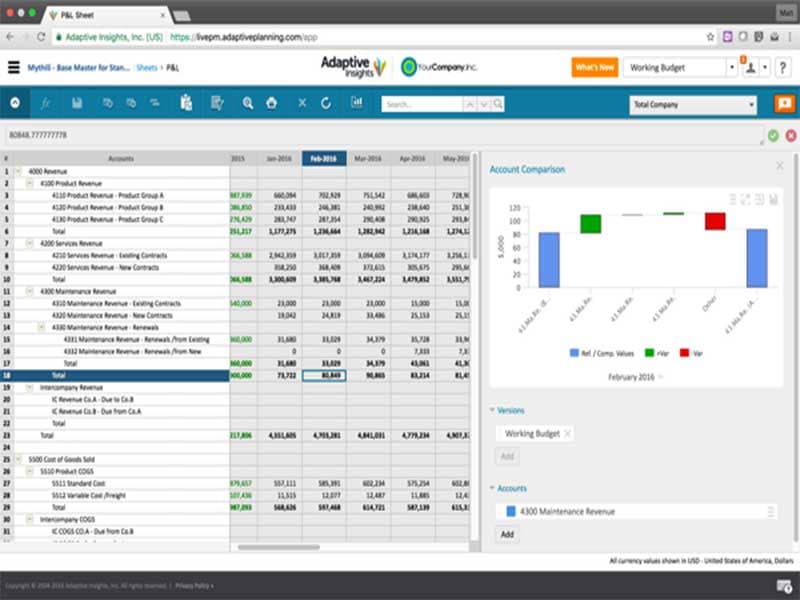
This feature supports flexible financial modeling, budgeting, forecasting, scenario planning, and reporting. It allows teams to build detailed financial plans, compare different business scenarios, and track performance over time. With real-time updates and centralized data, organizations can make more accurate financial decisions and adjust plans as needed.

See How It Works
Workforce Planning 

The workforce planning tools help organizations manage current and future staffing needs in a structured way. It includes headcount planning, cost planning, skills mapping, and capacity planning. Businesses can also align workforce plans with financial goals to better control hiring, resource allocation, and long-term talent strategies.

See How It Works
Operational Planning 

This feature offers cross-functional operational capabilities that work in concert with financial planning. Real-time data tools help deploy optimal resources to meet organizational goals across sales, demand and supply, projects, and marketing. Organizations can improve coordination across departments and ensure day-to-day operations stay aligned with overall company targets.

See How It Works
Close And Consolidation

Organizations can also streamline their financial close process by consolidating financial data from multiple entities into a single, accurate view. This feature supports faster and more controlled closing cycles by automating consolidation tasks, improving data accuracy, and reducing manual effort in financial reporting.

See How It Works

Pros And Cons of Workday Adaptive Planning

Pros

  • Works with complex financial models

  • Connects with Excel to manage financial data in reports and presentations

  • Scalable technology platform for multi-dimensional modeling, reporting, and analysis

Cons

  • Integration with some systems may be challenging

  • Implementation may take some time

  • Customization can be limited

Workday Adaptive Planning Reviews

Total 45 reviews

4.3

All reviews are from verified customers

Rating Distribution

5

Stars

40%

4

Stars

53%

3

Stars

7%

2

Stars

0%

1

Stars

0%

Share your experience

S

Stefan

Transportation/Trucking/Railroad, 51-100 employees

More than a year

5.0
February 2024

It really makes budgeting much easier

Pros

Adaptive serves our budgeting needs effectively. It's important function simplifies data uploads for analysis, streamlining our budgeting process.

Cons

Past bugs have been effectively addressed, enhancing the software's reliability. So I do not have much negative to say.

Rating Distribution

Ease of use

10

Value for money

10

Customer Support

10

Functionality

10

B

Brandon

Accounting, 11-50 employees

Less than 6 months

4.0
November 2023

Super easy and simple to use

Pros

Exceptionally user-friendly with intuitive report generation.

Cons

Cost was a concern, albeit our brief usage period.

Rating Distribution

Ease of use

9

Value for money

7

Customer Support

8

Functionality

8

JN

Joel Neil

Media Production, 500+ employees

More than a year

5.0
August 2023

A very strong tool

Pros

The reporting and real-time consolidation features of Adaptive greatly aid in planning ahead. Primarily utilized for high-level management reporting, it consistently delivers swift and effective solutions due to its array of features.

Cons

While customization options are limited and pricing may be a consideration, it aligns well with the needs of large corporations.

Rating Distribution

Ease of use

10

Value for money

10

Customer Support

10

Functionality

10

Frequently Asked Questions

Does Workday Adaptive Planning offer an API?

Yes, API access is available.

Does Workday Adaptive Planning support mobile devices?

Yes, the software supports mobile devices.

What level of support does Workday Adaptive Planning offer?

Customers can contact support via email, chat, and phone. FAQs and a knowledge base are also available.

What other apps does Workday Adaptive Planning integrate with?

It can integrate with several third-party software, including SAP, Oracle, Slack, and Salesforce.

What languages does Workday Adaptive Planning support?

It supports English, Spanish, French, Japanese, German, and Portuguese.

Who are the typical users of Workday Adaptive Planning?

Workday Adaptive Planning pricing usually starts around $1,500/month. The vendor also offers a 30-day free trial, with packages like Workday Adaptive Planning and Workday Adaptive Planning Close & Consolidation available on custom pricing. Get a tailored Workday Adaptive pricing estimate.

What types of pricing plans does Workday Adaptive Planning offer?

Factors like the number of users accessing the platform, features or modules required, implementation, customizations, etc., may affect the Workday Adaptive Planning cost.