


Payroll Relief
Last Updated

Key Takeaways
Generated from the text of customer reviews
Payroll Relief is paycheck and tax compliance software used by accountants at accounting firms and service bureaus. While users find the employee portal signup process easy, noting that the button for sending employees registration links works as intended, a few report limitations around e-filing amended forms frustrating. Recently, Payroll Relief added an AI assistant to help users with support queries.
Our Verdict
Payroll Relief is a reliable choice for small to mid-sized accounting practices that run payroll for a growing client roster and need tax compliance handled with less manual effort. Its per-paycheck pricing decreases as payroll volume increases, which may suit practices processing payroll for multiple clients. We recommend it for practices turning payroll into a steady service line.
Payroll Relief Specifications
- Employee Information Management
- Attendance And Time Tracking
- Employee Self-Service Portal
- Payroll Integration
What Is Payroll Relief?
Payroll Relief is a web-based, mobile-friendly payroll system for accountants and payroll service providers who handle payroll for their clients. It covers the full cycle in one place, from employee setup and pay runs to tax compliance, year-end reporting, and employee records. Paychecks, tax payments, and filings run through automated processes, and work for multiple clients can be handled in batches.
What Is Payroll Relief Best For?
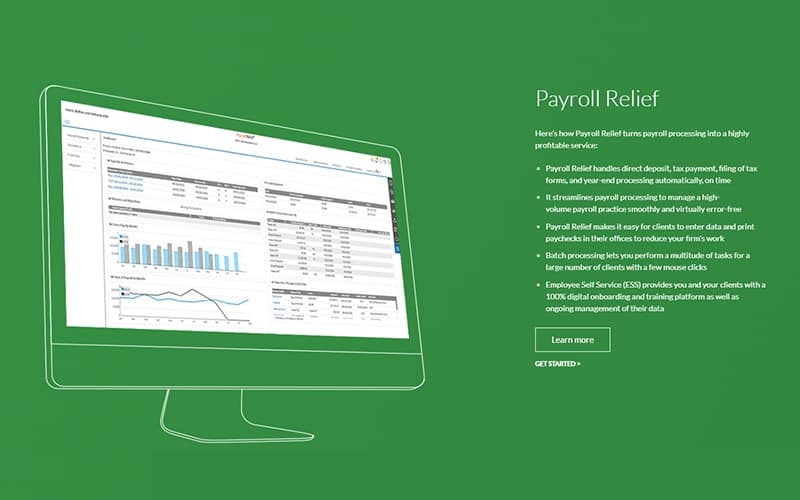
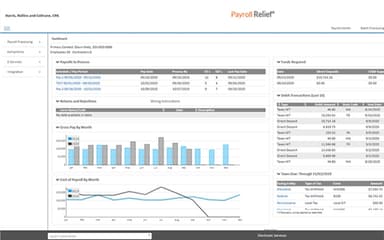
A standout feature of Payroll Relief is 'Payroll Snapshot', which displays pending payroll activity for all clients in one place. It shows upcoming payrolls alongside the status of tax payments and e-filing. This feature is particularly useful for accounting firms and payroll service providers that manage payroll for multiple clients. Staff can review pending items and due dates from a single view instead of opening each client's file individually.
How Much Does Payroll Relief Cost?
Payroll Relief pricing is estimated to range from $125 to $200/month as per industry benchmarks for similar cloud-based payroll systems. However, actual costs vary as the vendor offers subscription-based custom priced plans depending on your organizational needs.
In addition to the base subscription costs, organizations should account for the following potential expenses:
- Initial Fee: $500 (one-time), covering software setup, training, and cloud hosting
- Data Conversion Services: $50–$100 per client for moving existing payroll data into the system
- W-2/1099 E-Filing Fee: $2.35 per W-2 or 1099 e-filed
- Accounting And Third-Party Integrations: $500–$3,000/integration where custom mapping or professional services are required
Reviewers have mixed views on Payroll Relief pricing. Many find it budget-friendly for its features, noting direct deposit costs nothing extra. Others mention yearly price increases, prepaid annual billing based on projected checks, and costs rising as firms add clients.
Disclaimer: Pricing references are based on publicly available third-party information and industry benchmarks. Actual costs may vary.
Payroll Relief Integrations
The platform integrates with a range of systems and platforms, including:
- Accounting Power
- QuickBooks
- CS Accounting
- Peachtree
- Swipeclock
- InsureLinx
- TransAmerica Group
How Does Payroll Relief Work?
Follow the steps below to see how to get started with the software:
- Log in to Payroll Relief through a web browser or mobile device
- Set up clients and import employee and prior payroll data in Excel format
- Choose how each client sends payroll data, either in the program or on an emailed Excel template, and set their access level
- Enter payroll on the spreadsheet screen using exception-based entry, or import hours from Swipeclock
- Check pre-approval reports and warnings, then approve payrolls one at a time or in batches
- Print checks while direct deposits, tax payments, and e-filings process automatically
- Process W-2s and 1099s in batches at year-end and release them to employee portals
- Monitor e-filing, tax liabilities, and forms due across clients with the management tools
Who Is Payroll Relief For?
It is built for accounting professionals who run payroll for their business clients. It’s typically used by:
- Accountants and accounting firms
- Payroll service bureaus
- Business clients of accounting firms
- Client employees
Payroll Relief Use Cases
Based on our analysis of user feedback and Payroll Relief’s capabilities, we have identified key scenarios where this software is a good fit for payroll providers, accountants, CPA offices, and enrolled agents who use it to handle garnishments, schedule tax deposits, report retirement and contractor pay, and let clients enter their own payroll hours.
1. Payroll Providers Handling Garnishment Orders For Small Employers
When an employee has multiple court orders, a single paycheck may require several separate garnishments sent to different agencies. Payroll Relief sets these up as custom deductions and splits the withheld amounts across each order. Only child support is paid electronically to the receiving agency, while other garnishment payments still go out as paper checks. Once the rules are set, they apply on every pay run, so staff don’t work out each deduction by hand.
2. Accountants Handling Clients On A Semi-Weekly Deposit Schedule
Clients on semi-weekly deposit schedules face federal tax deadlines just days after payday. Each deadline leaves minimal time to collect funds and submit payments. Payroll Relief addresses this with an option to pre-fund electronic tax payments incrementally as each payroll is processed. The platform then holds and schedules those funds to pay out on the exact due date. Firms can also specify different terms for any tax payment when needed.
3. CPA Offices Moving Retirement And Contractor Reporting Off Legacy Payroll
CPA offices leaving a legacy payroll system still need to prepare retirement reports and contractor 1099s for their business clients. Payroll Relief imports employee and prior period payroll data in Excel format, so records from the old system come along. It also tracks contractor pay alongside regular employee wages, and 1099 forms draw from those same records at year-end. Retirement details go to plan administrators through its Retirement Transmittal Report.
4. Enrolled Agents Whose Clients Need Paychecks While They’re Away
When the person responsible for logging hours is away, keeping payroll on schedule becomes a challenge, and re-entering time records into another system doubles the workload. Payroll Relief resolves this by providing client logins with customized access limits controlled by the firm. Clients can enter their own hours and preview net pay figures, leaving the firm to review and approve the run later. This approach fits small accounting practices where a single staff member manages payroll across multiple accounts.
Is Payroll Relief Right For You?
Payroll Relief lets your firm run payroll directly for business clients, functioning as an in-house service bureau for all your processing needs. Firms can switch on Automatic Payment, an option that collects and deposits their payroll processing fees automatically. Clients can set up individual logins for different branch locations. Each site can then manage its own staff, submit payroll details, and print checks directly from its local bank account.
Paychecks can be printed on blank stock using MICR printing or as pressure-sealed checks, with digital signatures and company logos. An audit trail logs changes made to sensitive payroll data. The platform also maintains SOC 2 Type II compliance under AICPA standards and ensures high security. Backed by IRIS, Payroll Relief is used by payroll service companies like SwiftChecks Payroll Services to handle their client payrolls.
Still doubtful if Payroll Relief is the right fit for you? Get in touch at (661) 384-7070, and we will help you make an informed decision.
Payroll Relief Features
Automated Tax Payments And E-Filing
Payroll Relief schedules tax liabilities for payment on their due dates once a payroll is approved. It can also e-file federal and most state forms, including W-2s, W-3s, 1099-MISC, and 1096. Users can pay early, add an extra payment, or turn a form into a coupon when needed.
Customizable Report Sets
This feature lets firms group the reports they use often and run them as one request. Each group can cover a single payroll or a compliance period. Reports export to PDF, Excel, or Word and can be emailed to the client’s primary contact person or saved to Cloud Cabinet.
Retirement Plan Contributions
Payroll Relief calculates employer match amounts for 401(k), 403(b), 457(b), Roth 401(k), and SIMPLE IRA plans, including multi-tier matches. Firms can choose which pay types count toward the match. A Retirement Transmittal Report can be adjusted for plan administrators, and employer contributions can be included in third-party checks.
Employee Self Service
Payroll Relief’s Employee Self Service add-on moves new-hire onboarding online. Clients can set up their own onboarding steps and track training and compliance for new and current staff. Employees can update personal details at any time and view any training they still need to finish in one place.
Client Access Permissions
Payroll Relief features 'Client Access Permissions' which controls how much of the system each client can reach. Firms can open access to setup, payroll, compliance, reports, or 401(k) options, while e-services and payroll monitoring stay with the accountant. Clients can create logins for their own staff and pass on some of those rights.
Pros And Cons of Payroll Relief
Pros
Clients enter hours while the accountant’s away
Swipeclock hours upload without manual retyping
Bulk processing helps firms serve more clients
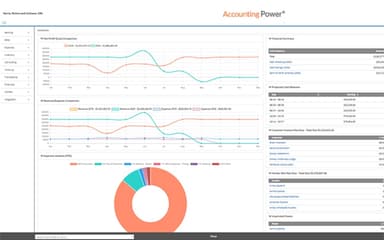
Accounting Power sync prevents double data entry
Prefunded taxes ease tight deposit deadlines
Cons
Client-facing interface feels dated and clunky
Pay types stay limited to hourly calculations
Third-party deductions are paid by paper check
Payroll Relief Reviews
Total 38 reviews
4.4
All reviews are from verified customers
Rating Distribution
5
Stars53%
4
Stars37%
3
Stars8%
2
Stars0%
1
Stars3%
Share your experience
Mid Market, 51-100 employees
“very friendly tool!”
Pros
Its extremely user-friendly. We use this program literally every single day and it has become such a simple part of our routine that I barely even think about it...I just get payroll done.
Cons
employee portal can be a problem for salaried employees, they can see their hourly rate and for some of them, that's an issue.
Rating Distribution
Ease of use
10
Value for money
10
Customer Support
10
Functionality
8
Mid Market, 51-100 employees
“good for most tasks”
Pros
This tool itself is just easy to use. And if I do run into a problem, the customer service agents are super helpful and seem well-trained on most issues.
Cons
The wait times when I call customer service can be pretty lengthy sometimes.but overall its good.
Rating Distribution
Ease of use
10
Value for money
10
Customer Support
8
Functionality
10
Mid Market, 51-100 employees
“Simple and efficient payroll tool”
Pros
I find it really easy to use... whenever I am adding new employees or actually processing the payroll.
Cons
my issue is with customer service and the fact that there's no way to inactivate a client without losing access to their payroll history. There should definitely be a way to mark them inactive but still have the data available for at least 3 years, if not longer. The IRS is so behind on things and this setup is going to cause major problems down the road.
Rating Distribution
Ease of use
7
Value for money
7
Customer Support
5
Functionality
6
Frequently Asked Questions
Does Payroll Relief have a mobile app?
Yes, Payroll Relief offers mobile apps for iOS and Android users.
How is Payroll Relief updated when legislation changes?
Payroll Relief monitors legislative updates and applies the changes directly to the system, so users don’t have to track them manually.
What level of support does Payroll Relief offer?
Payroll Relief offers support via phone, email, chat, and FAQs.
Does Payroll Relief offer an API?
Yes, Payroll Relief offers an Open API for HR Integration.
Does Payroll Relief offer help with switching from another payroll system?
Yes, Payroll Relief imports employee and prior payroll data from former providers, and AccountantsWorld offers unlimited free support and training.
Does Payroll Relief include human capital management (HCM) capabilities?
Yes, Payroll Relief offers employee onboarding and employee data management through its Employee Self Service add-on.