


WorkTime
Last Updated

Key Takeaways
Generated from the text of customer reviews
Our Verdict
Overall Rating
Based on 27 users reviews
4.5
Rating Distribution
Positive
100%
Neutral
0%
Negative
0%
Starting Price
$6.99
per employee per month
WorkTime Specifications
- Attendance and Time Tracking
- Workforce Analytics
- HR Analytics and Reporting
- Alerts/Notifications
WorkTime Features
Employee Attendance Monitoring
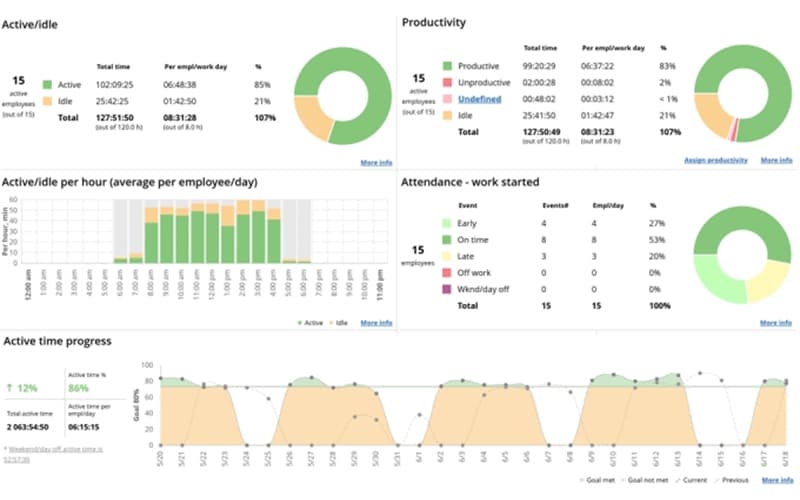
WorkTime allows managers to tie each login and logout to a specific user account and computer, which gives HR reliable attendance records. Teams can also calculate attendance percentages per employee, department, and location, and use the software's IP-based detection to separate office days from remote days. Plus, admins can set attendance targets and review progress over any chosen period.
Employer Screen Analyzer
Through the software's screen analyzer, management can sample each employee's display at random moments and record which applications are open and which are actually visible. The result is a productivity percentage in place of an image. Managers can also get a quick read on focus while private content stays out of view.
Goals Monitoring
Managers can set and monitor goals for attendance, active time, productivity, and distraction scores. The software allows them to track progress toward these targets and showcase current results through reports. Moreover, its leaderboards help highlight when employees achieve their goals, making progress visible to the team.
Productivity Monitoring
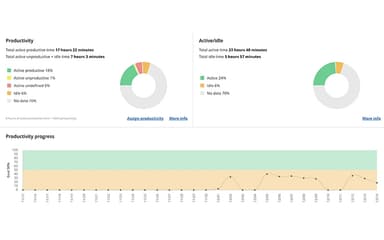
With WorkTime, businesses can classify applications and websites as productive, unproductive, or undefined. These tags then help feed productivity percentages for every employee and every day. Custom tags such as social media or client-specific software further help make reports easier to read. Additionally, managers can see which tools consume the most working time across all departments.
Overtime Tracking
This feature enables executives to look at activity before and after scheduled hours, during lunch, and on weekends. HR teams can separate genuine extra work from false overtime, such as staying late after arriving late. This capability also helps managers gain a clearer view of overloaded employees and departments, which supports fair workload decisions and more accurate payroll review.
Pros And Cons of WorkTime
Pros
Privacy-focused monitoring gives managers useful productivity visibility
Remote-work tracking reveals time trends across distributed teams
A straightforward dashboard helps managers monitor teams efficiently
Flexible tracking options let organizations tailor monitoring to workflows
Accurate time tracking supports clearer attendance and productivity insights
Non-intrusive metrics help managers track performance without micromanaging
Cons
Fewer integrations can create extra work across diverse business tools
Delayed data updates can reduce confidence in real-time productivity stats
Limited features may require extra steps to extract needed insights
WorkTime Pricing
Free | Basic | Premium | Enterprise |
|---|---|---|---|
$0 per employee per month | $6.99 per employee per month | $8.88 per employee per month | $10.99 per employee per month |
|
|
|
|
Disclaimer: The pricing details were last updated on Sep 14, 2026 from the vendor's website. Please contact us for a tailored pricing list.
WorkTime Reviews
Total 27 reviews
4.5
All reviews are from verified customers
Rating Distribution
5
Stars48%
4
Stars52%
3
Stars0%
2
Stars0%
1
Stars0%
Share your experience
Finance, 1-10 employees
Less than 6 months
“A Simple Way to Track Time and Productivity for Remote Teams”
Pros
It is an easy way to track time and keep track of a remote team's productivity. Features such as real-time monitoring and offline activity tracking give me a clear picture of how the team is working.
Cons
It would be great to see only the total hours worked but also the cost of specific projects.
Rating Distribution
Ease of use
9
Value for money
8
Customer Support
8
Functionality
7
IT, 1-10 employees
Less than 6 months
“A simple way to track time and productivity for remote teams. ”
Pros
It is an easy way to track time and keep track of a remote team's productivity. Features such as real-time monitoring and offline activity tracking give me a clear picture of how the team is working.
Cons
It would be great to see not only the total hours worked but also the cost of specific projects.
Rating Distribution
Ease of use
8
Value for money
9
Customer Support
9
Functionality
8
IT, 1-10 employees
Less than a year
“Tool Licenses”
Pros
I use the reports ti check website and application usage. This is useful reviewing the tools we pay for.
Cons
I wish there was a notification when my lunch break ends.
Rating Distribution
Ease of use
8
Value for money
7
Customer Support
10
Functionality
9
Frequently Asked Questions
Does WorkTime offer an API?
Yes, it offers an API.
What level of support does WorkTime offer?
The platform offers support via live chat, email, and phone.
What language does WorkTime support?
The WorkTime software is primarily available in English, French, German, Italian, and Portuguese.
Who are the typical users of WorkTime?
Several industries, including education, IT, banking, government, insurance, and healthcare, benefit from WorkTime.
What types of pricing plans does WorkTime offer?
The software offers these plans: Free, Basic ($6.99/employee/month), Premium ($8.99/employee/month), and Essential ($10.99/employee/month). You can request a personalized WorkTime price quote now.
What other apps does WorkTime integrate with?
The platform supports integration with Active Directory.
Does WorkTime have a mobile application?
Yes, it offers a mobile app for both Android and iOS devices.