



Last Updated
Key Takeaways
Generated from the text of customer reviews
Our Verdict
Overall Rating
Based on 203 users reviews
4.8
Rating Distribution
Positive
99%
Neutral
1%
Negative
0%
Starting Price
$90
per user per month

CASEpeer Specifications
- Case Management
- Document Management
- Client Management (CRM)
- Billing & Invoicing
CASEpeer Features
Practice Management
CASEpeer organizes contingency-fee operations through reporting, marketing, accounting, calendaring, and workflow automation tools. With this feature, users can automate recurring tasks, monitor case expenses and trust activity, synchronize calendars, and store documents. The platform also provides permission controls and centralized operational records for managing firmwide processes.
Case Management
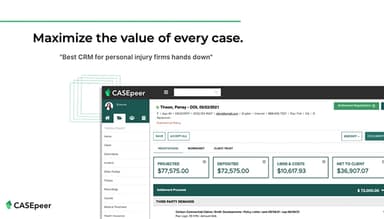
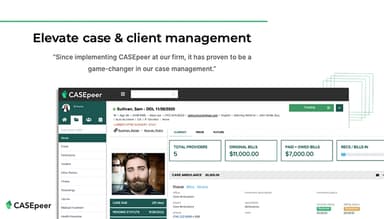
The feature centralizes case information from medical treatment through litigation and settlement. With it, legal professionals can organize files, review case timelines, and communicate with their teams. It also records treatment activity, case costs, documents, discovery requests, and settlement details.
Legal AI
The 8am IQ Writing Assistant operates within case notes, tasks, and text messages. It corrects grammar and spelling, simplifies complex sentences, and adjusts wording to professional, empathetic, or assertive tones. The tool also translates content into English, Spanish, and Arabic languages.
Client Experience
This feature provides two-way texting, intake forms, electronic signatures, a client portal, and file-sharing tools. While using it, law firms attach messages and emails to their respective cases. They also distribute forms and agreements via text, track pending signatures, and store completed documents within case records.
Reporting
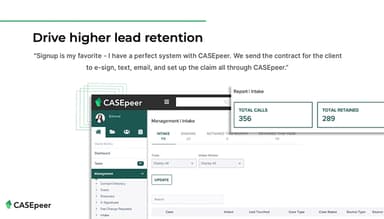
The reporting module generates reports covering case status, financial activity, referrals, marketing sources, and team productivity. Through it, legal teams can monitor conversion and retention rates, case costs, fee distribution, profitability, and task completion. They can also evaluate high value cased based on different criteria (insurance limits, wrongful death claims, and major defendants).
Pros And Cons of CASEpeer
Pros
Treatment tracking organizes medical details
Automated statute alerts reduce deadline risks
Task workflows strengthen assignment accountability
Settlement tools clarify negotiations and disbursements
Case timelines simplify activity history reviews
Cons
Calendar reminders may offer fewer configurations
Large demand packages might encounter storage constraints
Download duplication could hinder document-heavy demands
CASEpeer Pricing
Basic | Pro | Advanced |
|---|---|---|
$90 per user per month | $130 per user per month | $160 per user per month |
|
|
|
Disclaimer: The pricing details were last updated on Sep 14, 2026 from the vendor's website. Please contact us for a tailored pricing list.
CASEpeer Reviews
Total 203 reviews
4.8
All reviews are from verified customers
Rating Distribution
5
Stars81%
4
Stars17%
3
Stars1%
2
Stars0%
1
Stars0%
Share your experience
Legal Services, 11-50 employees
“Excellent value for money”
Pros
One thing that really stands out is how much value this software gives for the price. It comes with strong case management functionality without feeling too expensive especially when you look at the range of tools included. Getting started with it is fairly manageable as well. Even though there are a lot of features, the platform feels user-friendly enough that you can become comfortable using it pretty quickly with regular use. Security also feels dependable which is extremely important when dealing with sensitive client information in legal work. The document and file management features are reliable too. Uploading organizing and finding documents is simple which makes it much easier to keep cases organized and accessible. I also appreciate how well the system keeps everything centralized in one place. Overall, the feature set is robust and clearly built around legal workflows. It handles daily tasks well, from tracking cases to supporting communication. There are occasional bugs or small issues here and there but they have not been disruptive enough to seriously affect workflow. In general, it has been a dependable system for managing cases efficiently.
Cons
I'm not able to delete documents or notes when necessary. I also don't have access to reports showing my own work or the work completed by others which makes visibility and tracking more difficult.
Rating Distribution
Ease of use
8
Value for money
9
Customer Support
9
Functionality
9
Legal Services, 1-10 employees
“Works well for personal injury law firms”
Pros
Getting started with it feels pretty simple and it works really well for personal injury law firms. Having cases, documents and client information all together in one place makes it much simpler to stay organized and keep everything on track.
Cons
A noticeable downside is the limited customization which can make it harder to adapt the system to specific workflows or personal preferences. Some features can feel a bit rigid at times especially when trying to make the platform fit unique case requirements. There are also occasional integration issues with other tools which can slow things down for teams that depend on multiple systems. Although the platform is generally user-friendly some of the more advanced features could be more flexible and robust.
Rating Distribution
Ease of use
10
Value for money
10
Customer Support
9
Functionality
9
Law Practice, 11-50 employees
“easy to find info”
Pros
Using it day to day feels very user friendly. I can keep my cases updated, find important information fast and generate reports that are actually useful and meaningful.
Cons
I would change the medical treatment tab because it could be more user friendly. The provider order seems to shift after edits and it's frustrating to keep scrolling every time I add new information.
Rating Distribution
Ease of use
10
Value for money
10
Customer Support
10
Functionality
10
Frequently Asked Questions
Does CASEpeer offer an API?
Yes, CASEpeer provides API access for the Advanced plan.
What language does CASEpeer support?
CASEpeer supports the English, Spanish, and Arabic.
What other apps does CASEpeer integrate with?
CASEpeer integrates with several third-party applications, including LawPay, Mailchimp software, Microsoft 365 software, QuickBooks, Zapier software, Dropbox, and Apple Calendar.
Does CASEpeer offer a mobile app?
No, the platform does not offer a dedicated mobile application.
What types of pricing plans does CASEpeer offer?
CASEpeer pricing starts at $90 per user per month with the Basic plan. Its Pro plan is available at $130 per user per month, while the Advanced plan costs $160 per user per month. Request a custom quote for a detailed CASEpeer cost analysis.
Who are the typical users of CASEpeer?
CASEpeer caters to legal services industry and plaintiff-side practice areas, including personal injury law, motor vehicle accidents, medical malpractice, premises liability, wrongful death, mass torts, and contingency-fee legal services.
What level of support does CASEpeer offer?
CASEpeer offers support through FAQs/forums, email/help desk, phone assistance, a knowledge base, and live chat.