


Duro
Last Updated
Overview
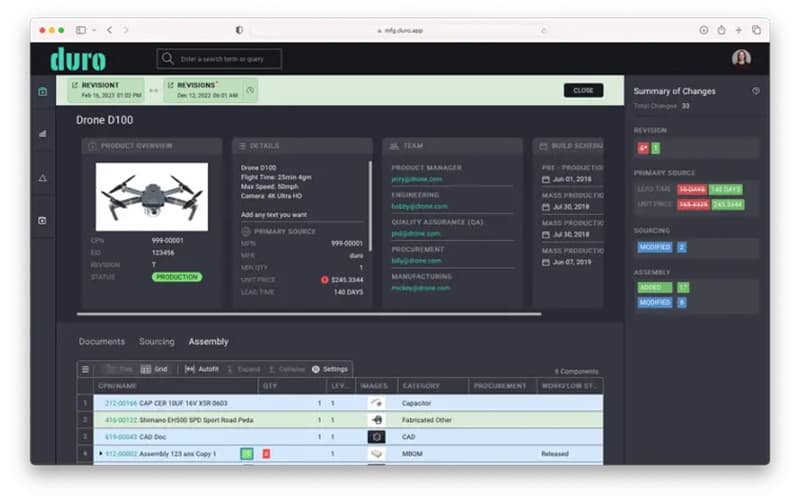
Duro helps hardware teams manage parts and changes efficiently. While the system's administration tools may need improvement, its powerful centralization of engineering data ensures accurate record-keeping and rapid product development cycles. Overall, it is an essential tool for growing manufacturers seeking improved data control and collaboration.
Duro Specifications
- Product Lifecycle Management (PLM)
- Bill Of Materials (BOM)
- Collaboration Tools
- Document Management
What Is Duro?
Duro is a modern, unified cloud solution that helps small-to-midsize manufacturers overcome the complexities of hardware development, offering a centralized source of truth for all product data. It enables teams to organize and categorize components by providing a single, consistent location for specifications, documents, and CAD models. By implementing precise change management controls, the tool allows businesses to confidently scale production while minimizing errors and preventing the use of obsolete parts.
Duro Pricing
Duro price plans are customized and are as follows:
- Team
- Business
- Enterprise
Disclaimer: The pricing is subject to change.
Duro Integrations
Duro integrates with the following tools and platforms:
- Oracle NetSuite
- Slack software
- Jira software
- Intellect QMS
- Boltline
- Tulip
- SolidWorks
Who Is Duro For?
Duro is ideal for the following sectors and industries:
- Oil and petroleum
- Energy management
- Industrial automation
- Computer infrastructure
Is Duro Right For You?
For companies managing complex hardware products, Duro offers a compelling value proposition by centralizing scattered engineering data and providing robust version control. Its key differentiator is its modern, cloud-native architecture, which is inherently more flexible and collaborative than legacy PLM (Product Lifecycle Management) systems. If your organization is struggling with cost control due to engineering errors, then this solution offers a clear path to efficiency and accuracy in development.
Still doubtful if the Duro software is the right fit? Connect with our customer support staff at (661) 384-7070 for further guidance.
Duro Features
Part Data Management
This feature establishes a single source of truth for all engineering and supply chain data. It allows teams to organize and store components, specifications, and CAD models in one place, significantly reducing search time and errors from using obsolete files
Bill Of Materials Management
The platform is the foundation for a complete digital thread, enabling the creation of accurate, multi-level Bill of Materials (BOMs). It synchronizes automatically with design changes, ensuring manufacturing and procurement always utilize the latest validated product specifications.
AI-Powered Automation
Duro has artificial intelligence built into every workflow, delivering predictive change analysis and natural language search capabilities. It provides intelligence in part selection and sourcing, enabling faster decisions and continuous learning from product history.
Supply Chain Management
The tool provides real-time data for fluctuating sourcing requirements directly within the platform. This allows engineering and procurement teams to assess material availability, lead times, and cost constraints early in development, which mitigates supply chain risk.
Pros And Cons of Duro
Pros
Provides an easy-to-use interface
Robust document support available
Caters to different types of business needs
Cons
Some plugins can be a bit challenging to handle
Rare UI loading issues
Duro Reviews
Total 10 reviews
3.5
All reviews are from verified customers
Rating Distribution
5
Stars40%
4
Stars20%
3
Stars0%
2
Stars30%
1
Stars10%
Share your experience
Small Business, 11-50 employees
“reliable plm hub”
Pros
It connects with all the software we use and has become our go to for both PLM and PDM. The online tutorials and guides are incredibly detailed and the support team is just an email away whenever we need help.
Cons
Since its still expanding as a platform, we run into the occasional bug now and then. That said, they push updates regularly so anything we spot is usually fixed by the next release.
Rating Distribution
Ease of use
8
Value for money
7
Customer Support
9
Functionality
7
Small Business, 11-50 employees
“buggy integrations”
Pros
At first glance, the interface is well designed and generally easy to move around in.
Cons
After about a year of using Duro at our small medical robotics startup, we ultimately decided it wasn't the right fit for us. Because we work in a regulated industry, we need a dependable PLM system and our workflow depends heavily on SolidWorks so strong integration was a must. Unfortunately, repeated problems with the SolidWorks plug in pushed us back to managing things manually in spreadsheets which ended up being both faster and more dependable. We spent a long time working with the Duro team, ran many tests at their request and shared extensive feedback with support in hopes of resolving bugs and improving missing features. We genuinely wanted the platform to succeed for our use case but even with some progress, it remained too buggy at the time we stopped using it. The problems we kept running into were significant. We saw data corruption, including incorrect quantities and revision numbers, lost attached documents and assembly parts remaining listed even after they had been removed. There were also both visible and silent failures, such as parts not updating properly, with notifications appearing inconsistently or not at all, plus unreliable server connections. Usability was also held back by missing features and bugs. Sorting parts was inconsistent both in the add-on and in the browser, there was no shift-click for selecting multiple parts, we couldn't release changes and add parts to an open draft ECO and previously generated drawings and STEP files couldn't be released. Large assemblies were another major issue. Version 4.0 of the add-on helped somewhat but with assemblies over 1000 parts, performance still dragged badly and more than 90% of our time was often spent just waiting for commands to finish. On top of that there were several troubling experiences with the Duro team itself. We asked for the ability to record BOM items in milliliters which was a simple but necessary request since the system only supported liters as whole integers. The response we received was: "Thank you for reaching out, we can add 'Milliliters' as one of the options to the dropdown, in exchange would you mind leaving us a 5-star review on G2 (similar to Yelp but for software)?" We also had support tickets closed before the issue was actually resolved, our whole team lost access to Duro for hours once without any communication or clear explanation and at one point a Duro developer accidentally altered our production data after confusing our environment with a demo one. For us, that was a serious quality system breach. Duro does have some positives, including a nicer UI than many other PLM tools and a support team that is responsive at times. An earlier impression of ours was also more favorable since the software initially felt quick to learn and had very few bugs during the transition period though vendor import options for mechanical parts were already limited compared with electrical parts. But after extended real world use, the platform's reliability and feature set simply did not meet the needs of our SolidWorks-based startup so we chose to move away from it and return to spreadsheets.
Rating Distribution
Ease of use
2
Value for money
2
Customer Support
1
Functionality
1
Small Business, 11-50 employees
“user friendly setup”
Pros
Using it after the installation phase was over was a piece of cake, the documentation is solid and every interaction we've had with the Duro team has been a positive one.
Cons
There's really nothing we dislike about it. It does cost more than some alternatives but it also seems quicker to set up and a bit more user friendly.
Rating Distribution
Ease of use
4
Value for money
5
Customer Support
5
Functionality
5
Frequently Asked Questions
Does Duro offer an API?
Yes, Duro does offer an API.
What level of support does Duro offer?
Users can fill out an online form to get in touch with the support team.
What types of Duro pricing plans are available?
Duro offers three customizable pricing plans: Team, Business, and Enterprise. Receive a personalized Duro cost estimate specific to your organization.
What language does Duro support?
Duro supports the English language.
What other apps does Duro integrate with?
Duro integrates with Oracle NetSuite, Slack software, Jira software, Intellect QMS, Boltline, Tulip, and the SolidWorks platform.
Who are the typical users of Duro?
Duro features support organizations in the oil and petroleum, energy management, industrial automation, and computer infrastructure industries.
Does Duro have a mobile app?
No, Duro does not offer a dedicated mobile app.