


Last Updated
Key Takeaways
Generated from the text of customer reviews
MDToolbox is an electronic prescribing (eRx) software designed for, and commonly used by clinicians, pharmacies, and front-office staff across general practice and specialty care. Users frequently highlight its ease of setup, intuitive interface, mobile prescription management, and efficient workflow for prior authorizations. However, some have also noted occasional connectivity issues.
Our Verdict
MDToolbox is a reliable choice for independent practices and small to mid-sized clinics seeking a straightforward e-prescribing system. Its pricing is viewed as fair for its functionality, especially for providers managing multiple prescriptions daily. We recommend it for healthcare teams prioritizing simplicity, compliance, and fast electronic prescription workflows.
Overall Rating
Based on 50 users reviews
4.8
Rating Distribution
Positive
98%
Neutral
2%
Negative
0%
Starting Price
$30
per month
MDToolbox Specifications
- Appointment Management/Scheduling
- e-Prescriptions
- Lab Integration
- Patient Portal
What Is MDToolbox?
MDToolbox is an award-winning e-prescribing solution designed for small to medium size medical practices across various specialties.
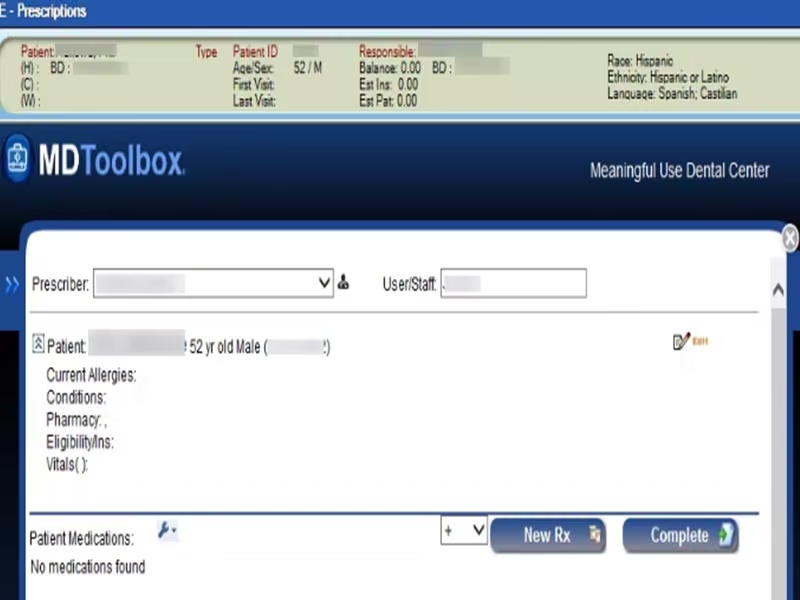
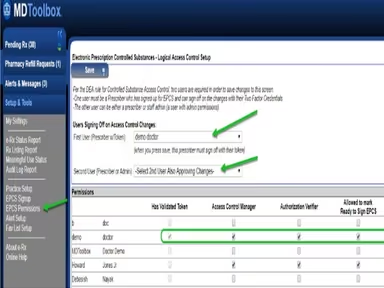
The software provides a variety of modules and solutions including electronic prescribing of controlled substances (EPCS), electronic prior authorization, direct messaging, and mobile access.
It can run as a standalone product or synced with other office software, allowing physicians to create and send electronic prescriptions, find drug information, and get prior authorization from insurance companies for their patients.
What Is MDToolbox Best Known For?
The software stands out with its MDToolbox-Rx Mobile solution, which allows busy physicians to easily prescribe both controlled and non-controlled medications electronically from any mobile device like iPhones, Androids, iPads and tablets. This empowers prescribers to ensure convenient and flexible prescription management even when on the go.
How Much Does MDToolbox Cost?
MDToolbox pricing starts at $30 with a 30-Day Free Trial. It has two pricing plans shown below:
- E-Prescribe Pro: $30/Month
- E-Prescribe Complete: $38/Month
Additional add-ons with varying prices are also available. Data Sync pricing includes free manual uploads and free one-way HL7 automated patient sync. For organizations requiring two-way patient data exchange (upload and download), a one-time sync setup fee of $700 per account applies.
Ongoing monthly pricing is $30 for two-way HL7 or CCD automated sync, or $50 per month for two-way Patient API access using a secure API key. Furthermore, the Visit Notes Add-On is available at $10/provider/month while Secure Messaging costs $10/address/month.
Many reviewers say the pricing is competitive and cost‑effective when compared with the alternatives they’ve used, especially for standalone e‑prescribing. A few users outside the main review pools describe billing confusion, particularly around annual vs month‑to‑month contracts.
Disclaimer: The pricing is subject to change.
MDToolbox Integrations
MDToolbox-Rx supports integration with a variety of software systems. However, the vendor has not disclosed more information about its specific third-party integrations.
How Does MDToolbox Work?
Follow the steps outlined below to get started with the software:
- Log in to the software using your credentials
- Search for a patient in the database or add a new patient
- Complete an electronic prescription by selecting the medication, dosage, and submit to pharmacies
- View insurance formulary information and check for prior authorization requirements
- Send and receive secure clinical messages to coordinate care with other providers
- Access the mobile version of MDToolbox to complete prescriptions on the go from any device
- Use the EPCS module to electronically prescribe controlled substances
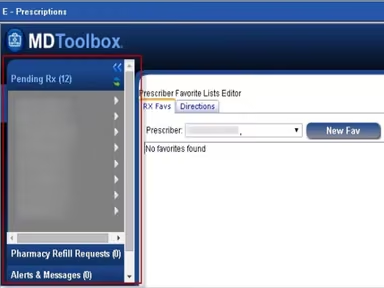
- View patient history and favorite lists to streamline the prescribing workflow
Who Is MDToolbox For?
MDToolbox is well-suited for small to medium-sized practices across a variety of healthcare specialties.
MDToolbox Use Cases
Based on our analysis of user reviews and MDToolbox’s current capabilities, we have identified key scenarios where this e-prescribing software is a strong fit for medical practices:
Practices Managing Controlled Substance Prescriptions
Clinics that regularly prescribe controlled substances benefit from MDToolbox’s DEA-certified Electronic Prescribing of Controlled Substances (EPCS) module. It enables compliant and secure prescription management, reducing paperwork while ensuring patient safety and regulatory adherence.
Providers Requiring Mobile Prescription Management
Physicians and specialists who need to manage prescriptions on the go find value in MDToolbox-Rx Mobile. The mobile compatibility with iPhones, iPads, and Android devices enables prescribers to securely send prescriptions anytime, anywhere—particularly useful for multi-site or traveling providers.
Clinics Seeking Efficient Prior Authorization Processes
MDToolbox supports healthcare providers who frequently deal with insurance prior authorizations. The software’s electronic prior authorization workflow helps streamline approvals, reducing turnaround times and administrative delays in medication delivery.
Independent Providers Prioritizing Secure Communication
Individual practitioners and small offices that emphasize confidentiality can benefit from MDToolbox’s secure direct messaging feature. It allows providers to exchange patient information safely with pharmacies and other care professionals within a HIPAA-compliant environment.
MDToolbox User Sentiments
Most Positive Sentiments | Least Positive Sentiments |
Ease of Use And Mobile Access 70% were Positive Users frequently praise the intuitive interface and ability to write prescriptions from mobile devices. One of the users said: "The ease of operation in using it helps us manage the daily workflow in our busy office.” | Pharmacy Connectivity Issues 10% were Positive Some users report pharmacies not receiving scripts or delays in processing prescriptions. A user was noted saying: "Lots of trouble with pharmacies claiming they do not receive scripts.” |
Integrated Workflow Efficiency 60% were Positive Reviewers value that prescribing, refills, and prior authorizations are handled in one system without jumping between tools. | Slowness & Occasional Lag 15% were Positive Some users note occasional slowdowns when navigating between patients or steps, particularly on mobile. |
Reliable Customer Support 65% were Positive Users often mention responsive support when issues arise, improving problem resolution. | Limited Customization 10% were Positive Some clinicians request more flexibility in templates or deeper EHR integrations. A user expressed their demand by saying: “I wish there were more options to customize templates for our specialty.” |
Is MDToolbox Right For You?
If you're in search of an affordable yet comprehensive e-prescribing solution tailored for small to medium-sized practices, MDToolbox could be the right choice. It provides a suite of modules and mobile access, streamlining day-to-day prescribing workflows.
As an ONC-certified 2015 edition platform, MDToolbox merges cutting-edge technology with comprehensive features to facilitate secure and efficient electronic prescribing. Its award-winning solutions and dedicated U.S.-based support services demonstrate its commitment to user experience and satisfaction.
Still not sure if MDToolbox software is the right choice for you? Contact us at (661) 384-7070, and we will help you make an informed decision.
MDToolbox Features
Electronic Prescribing
MDTools-Rx is a certified e-prescribing solution that connects physicians with over 70,000 pharmacies nationwide, allowing them to send and receive prescription orders and refills easily. The software provides features such as access to drug reference information, decision support tools, patient education resources, and real-time checking for medication interactions and formulary compliance.
Electronic Prescribing Of Controlled Substances
The software is fully certified to securely send prescriptions for Schedule II-V controlled substances electronically. It has undergone audits by a Qualified DEA Auditor and is also certified by Surescripts® for the electronic transmission of controlled substances. Healthcare providers can utilize a standardized workflow for all prescribing tasks, improving security and overall patient safety.
Electronic Prior Authorization
MDToolbox software offers a user-friendly electronic prior authorization module that enables healthcare providers to quickly obtain prior authorization from insurance companies for their patients. The module alerts prescribers when prior authorization is required and streamlines the process with electronic smart forms. These forms are pre-filled and only present pertinent questions, ensuring a quick and efficient approval process.
Direct Messaging
The vendor’s email messaging module provides healthcare providers with a secure platform to exchange messages and health information. This feature ensures the highest levels of encryption and security, facilitating confidential and protected communication among healthcare professionals. Overall, it enhances collaboration and information sharing within a secure digital environment.
Pros And Cons of MDToolbox
Pros
An intuitive interface for seamless navigation
Offers EPCS functionality for secure controlled substance prescriptions
Efficient electronic prior authorization process for insurance approval
Mobile access supports prescribing on-the-go for flexibility.
Responsive customer support
Cons
Compatibility issues with certain EHR systems may arise
Extra sign-in/authentication steps can interrupt speed, especially for secure actions
MDToolbox Pricing
E-Prescribe Pro
$30 per month


View Price
What's Included
Everything you need for standalone e-Prescribing of noncontrolled substances
E-Prescribe Non-Controlled Prescriptions
Electronic Refills + e-Cancels
Electronic Prior Approvals
Meaningful Use Stage 3 Certified
Web-Based - Prescribe Whenever and Wherever You Need
U.S. Based Support: Phone, Email, & Chat
Built-In Time Saving Tools: Favorite Lists, SIG Builder,Dosing Calculator and More
View Patient Formularies and Prescription Pricing
State PMP Integrations
E-Prescribe Complete
$38per month
View Price
What's Included
E-Prescribe Pro Features, plus:
e-Prescribing of Controlled Substances (EPCS)
Disclaimer: The pricing details were last updated on Jul 06, 2026 from the vendor's website. Please contact us for a tailored pricing list.
MDToolbox Reviews
Total 50 reviews
4.8
All reviews are from verified customers
Rating Distribution
5
Stars80%
4
Stars18%
3
Stars0%
2
Stars2%
1
Stars0%
Share your experience
Jeffrey
Healthcare, 1-10 employees
Less than a year
“Good for nothing”
Pros
I appreciated its usability; however, some days it takes hours to order a single medication, like today.
Cons
On days when I can't log in, and 'support' just says they're working on it. Then the same thing happens a week later. Extremely slow.
Rating Distribution
Ease of use
2
Value for money
2
Customer Support
2
Functionality
5
Cece
Healthcare, 11-50 employees
More than a year
“Great value for money”
Pros
Its user-friendliness and reliability make it our preferred software for handling prescriptions.
Cons
Absolutely nothing. This product is excellent. We're thrilled with it!
Rating Distribution
Ease of use
10
Value for money
10
Customer Support
10
Functionality
10
Justin
Healthcare, 101-500 employees
More than a year
“Innovative!”
Pros
Setting up, maintaining, and training providers on it is super easy for us and it effectively performs its intended tasks.
Cons
NO CONS. I really like the ability to integrate and customize is great.
Rating Distribution
Ease of use
6
Value for money
8
Customer Support
5
Functionality
5
Frequently Asked Questions
Who are the typical customers of MDToolbox?
The typical customers of MDToolbox include small and mid-sized healthcare facilities.
What are the main features of MDToolbox?
The main features of MDToolbox include electronic prescribing, EPCS, electronic prior authorization, direct messaging, real-time prescription benefits, and a comprehensive library to check medicines by name, generic status, and brand.
Is MDToolbox cloud-based?
Yes, MDToolbox e-prescribing software is cloud-based.
How much does MDToolbox cost?
MDToolbox offers two standard pricing plans, starting at $30/month. The vendor also offers a free version. Request a custom pricing quote for your practice today!
What level of support does MDToolbox offer?
MD Toolbox offers phone and email support options.
How does MDToolbox help health systems?
MDToolbox-Rx offers tools to help health systems meet Merit-based Incentive Payment System (MIPS) and Medicare Access and CHIP Reauthorization Act (MACRA) requirements. It has a good overall rating and streamlines day-to-day prescribing workflows for providers.
Which languages does MDToolbox support?
MDToolbox supports English language.
Does MDToolbox have a mobile app?
Yes, MDToolbox-Rx Mobile is available for Android and iOS devices.Yes, MDToolbox-Rx Mobile is available for Android and iOS devices.
What other apps does MDToolbox integrate with?
MDToolbox supports integrations with various EHR and practice management systems, though specific integrations are not publicly listed.
Does MDToolbox offer an API?
Yes, MDToolbox provides API integration options for healthcare software systems.