



Last Updated
Overview
A1 Tracker streamlines risk management with real-time reporting, event calendars, and cost tracking. While the initial setup and implementation process can be time-consuming, its intuitive interface and feature-rich tools make it an effective software for proactive risk mitigation and operational efficiency.
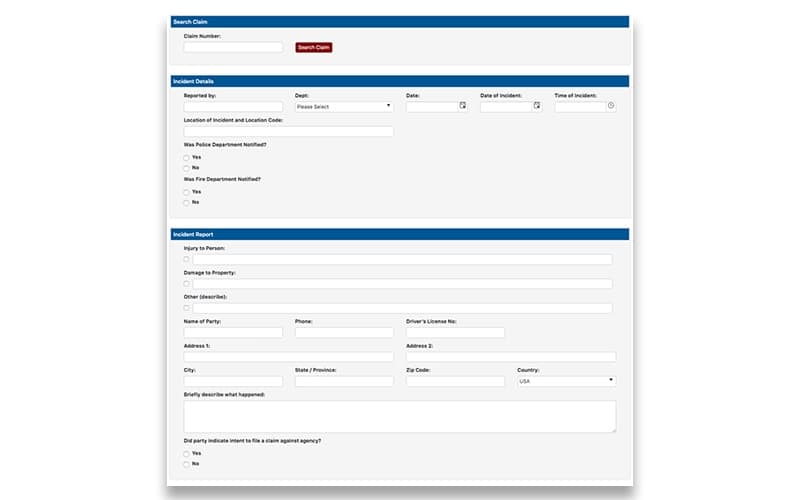
A1 Tracker: Risk Management Software Specifications
- Time Tracking
- Task Management
- Reporting
- Budget Management
A1 Tracker: Risk Management Software Features
Live Reporting
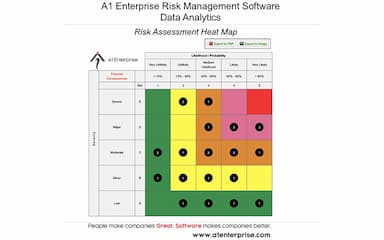
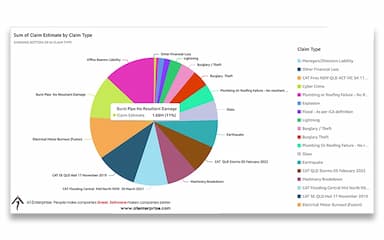
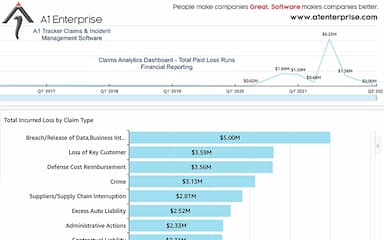
A1 Tracker offers real-time, live reporting features, including heat zones, GPS and map reports, and dashboard reports for quick access to risk data throughout the organizations and regions. Users can also view timeline graphs to analyze the sequence of events and their lifecycle.
Event Calendars
The event calendar enables risk managers to schedule risk audits, key dates, risk durations, peak risk dates, and more. Managers and business owners can trigger reminder notifications based on the key dates mentioned on the event calendar.
Cost Tracking
A1 Tracker enables managers and business owners to track the cost of risk, including the anticipated cost of certain events and threat assessment. It also helps calculate reserved costs for allocated funds in case an event actually occurs.
Mobile Access
A1 Tracker is a mobile-friendly risk management software enabling users to send text and email notifications for real-time reporting. It also allows managers to assign tasks and send workflow triggers and real-time alerts across the team.
Risk Management Templates
A1 Tracker offers risk management templates, including waivers, disclaimers, insurance policy contracts, assignments, and checklists. Managers and business owners can also route these documents for electronic signatures, and receiving parties can resubmit the electronically signed documents back to the A1 tracker portal.
Data Migration
A1 Tracker enables users to migrate data from their legacy systems (including excel, CSC, and txt documents) and integrate it with ERP or CRM tools. The deployment team from the A1 enterprise, the parent company of the software, migrates all the data during software implementation. Users can also request to schedule recurring data imports to keep data consistent.
Live Tracking & Security
A1 Tracker has a secured portal to track user activity and changes made by users on the system. The SSL servers and data encryption offered by A1 enterprise guarantee the privacy and security of confidential data of organizations.
Pros And Cons of A1 Tracker: Risk Management Software
Pros
Offers modular and customizable software solutions to suit various requirements
Configurable dashboards and reports keep stakeholders informed
Integrations enable data sharing with other systems for centralized information management
Provides predefined templates to simplify common risk management tasks
Responsive customer support
Cons
Initial setup and implementation process can be time-consuming
Potential learning curve for new users
Customization options may be limited for a few advanced features
A1 Tracker: Risk Management Software Reviews
Total 41 reviews
4.8
All reviews are from verified customers
Rating Distribution
5
Stars80%
4
Stars17%
3
Stars2%
2
Stars0%
1
Stars0%
Share your experience
Not specified, 500+ employees
Less than a year
“Simple and helpful”
Pros
The ease of use made learning and utilizing it straightforward!
Cons
Finding my way around the programs settings could be a bit more user-friendly.
Rating Distribution
Ease of use
8
Value for money
10
Customer Support
10
Functionality
8
Construction, 101-500 employees
More than a year
“Customization Without Compromise”
Pros
A1 stands out with its sandbox design and extensive customization options. Despite not being their primary demographic they worked with us to fulfill all our business needs.
Cons
Theres room for improvement in the Data ImportExport feature. Our main challenge lies in surpassing a data threshold and needing to manually purge data rather than having an integrated system for archiving after a certain timeframe.
Rating Distribution
Ease of use
10
Value for money
8
Customer Support
10
Functionality
8
Insurance, 51-100 employees
More than a year
“A1 - Partners in Success”
Pros
A1 truly listens to my needs and strives to meet them. Their team has provided excellent service for almost three years and I cannot praise them highly enough.
Cons
I cant identify any drawbacks. If youre considering a software partner I highly recommend A1; you wont be disappointed.
Rating Distribution
Ease of use
10
Value for money
10
Customer Support
10
Functionality
10
Frequently Asked Questions
What level of support does A1 Tracker provide?
A1 Tracker offers phone and email support options.
What type of pricing plans does A1 Tracker offer?
A1 Tracker offers customizable and flexible pricing plans. Contact us for a personalized pricing quote tailored to your specific requirements.
Does A1 Tracker offer an API?
No, A1 Tracker does not offer an API.
What languages does A1 Tracker support?
A1 Tracker supports the English language. However, the vendor may also support additional languages.
Who are the typical users of A1 Tracker?
The typical users of A1 Tracker include a wide range of organizations across various industries. Common users would be those in roles responsible for managing risks, incidents, claims, contracts, assets, compliance, and safety.