


RoboHead
Last Updated
Overview
RoboHead provides an intuitive cloud-based solution for managing marketing and creative projects. Resolving issues of resource management, collaboration, and visibility, it simplifies project initiation, task management, and dashboard customization for efficient project delivery. Explore RoboHead features to streamline your organizational operations.
RoboHead Specifications
- Time Tracking
- Task Management
- Reporting
- Budget Management
RoboHead Features
Project Management
The software allows teams to manage their projects from initiation to completion. It helps teams streamline their workflow, improve productivity, and ensure that projects are completed on time and within budget. RoboHead offers a centralized location for all project-related information. It provides a centralized location for all project-related information, making it easy to track how many upcoming projects are headed your way.
Team Management
This feature allows managers to allocate resources effectively, balance workloads, and ensure no team member is overworked. It assists in maintaining a healthy work environment and promotes team efficiency. Additionally, by offering a transparent view of each team member's assignments and deadlines, RoboHead allows managers to pinpoint constraints and reallocate tasks as required, acting as a reliable traffic manager. Furthermore, it promotes transparency and accountability within the team.
Workflow Automation
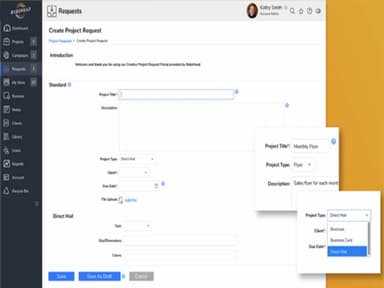
RoboHead offers customizable project request forms and workload prioritization features. These tools enable teams to automate their workflow, reducing manual effort and increasing efficiency. By automating routine tasks, teams can focus more on the creative and strategic aspects of their projects. Moreover, the automation tools are flexible and can be tailored to meet your teams' unique requirements.
Reporting
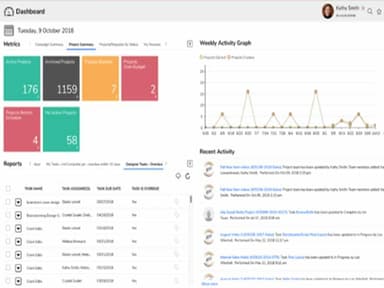
The platform provides customizable dashboards for reporting. Teams can keep track of their progress, make data-driven decisions, and demonstrate their achievements visually appealingly. Furthermore, you can also share reports with stakeholders, keeping everyone informed about the project’s status. The software supports data export, making incorporating RoboHead data into external reports and presentations easy.
Real-Time Collaboration
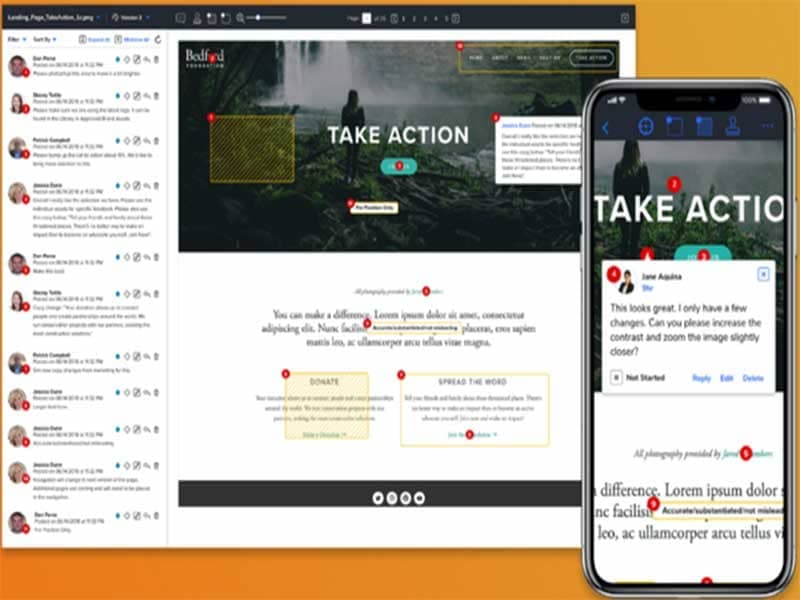
RoboHead allows you to collaborate, provide feedback and share work with others in real time. This functionality enhances team communication and ensures everyone is on the same page. It allows for immediate feedback, which can significantly improve the quality of work and reduce the time spent on revisions. Furthermore, RoboHead offers a collaborative environment where ideas can be shared and discussed freely, leading to more innovative and effective solutions.
Pros And Cons of RoboHead
Pros
Offers end-to-end project management capabilities
Facilitates real-time collaboration among team members
Allows users to create personalized dashboards for reporting
Reduces delays by collecting all the information during project initiation
Provides 24/7 customer support for immediate assistance
Cons
Some features may be overwhelming for smaller teams
Customizing reports may require advanced skills, according to some reviews
Integration dependencies
RoboHead Reviews
Total 46 reviews
4.7
All reviews are from verified customers
Rating Distribution
5
Stars72%
4
Stars26%
3
Stars2%
2
Stars0%
1
Stars0%
Share your experience
Entertainment, 500+ employees
More than a year
“Great Creative Management Tool”
Pros
I love how easy it is to submit tickets and add notes to them. It keeps me organized and helps me stay on top of project management with our creative team.
Cons
Occasionally, there are issues with file uploads or opening attachments within tickets.
Rating Distribution
Ease of use
8
Value for money
10
Customer Support
10
Functionality
8
Small Business, 500+ employees
Less than a year
“Easy to track!”
Pros
Having the ability to view my projects and track deadlines is extremely helpful. It also allows me to manage my freelancers' projects efficiently.
Cons
The ease of changing out someones name or using a dropdown function is great but sometimes cause trouble.
Rating Distribution
Ease of use
10
Value for money
10
Customer Support
10
Functionality
10
Healthcare, 500+ employees
Less than a year
“Highly recommend”
Pros
RoboHead has played a key role in our departments success and my own work. I love how we can customize it to fit our team's needs. I can't imagine working without it. It's an indispensable tool for our team's efficiency.
Cons
Occasionally, the page loading speed can be slow. Other than that I don't have many complaints.
Rating Distribution
Ease of use
8
Value for money
8
Customer Support
8
Functionality
10
Frequently Asked Questions
Does RoboHead offer an API?
Yes, RoboHead has an API available for its clients.
What languages does RoboHead support?
RoboHead supports the English language.
What other apps does RoboHead integrate with?
RoboHead integrates with Gmail, Microsoft Outlook, Apple Calendar, and Adobe Creative Cloud. It can connect with more via webhooks and Zapier.
Does RoboHead support mobile devices?
Yes, RoboHead supports Android and iOS devices. It can also work with Mac OS.
What types of pricing plans does RoboHead offer?
RoboHead software pricing is tailored to match your organization's unique needs.
Who are the typical users of RoboHead?
RoboHead is used by information technology, e-commerce, food and beverages, insurance, and automotive businesses.
What level of support does RoboHead offer?
RoboHead provides support via multiple channels: a help desk, email, FAQs, a forum, a knowledge base, chat, 24/7 customer representative, and phone.