



Last Updated
Overview
Beebole software enables efficient tracking of team time and budget. This flexible and intuitive tool assists in project planning, resource distribution, and performance measurement. Ideal for businesses of all sizes, Beebole simplifies time and budget management.


Beebole Specifications
- Time Tracking
- Task Management
- Reporting
- Budget Management
What Is Beebole?
Overview
Beebole is a cloud-based time tracking and workforce management platform that helps organizations track employee time, manage projects, plan resources, and monitor project costs. The software includes timesheets, project financial management, resource planning, absence tracking, task management, reporting, and approval workflows.
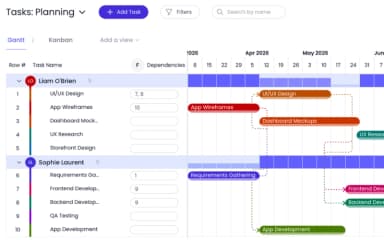
Managers can assign work through the planning module, allowing planned hours to appear in employee timesheets. Employees can then confirm or update actual hours worked. The platform also supports project budgeting, cost tracking, and reporting to help teams monitor project performance.
What Is Beebole Best For?
Beebole is commonly used for project time tracking and project cost management. It enables organizations to track employee hours, compare planned and actual work, manage project budgets, and monitor project profitability through reporting and analytics tools.
Beebole Pricing
Beebole offers three plans:
- Free - $0 (up to 5 users)
- Essential - $10/user/month
- Advanced - $20/user/month
Disclaimer: The pricing is subject to change.
Beebole Integrations
The following third-party integrations are available with the Beebole software:
- Asana
- QuickBooks
- BambooHR
- Google Workspace
- Microsoft 365
- Google Sheets
- Microsoft Excel
How Does Beebole Work?
Here is how to start with the software:
- Log in to the software using the credentials
- Set up departments, teams, projects, and tasks
- Invite employees — they receive timesheet access immediately
- Configure approval chains, billing rates, cost rates, and work schedules
- Assign planned work through the resource planning module; entries appear pre-populated in each employee's timesheet
- Allow employees to record or update time entries through timesheets or timers
- Review planned versus actual work hours, budgets, and project metrics.
- Generate reports, schedule email delivery, and export to Excel or Google Sheets for deeper analysis
Who Is Beebole For?
Beebole can be used by organizations of various sizes across industries such as:
- Professional services
- Technology
- Marketing
- Engineering
- Consulting
- Nonprofit organizations
Common users include:
- Project managers
- Operations managers
- Finance teams
- HR teams
- Team leads
Is Beebole Right For You?
Organizations seeking a platform for time tracking, resource planning, project cost monitoring, and reporting may consider Beebole. The software includes configurable approval workflows, permissions management, project budgeting tools, and reporting capabilities that support workforce and project management processes.
Still unsure if the Beebole software benefits are not right for you? Contact our customer support team, who will help you make the best decision.
Beebole Features
Resource Planning Connected to Timesheets
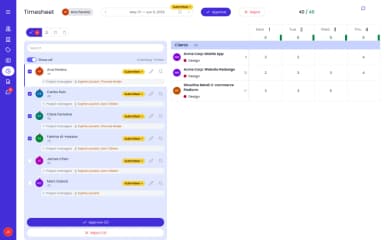
Managers assign work in the planning view and those entries appear pre-populated in each employee's timesheet. Employees confirm or adjust actual hours. Deviations between planned and actual are visible in real time — eliminating the disconnect between what was planned and what was tracked.
Project Time Tracking
Track time against unlimited projects, sub-projects, tasks, and clients via weekly timesheet or start/stop timer. Log daily, weekly, or monthly. Pin frequent entries, copy previous weeks, or import from calendar for faster submissions.
Project Financial Management
Set billing and cost rates at the person, project, task, or tag level — with effective dates for historical accuracy when rates change mid-contract. Track expenses against project budgets. Monitor margins and profitability in real time, not just at month-end. Multi-currency support from the Essential plan.
Multi-Stage Approval Workflows
Define the exact approval sequence — manager, project lead, finance — with quorum settings. Bulk approve, lock, or reject timesheets and time-off requests in one action. Every approval is logged in a full audit trail that meets DCAA requirements across all plan levels.
Absence and Time-Off Management
Manage all time-off types with configurable accrual policies, carry-forward rules, and per-person quotas. Employees submit requests through the same approval workflow as timesheets. Holiday calendars are configurable at the organization, team, or individual level.
Custom Reports with Scheduled Delivery
Build configurable reports across time, costs, billing, expenses, and tasks. Apply filters and groupings, save templates, and schedule automatic email delivery to colleagues and clients. Export to Excel or Google Sheets for further analysis.
Custom Roles with 24+ Permission Scopes
Assign granular roles with view/manage splits and field-level visibility. Each role sees only what it needs — employees see their own timesheets, project leads see their team, finance sees cost and margin data. Configurable without IT involvement.
Native Integrations and Open API
Native integrations with Asana, QuickBooks, BambooHR, and more. SSO via Google Workspace and Microsoft 365 from the Essential plan. An open API is included at all plan levels at no extra cost for custom integrations with payroll, ERP, and billing systems.
GDPR- and DCAA-Compliant Audit Trail
Every create, update, and delete action is logged with who made the change and when. The audit trail meets DCAA requirements and is available across all plan levels. Data is encrypted, and users can export or delete their data in line with GDPR requirements.
Configurable Tags, Fields, and Work Schedules
Hierarchical tags mirror your org structure with cascading rates and approval chains. Custom fields on persons, projects, tasks, and time records accommodate any reporting dimension. Work schedules are configurable at the org, team, or individual level with multiple schedule types.
Beebole Key Sentiments
Most Positive Sentiments
User Interface Design

97.37% Positive

2.63% Neutral

0% Negative
Time Tracking
70.89% Positive
20.25% Neutral
8.86% Negative
Least Positive Sentiments
Mobile Application
4.76% Positive
47.62% Neutral
47.62% Negative
User Experience
0% Positive
55% Neutral
45% Negative
Most Positive Sentiments
Least Positive Sentiments
User Interface Design
97.37% Positive
2.63% Neutral
0% Negative
Mobile Application
4.76% Positive
47.62% Neutral
47.62% Negative
Time Tracking
70.89% Positive
20.25% Neutral
8.86% Negative
User Experience
0% Positive
55% Neutral
45% Negative
Pros And Cons of Beebole
Pros
Project cost and margin tracking, not just time tracking
Resource planning built directly into the timesheet
Configurable, multi-dimensional reports — 11 chart types, saved templates, and folders
Highly configurable: custom roles, tags, custom fields, multi-stage approvals
Free plan for up to 5 users, plus a 30-day free trial, no credit card required
Open API with native integrations (Asana, BambooHR, QuickBooks, Google Sheets, Excel)
In-app support with 1:1 onboarding on paid plans
Cons
No native invoicing or payment collection
Free plan capped at 5 users
Expense tracking is scoped to project budgets, not employee reimbursement
Beebole Pricing
Free | Essential | Advanced |
|---|---|---|
$0 | $10/user/month | $20/user/month |
|
|
|
Disclaimer: The pricing details were last updated on Sep 25, 2026 from the vendor's website. Please contact us for a tailored pricing list.
Beebole Reviews
Total 110 reviews
4.6
All reviews are from verified customers
Rating Distribution
5
Stars65%
4
Stars33%
3
Stars2%
2
Stars0%
1
Stars0%
Share your experience
Healthcare, 11-50 employees
More than a year
“The Executive Time Tracking Solution”
Pros
Beebole Project ensures I am productive and reliable every time.
Cons
In Beebole Project, we have got solid time reporting features, encountering zero functional hurdles.
Rating Distribution
Ease of use
10
Value for money
10
Customer Support
10
Functionality
10
Nonprofits, 11-50 employees
More than a year
“Very good overall”
Pros
Beebole is simple, flexible, and has lots of features, with excellent support.
Cons
The configuration screen allows for the duplication of widgets.
Rating Distribution
Ease of use
9
Value for money
10
Customer Support
10
Functionality
10
Accounting, 51-100 employees
More than a year
“Good TM online App”
Pros
It is easy for everyone to use, and the online data storage is very practical. Project management is well thought out.
Cons
There is a shortage of functionalities and it lacks integration with other apps considering the price paid.
Rating Distribution
Ease of use
10
Value for money
8
Customer Support
7
Functionality
8
Frequently Asked Questions
What language does Beebole support?
Beebole is available in 10 languages: English, French, Spanish, German, Dutch, Italian, Portuguese, Polish, Czech, and Hungarian.
How can I track employee time with Beebole?
Employees log time via a weekly timesheet or a real-time start/stop timer. When managers use the resource planning view to assign work, those entries appear pre-populated in each employee's timesheet — reducing the effort of daily time logging for teams with predictable schedules.
Can Beebole handle multiple currencies?
Yes. Multi-currency support is available from the Essential plan, making Beebole suitable for teams billing clients in different currencies or operating across multiple countries.
Does Beebole offer an API?
Yes. Beebole includes an open GraphQL API at all plan levels at no extra cost. It supports custom integrations with payroll, ERP, billing, and other business systems. Documentation is available at beebole.com.
What other apps does Beebole integrate with?
Beebole integrates natively with Asana, Jira, Linear, QuickBooks, and BambooHR. SSO is available via Google Workspace and Microsoft 365. It also connects with Google Sheets and Microsoft Excel. An open GraphQL API supports custom integrations with any system.
What level of support does Beebole offer?
The Free plan includes forum and community resources. Essential and Advanced plans include in-app support and 1:1 onboarding sessions. Custom consulting is available on request for all paid plans.
Is Beebole suitable for a small consulting firm?
Yes. The Free plan supports up to 5 users at no cost. For small consulting firms tracking billable hours by client and project, setting billing rates, monitoring project profitability, and generating client-ready reports, Beebole covers all of this without enterprise-level complexity.
Does Beebole support mobile devices?
Yes. Beebole is a web-based platform installable as a PWA (Progressive Web App) on any device — desktop, tablet, or mobile — without a native app download from an app store.
Who are the typical users of Beebole?
SMBs and mid-market teams across professional services, technology, marketing, engineering, consulting, and non-profit sectors. Primary users include project managers, finance controllers, operations managers, HR managers, and team leads.
What types of pricing plans does Beebole Project Time Tracking offer?
The software offers three pricing plans, including Free, Essential at $10/user/month, and the Advanced plan at $20/user/month. You can also get a personalized Beebole cost quote as per your needs.