



Last Updated
Key Takeaways
Generated from the text of customer reviews
Factor A/E is project management software for architecture and engineering (A&E) firms. It's most relevant to teams managing project resources, timelines, expenses, and firm performance. Users commonly praise its forecasting and time management tools, though some find navigation confusing since the same data can be reached in multiple ways. In October 2026, Factor and Monograph joined forces; Factor remains supported but is no longer onboarding new firms.
Our Verdict
Factor A/E remains a relevant project management option for existing A&E firms that value industry-specific workflows and established project management capabilities. Reviewers generally view its monthly pricing favorably, considering the features offered. Existing customers can continue using the platform with ongoing support and are recommended to evaluate whether and when a transition to Monograph makes sense.
Overall Rating
Based on 53 users reviews
4.8
Rating Distribution
Positive
98%
Neutral
2%
Negative
0%
Starting Price
$36
per user per month
Factor A/E Specifications
- Time Tracking
- Task Management
- Reporting
- Budget Management
What Is Factor A/E?
Factor AE is project management software built for architecture and engineering firms to manage projects, resources, time, billing, and firm performance. Its budget setup helps teams align project scope, hours, and billing around a shared financial plan. At the same time, resource scheduling shows availability and projected workload for better staff allocation.
Project timelines organize phases, tasks, and milestones, helping managers identify overlaps and keep delivery aligned with budgets. Time and expense tracking, task management, invoicing, and reporting further support day-to-day project administration. Following its acquisition by Total Synergy in 2025, Factor joined forces with Monograph in 2026.
What Is Factor A/E Best For?
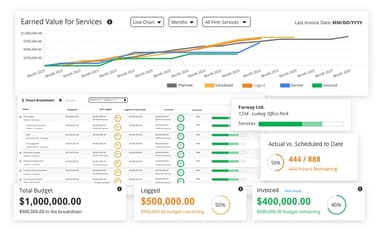
Factor AE is well-regarded for ‘The Pulse’, its central command center for firm-wide project visibility. The dashboard brings project health, profitability, budgets, timelines, utilization, workload, and financial performance into one live view. Teams can compare projects, spot risks, and adjust dates or resources while seeing the impact play out in real time. For A/E firms, this means replacing fragmented tracking with faster, data-informed decisions across projects and people.
How Much Does Factor A/E Cost?
Factor A/E price starts at $36/user/month for the Monthly subscription option. It also offers an annual option at $30/user/month (5+ users). All core features are included in this cost: this includes A&E-specific project setup, project management, time entry, resource scheduling, invoicing, KPI dashboards for A&E, and more.
The vendor claims no hidden fees. There is only a one-time fee for setup, data migration, and training, depending on your firm’s needs. A free trial is also available for users to explore the platform before making a commitment.
Users generally view Factor AE’s pricing favorably, particularly for smaller A/E firms. They describe the cost as fitting their budgets and offering better value than larger alternatives.
Disclaimer: The pricing is subject to change.
Factor A/E Integrations
The platform integrates with several third-party applications and systems, such as QuickBooks, to facilitate smooth data flow.
How Does Factor A/E Work?
Here’s a step-by-step guide on how users can navigate the software:
- Log in to Factor AE and access the main workspace
- Open the Projects menu and add or select a project
- Set up the project budget, phases, milestones, and planned dates
- Schedule resources and assign team members to project work
- Create tasks, assign owners and due dates, and track completion
- Record time and expenses against the relevant projects and phases
- Review project progress, budgets, workload, and profitability in The Pulse
- Manage invoicing and payments, then use dashboards and revenue forecasts to monitor firm performance
Who Is Factor A/E For?
Factor A/E is designed specifically for the architecture and engineering industries, and serves:
- Firm owners
- Project managers
- Office managers
Factor A/E Use Cases
Based on our analysis of Factor A/E software’s current capabilities and user feedback, we have identified the following scenarios where the software works well:
Architecture Firms Struggling To Keep Projects Within Budget And Schedule
Architecture and engineering firms can lose profitability when project hours, schedules, and budgets get managed separately. Factor A/E connects project budgets with time, scheduling, and billing, while project timelines keep phases, milestones, and percent complete visible together. This helps project managers spot when work is drifting from projected timeframes before overruns become harder to correct. Firms still need consistent time and project data for these budget views to stay useful.
Engineering Organizations Spending Excessive Time Preparing Invoices
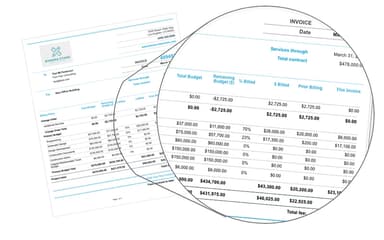
Manual billing can eat up substantial administrative time when firms need to reconcile hours, expenses, project progress, and different billing arrangements. Factor AE supports fixed-fee, hourly, and phased invoicing, with approved time and expense entries flowing directly into invoices. This can potentially translate into saving hours per month, letting teams focus on more productive tasks. Firms with highly unusual billing processes, though, may still need invoice customization during implementation.
A&E Companies Needing A Clearer View Of Firm-Wide Performance
When project information is scattered across individual teams, leadership can struggle to see which jobs need attention and how current work affects profitability. Factor A/E's ‘Pulse’ provides a portfolio-level view of hours, budgets, and forecasts, while real-time dashboards bring project health, workload, and financial metrics together. This makes the software particularly relevant for owners and managers overseeing multiple active projects.
Firms Coordinating Growth With Future Workload And Revenue
Growing A&E firms can struggle to match incoming work with available staff, projected revenue, and existing commitments. Factor A/E combines opportunity tracking with resource scheduling and revenue forecasting, letting firms weigh potential projects alongside scheduled work, budgets, capacity, and projected starts. This gives decisionmakers a clearer basis for planning hiring and workloads before opportunities become signed projects. Still, forecasts remain only as reliable as the pipeline, budget, and scheduling assumptions behind them.
Is Factor A/E Right For You?
Architecture and engineering firms can struggle to keep project budgets, staff time, billing, and profitability aligned across multiple jobs.
Factor brings these workflows together with project planning, resource scheduling, time and expense tracking, invoicing, and firm-wide visibility. Its A&E-specific design makes it particularly relevant for firms that want project management built around industry workflows, rather than a general-purpose platform.
In terms of security, data gets encrypted using SSL/TLS during transmission, and the company says it takes extensive measures to secure data at rest as well.
That said, Factor is no longer onboarding new firms following its October 2026 combination with Monograph. New buyers can explore Monograph instead, while existing Factor customers can continue receiving support.
Still doubtful if the software is the right fit for you? Connect with us at (661) 384-7070 for further guidance.
Factor A/E Features
Connected Project Budgeting
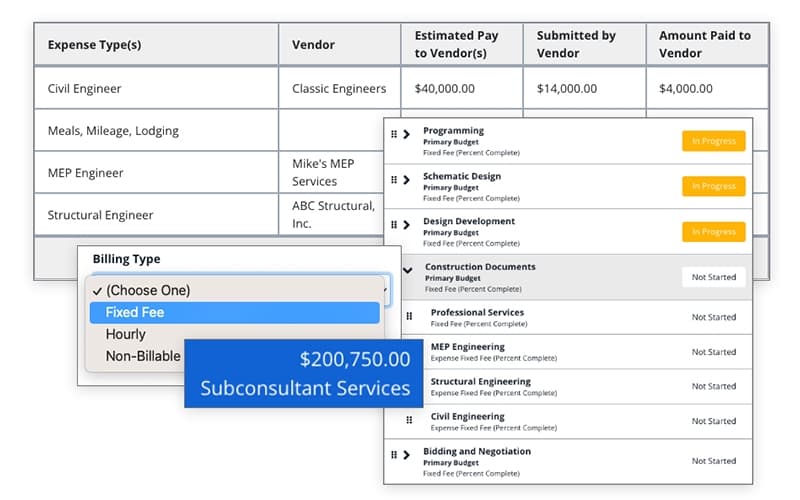
Project budgets can be built with fixed-fee and hourly billing, phases, fees, and subconsultants assigned along the way, with those budgets guiding time logging, scheduling, and forecasting. Templates for rates and budget breakdowns, along with imported past actuals, speed up setup considerably. Teams end up with a shared view of remaining budget, staffing allocation, and project runway, catching issues earlier for course correction.
Real-Time Resource Scheduling
The platform assigns hours by person, project, or phase, with those assignments flowing directly to timesheets and dashboards. Teams can monitor utilization, compare scheduled hours with actuals, and view projected spend against revenue targets in real time. Scheduling shortcuts also support bulk planning and quick reassignment when plans shift. Managers, as a result, spot workload imbalances and understand the financial impact of staffing changes before project costs start to drift.
Integrated Payment Processing
Clients can pay invoices through embedded payment links using ACH, credit cards, or both, via ‘FactorPay.’ Teams can manage convenience fees, monitor accounts receivable, connect deposits to invoice records, and sync invoice and payment statuses with QuickBooks Online in real time. This connected workflow helps cut down on manual payment tracking, giving firms a current view of outstanding balances and cash flow.
Connected Task Management
The software turns project plans into tasks, subtasks, owners, and due dates, with templates, reminders, and progress tracking built in. Task hours flow into resource schedules, while logged time and completed work update project visibility, reports, and invoices automatically. Linking tasks to phases and milestones keeps related work aligned when plans change. Project managers get a live view of assigned work, progress, and slipping hours or budgets, without manually reconciling updates themselves.
Opportunity Pipeline Management
Factor A/E features a customizable pipeline that centralizes leads, proposals, forecasts, and opportunity stages. Firms can track win probability, next actions, key dates, proposal fees, awarded amounts, and win rates by client, sector, or project type. Opportunities can also connect to forecasting, staffing, and capacity planning, with won work converting directly into active projects. This helps firm leaders use historical proposal and win-rate data to shape sales decisions.
Pros And Cons of Factor A/E
Pros
Easy project tracking keeps teams organized across workflows
Efficient time entry reduces administrative work significantly
Clear dashboards provide useful project and resource visibility
Quick invoicing simplifies billing across multiple projects
Responsive support helps resolve workflow issues
Cons
Report customization remains difficult for some teams
Project setup can require considerable manual effort
Timesheet capability needs constant refreshes to avoid errors
Factor A/E Pricing
Factor A/E Pricing |
|---|
$36 per user per month |
|
Disclaimer: The pricing details were last updated on Sep 25, 2026 from the vendor's website. Please contact us for a tailored pricing list.
Factor A/E Reviews
Total 53 reviews
4.8
All reviews are from verified customers
Rating Distribution
5
Stars77%
4
Stars21%
3
Stars2%
2
Stars0%
1
Stars0%
Share your experience
Architecture & Planning, 11-50 employees
Less than 6 months
“Help stands out more than software”
Pros
To me it seems like one of those platforms that simply works without getting in the way. It's very easy to use and their team has easily been the most supportive group we have dealt with across all our software vendors. That kind of responsiveness is really refreshing these days.
Cons
There have been a few small coding hiccups here and there but the team has been quick to respond and address them.
Rating Distribution
Ease of use
10
Value for money
9
Customer Support
8
Functionality
9
Civil Engineering, 11-50 employees
Less than a year
“provides quick access”
Pros
Working in an admin role I really liked having quick access to everything the platform offers. The search bar made moving between projects, invoices and timesheets very convenient. On top of that the invoice generation feature made it simple to create and send invoices without delays. Customer support also responds very quickly which has been a big plus.
Cons
One part that seems a bit challenging is learning how to build your own templates for specific statistics such as creating one for the total of all current project expenses. That said the team is usually very quick to put those templates together for you.
Rating Distribution
Ease of use
8
Value for money
9
Customer Support
8
Functionality
10
Architecture & Planning, 11-50 employees
Less than a year
“Workflow moves much more smoothly”
Pros
Factor AE is easy to use thanks to its user friendly interface which makes handling tasks and projects much simpler. The workflow automation and collaboration tools have been especially useful, helping our team communicate better and work more efficiently.
Cons
That said a few of the more advanced features take some time to fully learn and customer support can occasionally be a bit slower to respond than I'd expect.
Rating Distribution
Ease of use
10
Value for money
10
Customer Support
8
Functionality
8
Frequently Asked Questions
What is Factor A/E?
Factor A/E is project management and firm-management software built specifically for architecture and engineering firms. It combines project planning, time tracking, resource scheduling, invoicing, reporting, and firm-level financial visibility.
Is Factor A/E worth the money?
Current reviews generally rate Factor A/E highly for value, ease of use, billing, and support. Users particularly value having project management, time tracking, and invoicing connected rather than maintaining separate systems.
Who is Factor A/E best suited for?
Factor A/E is designed for architecture and engineering firms, particularly small and mid-sized practices managing project budgets, staff time, resources, billing, and profitability.
Does Factor A/E integrate with QuickBooks?
Yes. Factor AE integrates with QuickBooks to connect project and billing information with accounting workflows.
Does Factor A/E offer a free trial or demo?
Yes. Factor offers a free trial as well as a live demo for firms that want to evaluate the platform before purchasing.
Is Factor A/E still available and supported?
Yes. Factor A/E continues to operate and support existing customers, but as of October 2026, it is no longer onboarding new firms. Factor says existing customers can continue using the platform and receiving support, while new product development is moving to Monograph.