


Knowify
Last Updated
Key Takeaways
Generated from the text of customer reviews
Knowify tracks job costs in real time for trade contractors, comparing actual labor and material spend against the original project budget as work happens. While reporting stays limited to preset templates without custom data access, users praise the deep two-way QuickBooks sync. Recently, Knowify added an AI Connector that lets contractors query project data in plain language through Claude and ChatGPT.
Our Verdict
Knowify suits small-to-midsize trade subcontractors using QuickBooks for the purpose of tracking real-time job costs and managing commercial AIA progress billing. Pricing scales with user count and add-ons like Service Pro or equipment tracking, so costs grow as teams expand. We recommend it to contractors that perform their own work rather than businesses that mainly coordinate many independent subcontractors.
Overall Rating
Based on 80 users reviews
4.5
Rating Distribution
Positive
89%
Neutral
11%
Negative
0%
Starting Price
$149
per month
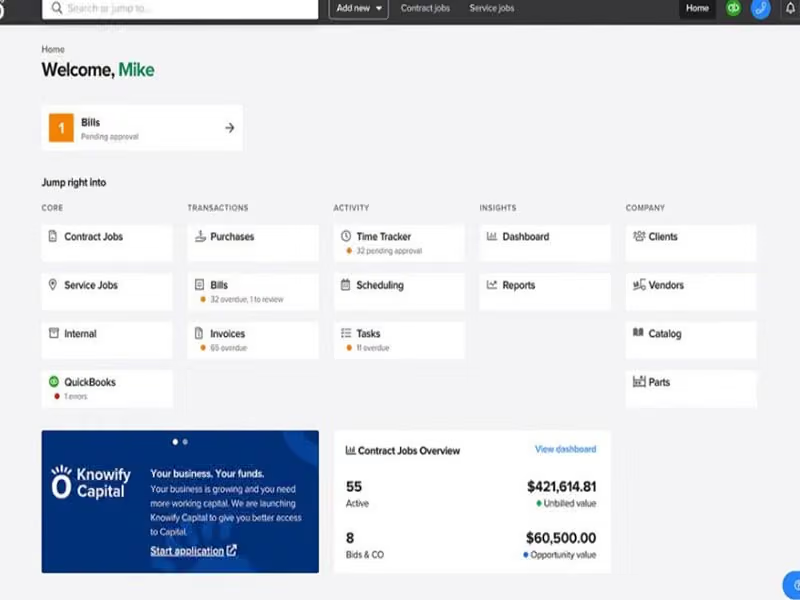
Knowify Specifications
- Time Tracking
- Task Management
- Reporting
- Budget Management
What Is Knowify?
Knowify is a cloud-based construction project management and real-time job costing platform for construction trade contractors. The main purpose of this software is to protect and maximize a construction company's profit margins by giving them precise control over their project finances and operations. In construction, a business can easily lose money if they miscalculate material costs, suffer from unrecorded labor hours, or fail to bill clients on time. Knowify acts as the central system that stops these financial leaks. It is designed for businesses that perform construction or repair work, such as electrical, plumbing, HVAC, roofing, painting, carpentry, remodeling, concrete, fire protection, and other specialty trades.
What Is Knowify Best For?
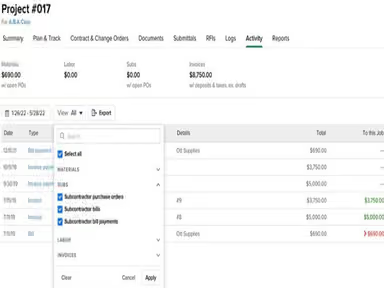
One of the main standout features of Knowify is its real-time job costing. It tracks the actual cost of labor, materials, equipment, subcontractors, and other expenses for each project, then compares those costs with the original project budget. Many contractors only discover whether a project made money after the work is completed. By then, it is too late to fix overspending. Knowify lets the contractor see project costs while the job is still active. For example, if labor is taking longer than planned or material costs are higher than expected, the project manager can notice the issue early and take action. Business owners can see whether projects are profitable or are going over budget.
How Much Does Knowify Cost?
Knowify pricing starts at $149/month for the Core plan, which includes 1 user and covers bidding, executing, and invoicing for fixed-price and AIA jobs. Further pricing tiers of the software are as follows:
- Advanced - $399/month (includes 10 users)
- Enterprise - Custom Pricing
A free trial is available for Core and Advanced plans.
Knowify also offers optional add-ons:
- Service Pro - $199/month, adds real-time dispatching, payment processing, equipment history, inventory management, and automated appointment reminders
- Live Equipment Tracking - $35/vehicle/month, adds GPS tracking and access to the FleetSharp telematics platform
Beyond the monthly plan, contractors should also budget for setup and rollout costs:
- Onboarding And Setup: $0–$2,500, higher if using a QuickBooks/Knowify consultant for custom job phases, AIA billing, or retainage setup
- Data Migration: $300–$5,000, rising with legacy job structures, active job budgets, and historical financial detail
- Multi-User Or Multi-Department Rollout: $1,500–$10,000, higher for multiple branches, service departments, or Enterprise-tier configuration
- Staff And Admin Training: $500–$5,000, higher for role-based workshops across estimators, PMs, bookkeeping, and field staff
- Ongoing Management: $300–$3,000 per month in internal labor, rising with transaction volume and frequent WIP or billing review
Reviewers generally describe Knowify's pricing as reasonable relative to the value it provides, with several noting it's hard to find comparable software at the same price. Some users flag the payroll add-on as expensive given construction's high employee turnover, and a few mention reporting features cost extra without covering all their needs.
Disclaimer: The pricing is subject to change.
Knowify Integrations
The vendor integrates with several third-party software solutions including:
- Square Payments
- QuickBooks Online
- QuickBooks Desktop
- QuickBooks Payroll
- HubSpot CRM software
How Does Knowify Work?
Here's how you can access the platform and start using its features:
- Log in to your account and connect QuickBooks Online, QuickBooks Desktop, or another supported accounting tool
- Choose a contract type for the project, fixed price, cost plus, time and materials, or AIA billing
- Build a detailed estimate, breaking the project into phases and pulling in materials, labor, and subcontractor costs
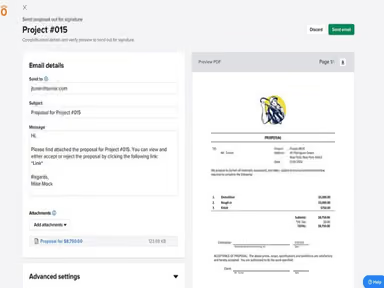
- Send the estimate as a client-ready proposal, then convert it into a project budget once approved
- Schedule labor and equipment, and let field crews log time, expenses, and photos directly from the job site
- Track job costs in real-time as purchases and bills come in, comparing actual spend against the original budget
- Generate invoices automatically based on the contract type, including AIA G702/G703 forms if applicable
- Sync all activity back to QuickBooks in real-time, so the books stay accurate without double entry
Who Is Knowify For?
Knowify is mainly intended for small to mid-sized businesses working in various industries and sectors. These include:
- Specialty trade contractors
- Subcontractors
- Remodelers
- Commercial contractors
- Residential contractors
- Self-performing construction businesses
Knowify Use Cases
Based on our analysis of Knowify features and platform capabilities, we have identified key scenarios where this software is a strong fit for:
1. Trade Businesses Creating Accurate Bids For New Jobs
Before a contractor can win a project, they must tell the customer what the work will cost. This is difficult because the contractor must estimate labor, materials, equipment, subcontractor work, overhead, and profit. If the contractor forgets a cost or underestimates labor, they may win the job but will not make any profit, and in some cases, they may lose the money. Plus, if the quote takes too long to prepare, the customer may choose another contractor. Knowify creates detailed estimates and turns an accepted estimate into the starting project budget.
2. Growing Trade Businesses Managing Client-Requested Extra Work
Construction work usually changes even after the contract is signed. Sometimes customers request extra outlets, and sometimes they want to replace the material. In some cases, the construction job itself can cause additional repair work. If a contractor performs this extra work based on a verbal agreement without recording it formally, they run a massive risk of not getting paid. Furthermore, undocumented work destroys the accuracy of the original project budget. But Knowify solves the problem, as it creates change orders, sends them for approval, and updates the project budget and projected profit.
3. Subcontractors Facing Cash Flow Leaks And Delayed Payments
In construction, the project owner or general contractor often holds back part of every payment until the job is substantially complete. This withheld amount is called retainage. Contractors must track how much money is being held and remember to bill it after completing the required work. If a business lacks an organized tracking system, they may delay billing for these funds or entirely forget to collect the money they rightfully earned, severely damaging their year-end cash flow. What the software does is calculates retainage on project invoices and can create the final retainage invoice when the job is complete.
4. Commercial Firms Vulnerable To Costly ‘Unapproved Work’ Lawsuits
On commercial projects, drawings and specifications may be unclear or incomplete. A contractor needs written clarification before installing a product or performing work. Sometimes they need to submit product information, samples, or technical documents for approval. But the problem is that nobody reads informal emails, and working without formal approval can lead to rework or legal disputes. Therefore, Knowify keeps RFIs, submittals, project documents, and approval activity connected to the relevant project.
Is Knowify Right For You?
Knowify is right for you if you run a specialty trade contracting or remodeling business that needs real-time job tracking and tight QuickBooks Online integration. It is not a one-size-fits-all tool. It serves as a specialized operational system (ERP) designed to bridge the gap between your field crews and your accounting books.
Not only that, but Knowify is trusted by contractors across trades, including Serett Metalworks, MPC Plumbing, Chaney Mechanical, Castle Electric, and Safe Harbor Exteriors. That shows its credibility in the specialty trade businesses.
Still not sure if Knowify software is the right choice for you? Contact us at (661) 384-7070, and our team will help you decide based on your requirements.
Knowify Features
AI Connector
AI Connector connects Knowify project data with supported third-party AI tools, including Claude and ChatGPT, through the Model Context Protocol (MCP). It allows an authorized user to ask questions in normal language about their actual Knowify information, for example, a contractor could ask: 'Which active jobs are over budget?' or 'Which customers have overdue invoices?' The AI tool uses the contractor’s Knowify data to provide an answer. This benefits business owners and executives who want rapid, automated summaries of company performance and predictive analysis without manually digging through spreadsheets.
Project Management
This serves as the central hub for mapping out workflows, timelines, and communications between the field and the office. It provides comprehensive schedule tracking via Gantt charts, resource allocation tools, and unlimited document and photo storage, so teams can pin blueprints or upload job site photos directly to specific project phases. It benefits project managers and site foremen who need to keep remote crews organized and ensure construction milestones are hit on schedule.
Invoicing And Project Finances
This module manages the money side of a contractor’s project. It helps businesses create invoices, progress bills, payment applications, schedules of values, retainage records, payment reminders, and overdue-balance reports. It also compares actual project costs with the original budget. This benefits owners, bookkeepers, and finance teams because it helps them bill work more accurately, follow up on unpaid invoices, and they can predict and understand whether a project is still profitable.
Service Pro
Service Pro is Knowify’s field-service management feature for contractors that perform short jobs, repairs, maintenance visits, and recurring service work. It offers real-time dispatching dashboards, work order generation, detailed customer equipment history tracking, automated client appointment reminders, and on-site mobile payment processing. This is most useful for businesses that need to manage many short customer visits alongside larger construction projects.
Estimating, Proposals, And Contracts
Estimating, proposals, and contracts helps a contractor calculate the expected cost of a new job and prepare a professional client document. The contractor can use cost templates, enter quantities such as square feet or units, add labor and materials, include subcontractor costs, apply profit markup, and create a proposal or contract. It helps the business quote work consistently and reduces the need to re-enter the same job information after the customer approves the proposal.
Pros And Cons of Knowify
Pros
Frequent updates add new features and improve existing functionality
Detailed SOV invoices support holdback options for better billing control
Two-way QuickBooks Online sync keeps financial data aligned
Cons
Reporting limited to preset templates, no custom data access
Some features geared more toward construction than consulting work
Knowify Pricing
Core | Advanced | Enterprise |
|---|---|---|
$149 per month | $399 per month | Custom Pricing |
|
|
|
Disclaimer: The pricing details were last updated on Sep 25, 2026 from the vendor's website. Please contact us for a tailored pricing list.
Knowify Reviews
Total 80 reviews
4.5
All reviews are from verified customers
Rating Distribution
5
Stars56%
4
Stars33%
3
Stars11%
2
Stars0%
1
Stars0%
Share your experience
Construction, 51-100 employees
Less than a year
“GK Engineering UK Steel Contractor”
Pros
Online, Seamless integration and Quick implementation are few features among many which I like the most.
Cons
Managing client billing, retention and outstanding payments can be frustrating at times. Modifying invoices can also cause issues at time.
Rating Distribution
Ease of use
10
Value for money
10
Customer Support
9
Functionality
10
Construction, 11-50 employees
Less than a year
“Knowify is a great tool for the company”
Pros
The integration with QBO is exceptional. The customer service is outstanding and quickly resolves any issues.
Cons
There is nothing much to say but I think the cost could be a bit lower.
Rating Distribution
Ease of use
8
Value for money
8
Customer Support
10
Functionality
8
Construction, 11-50 employees
Less than a year
“Up Your Game with Knowify”
Pros
The ability to track jobs, profitability, productivity/efficiency, job costing and expense management is a game changer. The reporting and data provided by Knowify allow us to analyze areas for improvement and implement processes to achieve our goals. If I had to highlight one thing Knowify does exceptionally well is its Change Order Management. We can capture revenue from change orders more frequently and thoroughly than ever before. This alone provides a significant return on investment and makes it worth every penny. We regularly recommend Knowify to other subcontractors and GCs because we've experienced the benefits firsthand. The more organized our customers and other subcontractors are, the better the entire industry becomes. I must mention Knowify's customer service it's the best support we've ever received from any platform. Their training is exceptional, and they continuously improve their product. I never miss their monthly focused training sessions and encourage my team to attend for their own development.
Cons
One drawback of Knowify is the general nature of its permission structure. However, we are actively collaborating with their developers to create a more detailed approach to address this issue. Despite this "con" we highly value our relationship with the Knowify team because they genuinely listen to and address our concerns. On a lighter note some of our team members didn't particularly like the name "Knowify" So, we playfully nicknamed it "Spike" by associating the orange "O" with a spiked hairdo.
Rating Distribution
Ease of use
8
Value for money
10
Customer Support
10
Functionality
8
Frequently Asked Questions
Does Knowify offer an API?
Yes, Knowify offers API access.
What language does Knowify support?
Knowify primarily supports the English language.
What other apps does Knowify integrate with?
The platform offers integration with QuickBooks Online, QuickBooks Time, QuickBooks Payments, and CompanyCam, along with many other third-party apps.
Does Knowify have a mobile app?
Yes, Knowify software offers a mobile app available on both iOS and Android devices.
What types of pricing plans does Knowify offer?
Knowify price starts at $149/month for the Core plan, which includes one user and supports bidding, project execution, and invoicing for fixed-price and AIA jobs. The Advanced plan costs $399/month for 10 users, while Enterprise pricing is custom. A free trial is available for Core and Advanced plans. Contact us for a custom Knowify pricing quote.
Who are the typical users of Knowify?
Typical users of Knowify include electrical, plumbing, HVAC, painting, and remodeling contractors.
What level of support does Knowify offer?
The vendor offers U.S.-based support through email.