


Planta Project
Last Updated
Overview
Juggling multiple projects and teams? PLANTA project's intuitive interface provides real-time visibility to keep work on track. Its robust resource optimization ensures the right people are allocated at the right time to resolve issues proactively. Explore PLANTA project and streamline work without glitches.
Planta Project Specifications
- Time Tracking
- Task Management
- Reporting
- Budget Management
What Is PLANTA project?
Overview
PLANTA project is a project management software that can handle both agile and traditional methods of project planning and execution. The software allows you to manage multiple projects simultaneously, with a clear overview of each project's dates, resources, and costs. It helps teams streamline their project management processes and caters to various industries.
What Is PLANTA Project Best For?
The software is known for its flexibility in handling both agile and traditional methods of project planning and execution. Its unique feature lies in its ability to manage multiple projects simultaneously, providing a clear overview of dates, resources, and costs.
PLANTA Project Pricing
The following are the pricing plans:
- Base - €0/user/month ( up to 5 free users )
- Premium - €9/user/month
Disclaimer: The pricing is subject to change.
PLANTA project Integrations
The software integrates with third-party applications, including:
- Jira
- SAP
- Microsoft Project
How Does PLANTA Project Work?
Here is how to start with the software:
- Log in using your credentials
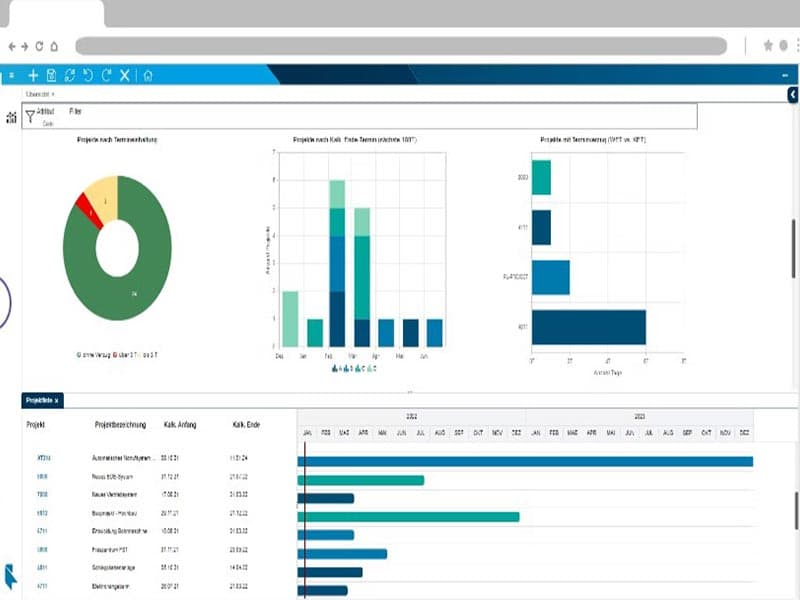
- Navigate the dashboard to get an overview of all ongoing projects
- Use the planning feature to set tasks, dates, and budgets for each project
- Assign resources to each task using the resource management feature
- Monitor project progress with planned-actual-comparisons and milestones
- Identify and manage risks and opportunities with the integrated risk management feature
- Control multiple projects in programs with the multi-project feature
- Record employee time with the time recording feature
Who Is PLANTA Project For?
Planta Project is suitable for project managers, team leaders, and other professionals who need to manage multiple projects simultaneously. It caters to various industries, including the following:
- Software Development
- Marketing
- Construction
- Manufacturing
Is PLANTA Project Right For You?
Are you looking for a project management software that can handle both agile and traditional methods of project planning and execution? If so, PLANTA project might be the perfect fit for you.
The software is known for its security and scalability. It provides a secure environment for your project data, ensuring that your information is always protected. It is for companies of all sizes because it is designed to scale with your business.
Still not sure if PLANTA project is right for you? Contact our customer support team at 661-384-7070, who will help you make the best decision.
Planta Project Features
Budget Management
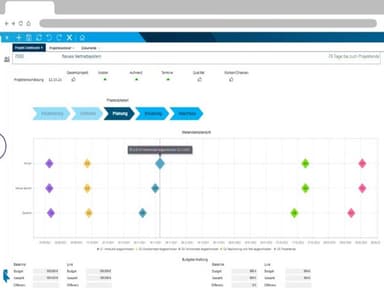
The software allows you to plan and control budgets for each project. This feature helps you keep track of your expenses and ensures that your projects stay within budget. It provides a detailed breakdown of costs, allowing you to see where your money is going and make informed decisions about resource allocation.
Gantt Charts
This feature enables you to visualize your project schedule and progress over time. This feature makes it easy to understand the timeline of your projects and monitor their progress. It visually represents tasks, dependencies, and deadlines, helping you manage your projects more effectively.
Portfolio Management
PLANTA project allows you to manage multiple projects in a portfolio. This feature provides a high-level view of all your projects, making prioritizing and allocating resources easier. It enables you to balance risk and reward across your portfolio, helping you to achieve your strategic objectives.
Resource Management
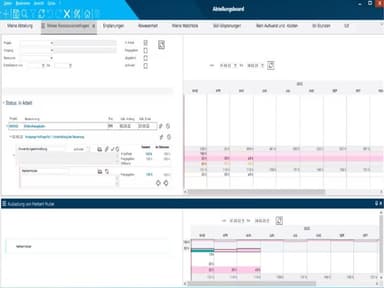
This feature allows you to assign resources to tasks and monitor their utilization. This feature helps you optimize the use of your resources and avoid bottlenecks. It provides insights into resource availability and capacity, helping you to plan more effectively and avoid over-allocation.
Client Portal
The software provides a client portal where clients can access project information. This feature improves transparency and facilitates communication with clients. It allows clients to view project status, submit requests, and provide feedback, enhancing client satisfaction and fostering stronger relationships.
Pros And Cons of Planta Project
Pros
Cloud-based accessibility
Robust features
Seamless integration
User-friendly interface
Cons
Minor bugs and glitches
Customer service can be improved, according to some PALNTA project
May need additional support or maintenance
Planta Project Pricing
Base | Premium |
|---|---|
€0per month | €9per user per month |
|
|
Disclaimer: The pricing details were last updated on Sep 28, 2026 from the vendor's website. Please contact us for a tailored pricing list.
Planta Project Reviews
Total 3 reviews
4.7
All reviews are from verified customers
Rating Distribution
5
Stars67%
4
Stars33%
3
Stars0%
2
Stars0%
1
Stars0%
Share your experience
Industrial Automation, 500+ employees
“Good functions, bad performance”
Pros
PLANTA offers a comprehensive set of features essential for managing multiple projects and detailed resource planning.
Cons
Unfortunately, the tool's performance leaves much to be desired, plagued by extended waiting times andNumerous bugs.
Rating Distribution
Ease of use
10
Value for money
10
Customer Support
10
Functionality
10
Insurance, 500+ employees
“Great Projectmanagement-Software with good Ressource Management”
Pros
Our team finds PLANT extremely user-friendly, making project management a breeze. Additionally, it stands out as the top tool for effective resource management.
Cons
While the standard reports are quite useful, some custom reports can be a bit challenging to create independently.
Rating Distribution
Ease of use
10
Value for money
10
Customer Support
10
Functionality
10
Information Technology and Services, 1-10 employees
“PLANTA eine individuell anpassbare Software mit hohem Funktionsumfang”
Pros
PLANTA is a versatile tool that adeptly caters to both agile and conventional project managementNeeds. Its adaptability allows for seamless alignment with our company's unique processes, and its customizability empowers us to develop our own functions.
Cons
Although the web client is still in its early stages, PLANTA assures active development efforts. Meanwhile, the standard full client provides all the desired capabilities.
Rating Distribution
Ease of use
8
Value for money
9
Customer Support
9
Functionality
9
Frequently Asked Questions
Who are the typical users of PLANTA project?
Planta Project is a versatile tool ideal for project managers and team leaders across various sectors such as construction, and manufacturing, software development, marketing, facilitating the management of multiple projects simultaneously.
What language does PLANTA project support?
PLANTA project supports multiple languages including German, English, French, Spanish, Italian, Portuguese, Czech, Polish, and Russian.
Does PLANTA project support mobile devices?
The software supports mobile devices.
Does PLANTA project offer an API?
Yes, the software has an API available for use.
What other apps does PLANTA project integrate with?
The software seamlessly integrates with third-party applications such as Jira, SAP, and Microsoft Project.
What types of pricing plans does PLANTA project offer?
PLANTA project management software provides flexible pricing plans, including a free Base plan for up to 5 users, a Premium plan at €9/user/month, and customizable options to suit various organizational needs. Request for a custom PLANTA price.
How can PLANTA project help with agile project management?
PLANTA project supports both agile and traditional project management approaches. Its flexible boards, views and workflows allow seamless integration of agile practices like kanban and scrum. The collaborative workspaces foster meaningful discussions to help iterate project ideas quickly.
How does PLANTA project help me manage multiple project ideas?
With PLANTA project, you can create and evaluate various project ideas efficiently. It provides customizable project templates and approval workflows to structure ideas consistently according to your standards. Cost-benefit analyses and resource simulations help prioritize ideas portfolio-wide for optimum resource allocation.
How can I get a comprehensive view of my company's projects?
PLANTA project's role-based dashboards and centralized reports provide a unified view of all your company's projects. Its powerful project portfolio management features give leadership complete visibility into the entire project progress including budgets, deadlines and interdependencies at the click of a button.
How can PLANTA project help with multi-project management?
PLANTA project is extremely useful for organizations managing a complex portfolio of projects simultaneously. Its intuitive interface provides multi-project managers with real-time visibility and control over resource allocation across all projects.
What level of support does PLANTA project offer?
Support for PLANTA Project is available through a variety of channels, including live chat, an email help desk, a FAQs section and forum, a knowledge base, and phone support.