Last Updated
Key Takeaways
Generated from the text of customer reviews
Rocketlane is a project management and onboarding platform that is widely used by SaaS and professional services teams. Users appreciate its ability to centralize client projects and communications while simplifying onboarding. Some feedback points to limitations in dynamic budgeted hours. Its recent updates include Nitro agentic AI launch for automated delivery assistance and MCP AI integration that embeds AI capabilities directly into workflows.
Our Verdict
The platform works best for mid-sized to large teams managing multiple client projects or onboarding programs. It suits organizations seeking structured delivery, centralized workspaces, and real-time progress visibility. We recommend it for professional services and SaaS organizations that want to simplify project delivery and maintain high standards.
Overall Rating
Based on 29 users reviews
4.8
Rating Distribution
Positive
100%
Neutral
0%
Negative
0%
Starting Price
$29
per month
Rocketlane Specifications
- Time Tracking
- Task Management
- Reporting
- Budget Management
What Is Rocketlane?
Rocketlane is an AI-powered PSA and delivery platform purpose-built for services teams that brings together every piece of your services business: projects, time tracking, finances, workforce management, and client collaboration. Instead of switching between disconnected tools, you’ll have one source of truth, helping you focus on delivering excellence and growing your business.
With real-time visibility into delivery health, margins, and utilization, Rocketlane helps you scale operations, improve profitability, and deliver consistent client outcomes.
What Is Rocketlane Best For?
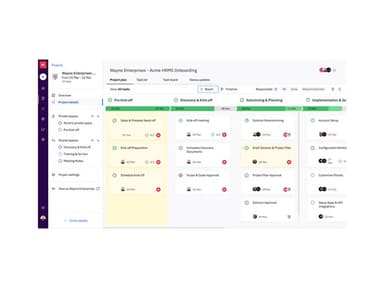
The platform is best known for its client portal, giving onboarding and implementation teams a shared space where clients can stay involved throughout the entire project. The portal keeps everything organized in one place, from project timelines and task updates to files, conversations, and approvals. With this feature, clients no longer have to dig through emails to understand what’s happening, while teams spend less time chasing updates and more time moving projects forward.
How Much Does Rocketlane Cost?
Rocketlane price starts at or $29/month for its Essential plan. Notable features include unlimited customer members and projects, a branded customer portal, actionable emails, and project presentations.
Other plans include:
- Standard: $59/user/month
- Premium: $79/user/month
- Enterprise: $99/user/month (billed annually)
A 14-day free trial is available.
For AI-enabled delivery, Rocketlane offers Nitro plans:
- Nitro Premium: $69/team member/month (billed annually)
- Nitro Enterprise: $109/team member/month (billed annually)
In addition to the base subscription fee, organizations should also account for the following potential additional expenses:
- Implementation: $1,000–$5,000 for SMBs; $5,000–$20,000+ for complex deployments
- Data/Content Migration: $1,000–$8,000, influenced by project volume and source system complexity
- Admin And User Training: $500–$5,000 based on team size and training depth
- Integrations/API/Add-Ons (SSO, CRM, storage, etc.): $2,000–$15,000+, depending on integration scope and customization
Disclaimer: The pricing is subject to change.
Rocketlane Integrations
Rocketlane smoothly integrates with a variety of other software applications, including:
How Does Rocketlane Work?
Log in to the software using your credentials and follow the given steps to start using Rocketlane:
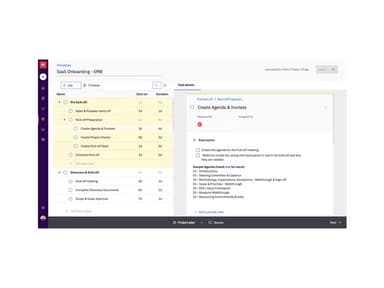
- Create onboarding projects using pre-built templates with tasks, milestones, timelines, and assigned stakeholders
- Set up customer workspaces to share project updates, documents, action items, and communication in one place
- Assign tasks to internal teams and customers while defining ownership, due dates, and project dependencies
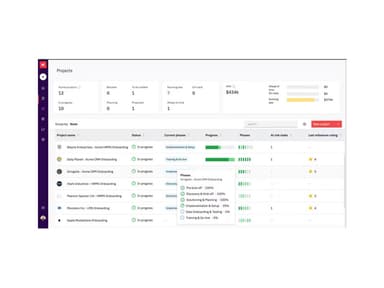
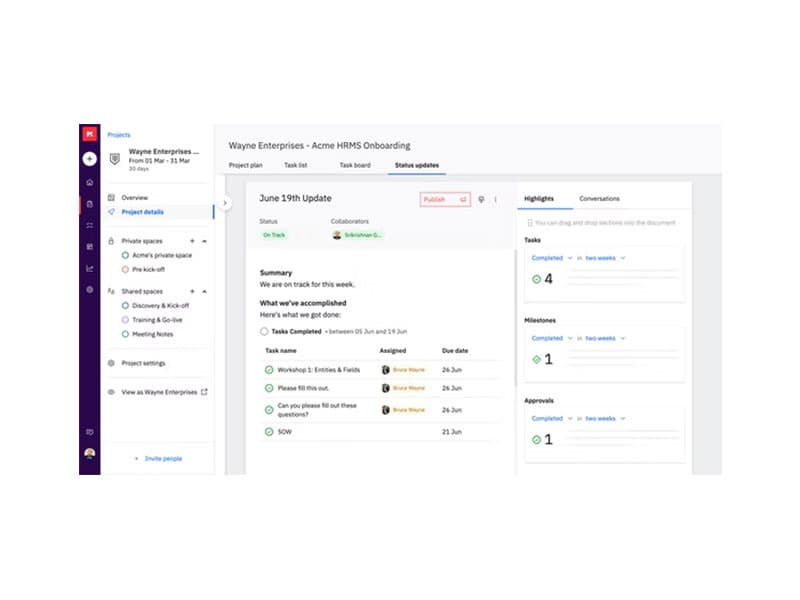
- Track project progress through dashboards, timelines, and status updates to monitor onboarding activities
- Manage customer communication by sharing updates, collecting approvals, and coordinating next steps within the portal
- Configure automations to trigger reminders, task updates, and workflow actions based on project activity
- Monitor resource allocation and team workload to balance project assignments across onboarding teams
- Generate reports to review project timelines, customer progress, and onboarding performance across accounts
Who Is Rocketlane For?
The Rocketlane software is ideal for various industries and sectors, including:
- SaaS
- Fintech
- Marketing
- IT
Rocketlane Use Cases
Based on our analysis of user feedback and Rocketlane’s capabilities, we identified several business scenarios where the platform fits particularly well for onboarding and implementation-focused teams:
1. SaaS Companies Managing Structured Customer Onboarding
Rocketlane is a strong fit for SaaS companies that need a more organized onboarding process after a deal closes. Teams can map out implementation steps, assign responsibilities, and keep customers informed through a shared workspace instead of relying on scattered emails and spreadsheets. This works especially well for companies onboarding multiple customers at once while still managing tailored implementation requirements.
2. Professional Services Teams Delivering Client Projects
Consulting, implementation, and services teams often use Rocketlane to manage customer-facing projects with clearer accountability and timelines. The platform helps teams coordinate internal work alongside customer tasks, making it easier to keep projects moving without constant manual follow-ups. Users particularly appreciate its client portals, as it helps ensure transparency and reduce unnecessary back-and-forth.
3. Enterprise Teams Handling Multi-Department Implementations
Rocketlane fits organizations where onboarding involves several internal and external stakeholders, such as IT teams, procurement, customer success, and operations. In these environments, projects usually require approvals, documentation, and coordination across departments before implementation is completed. The platform helps teams keep activities centralized so stakeholders can track progress without losing visibility into pending actions.
4. Distributed Teams Supporting Customers Across Regions
Rocketlane also works well for companies managing onboarding projects across different locations and time zones. Teams can share updates, track timelines, and collaborate with customers from a single workspace without depending heavily on meetings or long email chains. This makes it a practical option for remote implementation teams supporting global customers with ongoing onboarding activities.
Is Rocketlane Right For You?
If you are looking for a platform that simplifies client projects, onboarding, and service delivery, Rocketlane is a strong fit. Its standout strength is combining project delivery with structured onboarding, enabling teams to maintain visibility and consistency across engagements. Rocketlane is ISO 27001 certified, SOC 1 and SOC 2 Type 2 compliant, GDPR and HIPAA aligned, and built to scale for growing organizations while protecting sensitive client data.
Still doubtful if Rocketlane is the right fit for you? Connect with our customer support staff at (661) 384-7070 for further guidance.
Rocketlane Features
Project Management
This feature provides full visibility and control over the project lifecycle. Users can create reusable project, document, and task templates conveniently. It also enables them to execute projects with flexibility, automate workflows and status updates, and collaborate in real-time with teams and customers.
Financial Management
Using this tool, service companies can keep tight control over money, resources, and profitability. It majorly tracks project expenses to prevent budget overruns, aligning resource allocation (who does what, when) with financials, measuring planned vs. actual revenue and costs.
Time Tracking
Rocketlan’s time tracking feature allows team members to log hours in seconds, with smart suggestions and auto-carryovers helping them save time. They can even record work directly from ongoing tasks. Managers get clear approval flows, making reviews smooth and transparent. With detailed reports, it’s easy to see where time goes, while Google Calendar sync adds events automatically.
AI Fills
This feature enables users to automate post-meeting tasks, so the team doesn’t waste time on routine follow-ups and note writing. It captures meeting recordings, summarizes what was discussed, extracts key decisions and action items, and generates polished updates, emails, scope docs, etc. Everything is formatted and ready in seconds, helping teams stay proactive, consistent, and aligned.
Nitro
It is an AI-powered delivery feature that automates operational tasks, monitors customer interactions for early signals, and generates standardized project documents from templates. By centralizing knowledge and maintaining a single source of truth, Nitro ensures consistent, high-quality project execution while reducing manual work, rework loops, and lost context across teams and projects.
Pros And Cons of Rocketlane
Pros
Customizable client portal with polished branding options
Helps manage team capacity and reduce burnout risks
Offers real-time reporting and detailed project analytics
Cons
Initial setup and customization can take time
May require initial training
Rocketlane Reviews
Total 29 reviews
4.8
All reviews are from verified customers
Rating Distribution
5
Stars76%
4
Stars24%
3
Stars0%
2
Stars0%
1
Stars0%
Share your experience
Vinay
Computer Software, 500+ employees
Less than a year
“Best Ever Project and resource Management tool
Pros
Tracking multiple projects and resources in one place has been incredibly efficient.
Cons
The inability to assign dynamic budgeted hours can sometimes create hassles.
Rating Distribution
Ease of use
7
Value for money
8
Customer Support
10
Functionality
10
Sachi
Computer Software, 101-500 employees
Less than a year
“A must have product for Team and Client Management
Pros
Working with different stakeholders and managing tasks in one place has streamlined our workflow.
Cons
Rocketlane addresses all my day-to-day requirements effectively.
Rating Distribution
Ease of use
10
Value for money
10
Customer Support
10
Functionality
10
Anonymous
Not Specified, 51-100 employees
Less than a year
“Onboarding rocketlane was very easy
Pros
The ease of use stood out to me from the start. Managing projects and tasks felt intuitive, making it one of the best project management tools I've used. Setting it up was a breeze, and reaching out to their Customer Success Manager for any product queries was seamless. Overall, the setup has been a great experience, saving me significant time in monitoring project progress.
Cons
More customization options for reports would be welcome.
Rating Distribution
Ease of use
10
Value for money
8
Customer Support
10
Functionality
10
Frequently Asked Questions
What level of support does Rocketlane offer?
Rocketlane offers 24/5 support via in-app chat and email, with responses typically within a few hours. Paid users also have access to a knowledge base and video tutorials for self-service guidance.
Who are the typical users of Rocketlane?
The software caters to several industries, including SaaS, Marketing, Fintech, and IT.
What language does Rocketlane support?
The software supports only English language.
Does Rocketlane support mobile devices?
Yes, Rocketlane offers a dedicated mobile app for both iOS and Android.
What other apps does Rocketlane integrate with?
The platform provides seamless integrations with many tools, including Slack, Freshsales, Salesforce, Workato, HubSpot, and Jira.
What types of pricing plans does Rocketlane offer?
Rocketlane pricing starts at $29/team member/month for the Essential plan. The Standard plan is $59/team member/month, and the Premium plan is $79/team member/month. For teams needing the most advanced controls and customizations, the Enterprise plan is $99/team member/month when billed annually. Get in touch for a tailored Rocketlane cost estimate.
Does Rocketlane offer an API?
Yes, the software offers an API.