



Last Updated
Overview
HoneyBook POS provides a flexible environment for small business management that boosts client flow. It helps streamline all organizational operations in one place. There is no documentation, paperwork, unnecessary apps, or spreadsheets to deal with. It gives retailers peace of mind and a chance to enjoy their work.

HoneyBook Specifications
- Sales Orders
- Invoicing
- Sales Tracking
- Customer Relationship Management (CRM)
HoneyBook Features
Invoices
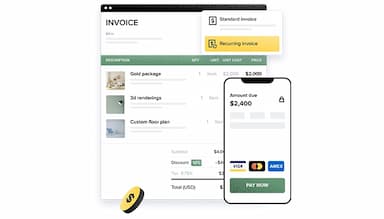
HoneyBook software offers a robust invoicing feature that facilitates quick online payments for a better client experience.
Proposals
It is easy to create professional invoices, finalize and sign contracts in one place, and make quick, easy payments without signing cheques or going through complex apps.
Scheduling
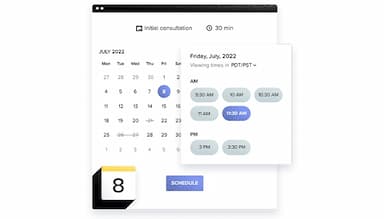
HoneyBook helps business owners manage their schedules by syncing their availability with incoming bookings through a link. It improves efficiency and client retention.
Contracts
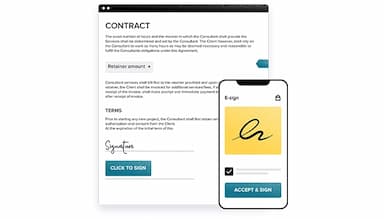
The system offers a secure online contract facility that allows professionals to create, customize, and sign contracts digitally.
Automation
This feature makes sending emails and notifications to clients easy through automated functionality. Business owners can keep the system running even when offline by sending automated messages, which can be either set to automatic or approved before sending.
Pros And Cons of HoneyBook
Pros
Online portal
Seamless integration with pic-time
Unified platform
Customizable contracts
Cons
Complex interface
Does not allow the revision of invoices and estimates easily
HoneyBook Reviews
Total 22 reviews
4.2
All reviews are from verified customers
Rating Distribution
5
Stars59%
4
Stars23%
3
Stars9%
2
Stars0%
1
Stars9%
Share your experience
Roma
Legal, 11-50 employees
Less than a year
“My Experience Using HoneyBook”
Pros
One thing I like about HoneyBook is its project and contract management features. It functions well as a CRM software and offers the best digital signature capabilities.
Cons
Considering how helpful HoneyBook has been, I have no complaints.
Rating Distribution
Ease of use
9
Value for money
10
Customer Support
10
Functionality
9
Tiara
Social Media, Advertising, Marketing, 1-10 employees
Less than a year
“Great for service professionals and freelancers”
Pros
I adore the professional presentation of information in HoneyBook. Everything is neatly laid out for everyone to see, including messages and threads. HoneyBook also simplifies business-to-client relations by handling contract sending, invoicing, signing and payment through Stripe.
Cons
Honestly, I don't have any cons. This program is truly the best of its kind.
Rating Distribution
Ease of use
10
Value for money
10
Customer Support
10
Functionality
8
Stephanie
Healthcare, 1-10 employees
Less than a year
“Honey Book is Excellent”
Pros
Using it is easy and it requires minimal training!
Cons
The pricing could be a little better, but overall I don't have any cons.
Rating Distribution
Ease of use
10
Value for money
10
Customer Support
10
Functionality
10
Frequently Asked Questions
What pricing plans does HoneyBook offer?
HoneyBook cost starts at $16/month after trial period. Get pricing details for the plan that best fits your business needs.
Who is HoneyBook typically used by?
HoneyBook is typically used by Florists, Photographers, Web Designers, Event Planners, Marketing Consultants, Videographers, Venues, Caterers, Coaches, Business Consultants, and many more small business retailers.
What languages does HoneyBook support?
HoneyBook supports the English language.
Does HoneyBook support mobile devices?
Yes, HoneyBook offers support for mobile devices.
Does HoneyBook have an API?
Yes, API access is available.
What other apps does HoneyBook integrate with?
HoneyBook integrates with Zapier, Calendly, Google Calendar, Zoom, iCloud, Meta Leads, QuickBooks, Microsoft Outlook, Gmail, Google Contact, Pic-Time, and many more.
What level of support does HoneyBook offer?
HoneyBook support includes a phone, email/Help Desk, chat, Knowledge base, and an FAQ forum.