


Last Updated
Overview
1up software provides an intelligent knowledge automation platform that empowers sales teams to answer complex product and security questions faster. Despite the web-based user interface that can feel less intuitive for some users, its ability to centralize fragmented intelligence justifies the investment.
1up Specifications
- Lead Management
- Sales Automation
- Activity Tracking
- Reporting and Analytics
1up Features
RFP Automation
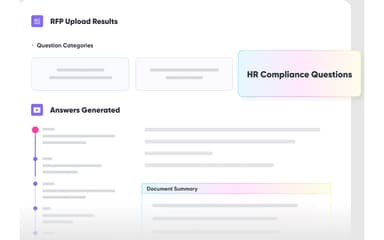
The platform utilizes advanced AI to automatically complete complex requests for proposals by analyzing your existing knowledge base and historical responses. This feature allows teams to generate hundreds of professional answers in minutes, supporting multi-format documents like Excel, Word, and PDF files.
Security Questionnaire Automation
Designed to simplify the due diligence process, this feature rapidly extracts technical and compliance data to populate security questionnaires. By leveraging internal documentation and previously approved assessments, it eliminates the need for manual research, allowing pre-sales engineers to focus on higher-value tasks rather than repetitive technical data entry.
Knowledge Automation
1up connects directly to fragmented data silos such as websites, wikis, and cloud storage to create a unified, searchable knowledge brain. This automated repository provides a single source of truth for the entire organization, ensuring that every team member has instant access to the most current product information.
Sales Enablement AI
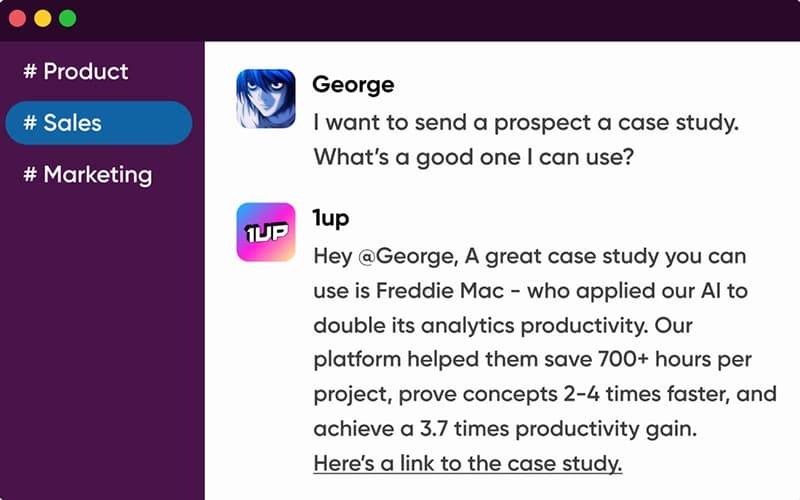
This feature delivers lightning-fast answers to sales inquiries directly within common communication tools like Slack and Microsoft Teams. By providing reps with immediate access to battlecards, case studies, and technical specifications during active deal cycles, it prevents deal momentum from stalling while waiting for subject matter expert responses.
Answer Hub
The ‘Answer Hub’ offers a branded, customer-facing portal that allows prospects to self-serve answers to their technical and security questions in real-time. This self-service chat interface builds buyer trust through transparency and reduces the volume of repetitive inquiries directed at your internal sales and support engineering departments.
Pros And Cons of 1up
Pros
Centralizes all RFP and questionnaire information
Automates RFP responses, saving significant time
Easy setup and smooth implementation process
Cons
Some minor initial setup or QA tweaks may be needed
Limited control over brand voice in RFP responses
1up Reviews
Total 5 reviews
5
All reviews are from verified customers
Rating Distribution
5
Stars100%
4
Stars0%
3
Stars0%
2
Stars0%
1
Stars0%
Share your experience
Tristan B.
Mid Market, 51-100 employees
“Makes things efficient”
Pros
Responding to RFPs used to be incredibly inefficient for us, with information spread across SharePoint, Confluence and endless questions across different Slack channels. Since moving to this solution everything is now centralized and much easier to find!! The long, frustrating hunt for answers is gone and having one shared source of truth has made our responses much more consistent. The Q&A feature has been especially useful and the Slack integration gets used a lot particularly when we need to describe something quickly and share it over email. Getting started was also very easy. Setup and implementation only took a couple of days and the team that helped us has been extremely supportive ever since. We're already well into a broader rollout across the company and other teams.
Cons
The only adjustment on my side was getting used to the web interface for answering and editing questions. I had been used to handling RFPs in Excel so the different workflow took a little time to adapt to. I still prefer a table style layout for that kind of work but their team has already said that a format like this is on the way.
Rating Distribution
Ease of use
8
Value for money
10
Customer Support
8
Functionality
10
Melissa D.
Small Business, 11-50 employees
“responsive support”
Pros
Right from the start the team behind this software has been very supportive, taking the time to walk through the platform thoroughly and continuing to help even after implementation. The platform also includes all the features needed to keep a response library organized and deliver quick answers for questionnaires and other response needs.
Cons
At this point I don't have any complaints or dislikes to mention.
Rating Distribution
Ease of use
9
Value for money
10
Customer Support
10
Functionality
10
Anonymous
Enterprise, 500+ employees
“outstanding tool!”
Pros
Working with the team has been amazing! The product starts delivering real value right away and getting everything implemented is very easy.
Cons
There's honestly not much to criticize with this tool. It has made a noticeable impact and nothing unexpected or negative has come up.
Rating Distribution
Ease of use
10
Value for money
10
Customer Support
10
Functionality
9
Frequently Asked Questions
Who are the typical users of 1up?
Typical users include industries like software, IT, finance, healthcare, and legal.
What other apps does 1up integrate with?
The software supports integration with multiple platforms, such as Slack software, Notion software, Confluence software, Salesforce, Egnyte, Google Drive, and Microsoft SharePoint.
Does 1up offer an API?
No, 1up does not offer an API.
What language does 1up support?
1up is available in 15 languages, including English, Spanish, Portuguese, German, French, Russian, Japanese, and Dutch.
Does 1up have a mobile app?
No, 1up does not have a mobile app.
What level of support does 1up offer?
1up offers support through contact form and FAQs.
What types of pricing plans does 1up offer?
The 1up price is based on four plans: Free ($0), Starter ($300/month), Plus ($600/month), Pro ($1000/month), and Enterprise (Custom pricing). Request a personalized 1up pricing quote for your business.