


Last Updated
Overview
Zoho Salesinbox transforms the way sales teams manage their email functions. Despite some speed issues when using the apps, it offers a wide range of products. Experience streamlined communication and enhanced organization, empowering your sales team to focus on deal closures in a productive way.
Zoho Salesinbox Specifications
- Lead Management
- Sales Pipeline Management
- Contact Management
- Sales Automation
Zoho Salesinbox Features
Your Pipeline. Your Inbox
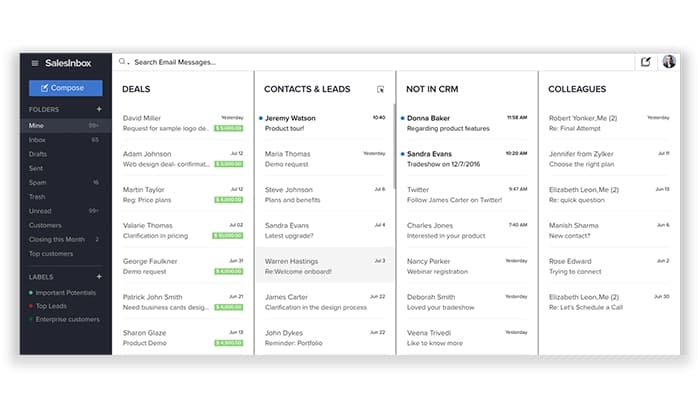
This powerful feature helps you organize your emails according to your sales pipeline. SalesInbox automatically categorizes your inbox by deals, leads, and contacts, allowing users to focus on what matters most and stay productive.
Go Beyond The Thread
This important feature empowers you with a complete history of your interactions with contacts. It helps integrate all relevant information and further ensures users have the context needed to respond effectively, minimizing disruptions and keeping your sales process smooth.
Drag. Drop. Deal
This robust feature enables you to manage your CRM activities right from your inbox. It offers drag-and-drop functionality that makes it easy for the users to convert emails into leads or deals, keeping everything in sync without needing to switch between different platforms.
Follow-Up
This essential feature assists you in managing follow-ups effectively. It comes with real-time alerts, and a response watch tool that keeps the users informed about pending actions and deadlines, ensuring that nothing falls through the cracks in your sales process.
Send Better Emails
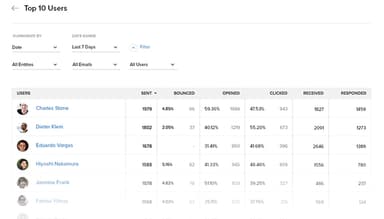
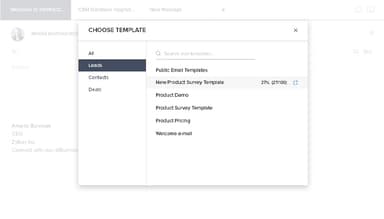
This valuable feature helps you improve your email performance by providing insights into engagement. It offers analytics on what works, enabling users to refine their messaging, create shared responses for common inquiries, and enhance your team's overall email communication skills.
Pros And Cons of Zoho Salesinbox
Pros
Affordable and comprehensive solution
Seamless invoicing and data integration
Helps track activities and billables
Wide range of products is offered
Easy integration with other apps
Cons
Lengthy onboarding process
Speed issues while using apps
Customization needs improvement
Step-by-step tutorials can be difficult
Zoho Salesinbox Reviews
Total 5 reviews
4.2
All reviews are from verified customers
Rating Distribution
5
Stars40%
4
Stars40%
3
Stars20%
2
Stars0%
1
Stars0%
Share your experience
Anonymous
Human Resources, 1-10 employees
More than a year
“Fantastic enhancement to Zoho CRM for improved email insights”
Pros
What I really like about SalesInbox is how it helps me organize the mess that is my inbox. It sorts my emails into categories like Deals, contacts, Not In CRM and Colleagues so I can focus on the deals that are about to close and not waste time on things like newsletters or notifications.
Cons
It does exactly what it's supposed to for its intended use and I haven't really encountered any major downsides. However it would be nice if it were more tightly integrated with the contact/account view, so I wouldn't have to switch between tabs as much.
Rating Distribution
Ease of use
10
Value for money
8
Customer Support
8
Functionality
7
Jonathan
Accounting, 1-10 employees
Less than a year
“The perfect solution for managing sales emails”
Pros
It instantly organizes all my sales emails and making sure everything is sorted in a way that fits my workflow.
Cons
The setup was a bit tricky at first but the Zoho team was more than helpful in assisting me through it.
Rating Distribution
Ease of use
10
Value for money
10
Customer Support
10
Functionality
10
Timerah
IT, 11-50 employees
Less than a year
“I'm a fan of Zoho SalesInbox”
Pros
SalesInbox automatically sorts and prioritizes my emails based on the deals that matter most so I can quickly see and do everything I need right from my inbox.
Cons
Before using Zoho Mail, customers need to add a custom domain, which makes it perfect for enterprises, but not the best fit for personal accounts.
Rating Distribution
Ease of use
9
Value for money
10
Customer Support
9
Functionality
9
Frequently Asked Questions
Does Zoho Salesinbox have a mobile app?
Yes, Zoho Salesinbox has a mobile app.
Does Zoho Salesinbox offer an API?
Yes, Zoho Salesinbox offers an API.
What other apps does Zoho Salesinbox integrate with?
Zoho Salesinbox integrates with Slack, MailChimp, Twilio, Leadfeeder, Zapier, QuickBooks, Dropbox, and countless more apps.
What types of pricing plans does Zoho Salesinbox offer?
Zoho SalesInbox cost is structured into four plans: Standard at $20/user/month, Professional at $35/user/month, Enterprise at $50/user/month, and Ultimate at $65/user/month, allowing you to choose the best fit for your business.
What language does Zoho Salesinbox support?
Zoho Salesinbox supports Arabic, English, Bulgarian, Chinese, Dutch, French, German, Hindi, Italian, Japanese, Polish, Portuguese, Russian, Spanish, Swedish, Thai, Turkish, Vietnamese, Korean, and a few other languages.
Who are the typical users of Zoho Salesinbox?
Typical users of Zoho Salesinbox are sales representatives, leaders, and development reps from startups, small to medium-sized businesses, and enterprises across various industries, including retail, insurance, automotive, life sciences, real estate, financial services, and agencies.
What level of support does Zoho Salesinbox offer?
Zoho Salesinbox offers phone, live chat, email/helpdesk, knowledge base, and FAQs/forums support.