


Last Updated
Overview
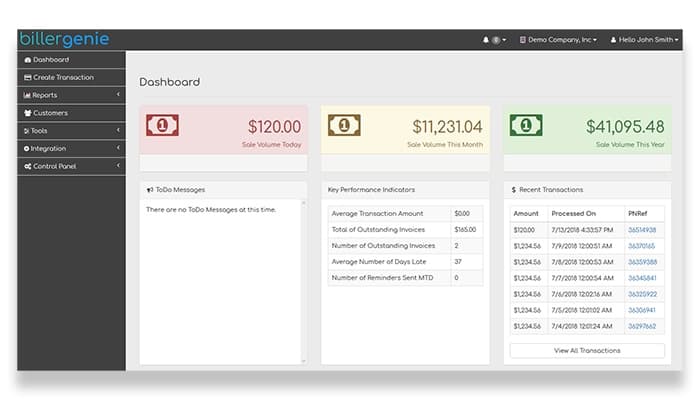
Biller Genie is an award-winning platform that seamlessly manages invoices, sets payment reminders, and streamlines bank reconciliation. It comes with a wide range of features that save all the administrative work. While navigating previous invoices can be difficult, its seamless accounting integration makes it ideal for businesses.
Biller Genie Specifications
- Financial Reporting
- Invoice Management
- Expense Tracking
- Tax Management
Biller Genie Features
Invoice Messenger
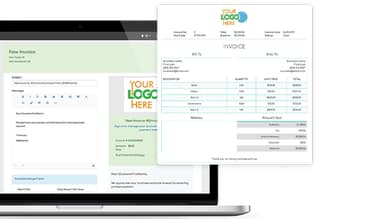
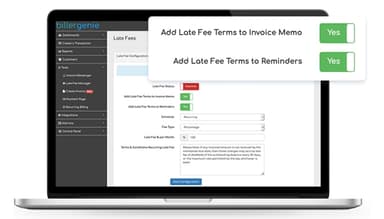
The invoice messenger feature enables businesses to send invoices promptly, ensuring timely communication with clients and reducing the chances of missed or delayed payments. Its flexibility allows for the creation of customized reminder schedules that begin with gentle prompts and escalate as invoices age past their due dates. This structured approach improves cash flow and eases the administrative burden of manual invoicing and follow-ups.
Automatic Batch Reconciliation
The automatic batch reconciliation (ABR) feature simplifies reconciling bank deposits with related invoices. This automation removes the need for manual matching, minimizing errors and saving time. ABR ensures precise financial records and improves the reliability of accounting data by accurately logging journal entries for daily batch totals.
Auto Pay
Auto pay streamlines the payment process, allowing customers to securely store their preferred payment methods and set up automatic payments for future invoices. Businesses can ensure timely receipt of funds, reducing the chances of late or missed payments.
Integrated Payments
Biller Genie provides integrated payment options, enabling customers to pay easily via credit card or ACH. This flexibility streamlines the payment process, reduces transaction friction, and increases the likelihood of on-time payments, ultimately enhancing businesses' cash flow.
Customer Portal
The customer portal feature enhances the customer experience by offering 24/7 access to invoices and secure payment options. This self-service platform allows clients to view their billing history, make payments online, and manage account details at their convenience. Businesses benefit from fewer support inquiries and faster payment cycles, as clients can independently manage their invoicing needs.
Pros And Cons of Biller Genie
Pros
Syncs automatically with QuickBooks for update
No need to manually enter client credit card details
Can easily create invoices for customers
Responsive customer service
Cons
Navigating past bills can be challenging
Extra fees for processing ACH transactions
Biller Genie Reviews
Total 21 reviews
4.8
All reviews are from verified customers
Rating Distribution
5
Stars81%
4
Stars14%
3
Stars5%
2
Stars0%
1
Stars0%
Share your experience
Yvey
Computer Software, 11-50 employees
Less than a year
“Seamless Quickbooks connection and support”
Pros
The connection between Biller Genie and QuickBooks works seamlessly. I am also really impressed with how helpful and responsive their support team is.
Cons
I think it would be helpful to get more detailed reports about emails that do not reach our clients and to have those alerts sent directly to our accounting team.
Rating Distribution
Ease of use
8
Value for money
8
Customer Support
9
Functionality
8
Amanda
Accounting, 1-10 employees
Less than a year
“Creating invoices is simple”
Pros
Creating and sending out invoices to customers is a very simple process.
Cons
Finding and reviewing old invoices in the system is not as easy as it could be.
Rating Distribution
Ease of use
7
Value for money
10
Customer Support
8
Functionality
8
Murray
Construction, 1-10 employees
Less than a year
“Sending and receiving payments simply”
Pros
The platform makes both sending bills and receiving payments incredibly simple.
Cons
One thing I noticed is that the quality of customer support has declined and now it's become difficult to get a timely reply.
Rating Distribution
Ease of use
6
Value for money
6
Customer Support
4
Functionality
8
Frequently Asked Questions
Does Biller Genie offer an API?
Yes, the software offers an API for use.
What language does Biller Genie support?
The software supports the English language.
What other apps does Biller Genie integrate with?
Biller Genie integrates with QuickBooks, PayPal, Phoenix, PayTrace, and Xero.
Does Biller Genie have a mobile app?
No, the software doesn’t have a mobile app.
What types of pricing plans does Biller Genie offer?
Biller Genie pricing plans are based on the needs of accounting firms. Contact us today and get a custom Biller Genie cost.
Who are the typical users of Biller Genie?
The software is used among professionals in diverse fields, such as construction, property management, finance, health and fitness, franchising, and accounting.
What level of support does Biller Genie offer?
The software offers support through a knowledge base, FAQs, live chat, email, and forms.