


Last Updated
Overview
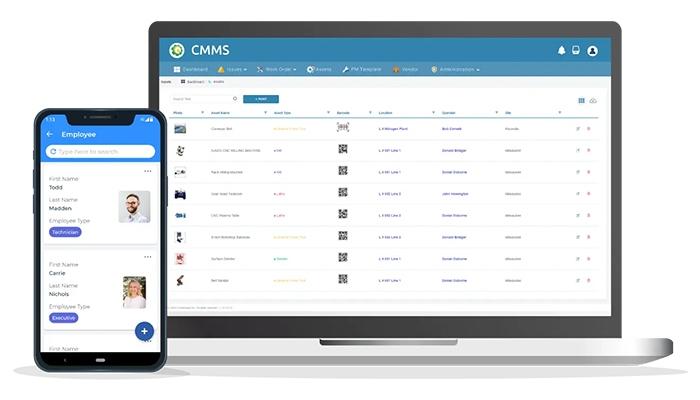
CloudApper CMMS is a system designed to efficiently manage assets and schedule business maintenance activities. While some users suggest improvements to the user interface, the software's customization capabilities stand out, allowing companies to effectively tailor the application to meet specific operational needs and requirements.



CloudApper CMMS Specifications
- Work Order Management
- Maintenance Logs
- Purchasing
- Incident Management
What Is CloudApper CMMS?
CloudApper CMMS software is a cloud-based and mobile solution designed to streamline enterprise asset and equipment management. It facilitates maintenance scheduling, inventory control, and work order routing, helping employees work more efficiently. With real-time updates, the software offers management greater visibility into asset conditions and ongoing maintenance plans. It enhances operational productivity and allows quicker decision-making, ensuring that asset performance is optimized, and maintenance activities are managed effectively.
CloudApper CMMS Pricing
Disclaimer: Pricing is subject to changes.
CloudApper CMMS Integrations
CloudApper CMMS offers integration with a wide range of third-party applications, including:
Who Is CloudApper CMMS For?
CloudApper CMMS is used across multiple industries and sectors, such as:
- Retail
- Healthcare
- Manufacturing
- Finance
- Hospitality
- Sales and marketing
- Legal
- Education
Is CloudApper CMMS Right For You?
CloudApper CMMS optimizes asset management with integrated features that improve efficiency and ensure timely maintenance. It enhances asset utilization, provides accountability through task monitoring, and offers flexibility for easy customization without coding. This solution reduces asset waste and depreciation, maximizing productivity and ROI and making it an excellent choice for businesses.
Still unsure if CloudApper CMMS is the right choice for your organization? Contact our customer support team at (661) 384-7070 to help you make a wise decision for your organization.
CloudApper CMMS Features
Workflow Automation
CloudApper offers powerful workflow automation features that streamline repetitive tasks and processes, improving efficiency and minimizing errors. The design studio allows easy workflow creation, with the option to include custom code for data exchange.
Analytics
The AI-powered platform offers customizable dashboards to monitor performance indicators and deliver real-time insights for data-driven decisions. It also helps generate reports in various formats, shareable via SMS, email, Slack, or third-party tools.
Notifications
The CloudApper platform allows real-time push notifications, text messages, and email alerts to be sent to designated users based on configurable triggers, enhancing productivity, reducing bottlenecks, and addressing critical workplace incidents promptly.
Cloud Agnostic
The CloudApper platform offers a scalable cloud infrastructure, ensuring consistent performance without unexpected downtimes. It also allows organizations to easily adjust the solution, upgrading or downgrading based on evolving needs.
Pros And Cons of CloudApper CMMS
Pros
Simplifies management of critical assets
Offers customization capability to tailor the app to specific needs
Offers mobile access for convenience
Reduces machine downtime and ensures smooth production
Cons
Tutorials need more depth according to some software users
User interface needs improvement
CloudApper CMMS Reviews
Total 2 reviews
4.5
All reviews are from verified customers
Rating Distribution
5
Stars50%
4
Stars50%
3
Stars0%
2
Stars0%
1
Stars0%
Share your experience
Anonymous
Computer Software, 51-100 employees
“Mobile CMMS that minimizes machine downtime”
Pros
CloudApper CMMS allows me to keep all equipment in my facility well-documented while ensuring repairs and maintenance are scheduled on time. This helps eliminate unnecessary downtime and keeps production running smoothly.
Cons
The user interface and experience could be improved and the tutorials could be more detailed for better guidance.
Rating Distribution
Ease of use
8
Value for money
8
Customer Support
8
Functionality
7
Salman R
Not Specified, 51-100 employees
“Comprehensive CMMS solution within budget”
Pros
The customization options made it easy to tailor the app to our needs. It's also highly affordable compared to other solutions, which usually start at $40. The ability to access it from smartphones and tablets adds to its convenience.
Cons
The loading time is sometimes quite slow, but I believe a fix is already in progress.
Rating Distribution
Ease of use
10
Value for money
10
Customer Support
10
Functionality
10
Frequently Asked Questions
What pricing plans does CloudApper CMMS offer?
The CloudApper CMMS pricing model is straightforward, offering just $10 per monthly user with no hidden fees. Request a quote for a customized cost structure.
Who is CloudApper CMMS typically used by?
CloudApper CMMS is utilized in various industries, including retail, healthcare, manufacturing, finance, hospitality, sales and marketing, legal, education, and government.
What languages does CloudApper CMMS support?
CloudApper CMMS supports English, Turkish, and French.
Does CloudApper CMMS support mobile devices?
CloudApper CMMS offers a mobile app compatible with iOS and Android devices.
Does CloudApper CMMS have an API?
Yes, CloudApper CMMS offers an API.
What other apps does CloudApper CMMS integrate with?
CloudApper CMMS provides seamless integration with third-party applications, including UKG, Oracle, CERIDIAN Dayforce, Workday, Infor, Salesforce, Google, Slack, Microsoft, and SAP.
What level of support does the CloudApper CMMS offer?
CloudApper CMMS provides support through phone, chat, a knowledge base, email/help desk, and FAQs/forums.