


eMaint CMMS

Last Updated
Key Takeaways
Generated from the text of customer reviews
Our Verdict
Overall Rating
Based on 528 users reviews
4.4
Rating Distribution
Positive
91%
Neutral
7%
Negative
1%
Starting Price
$69
per month
eMaint CMMS Specifications
- Work Order Management
- Maintenance Logs
- Purchasing
- Purchasing
eMaint CMMS Features
Work Order Management
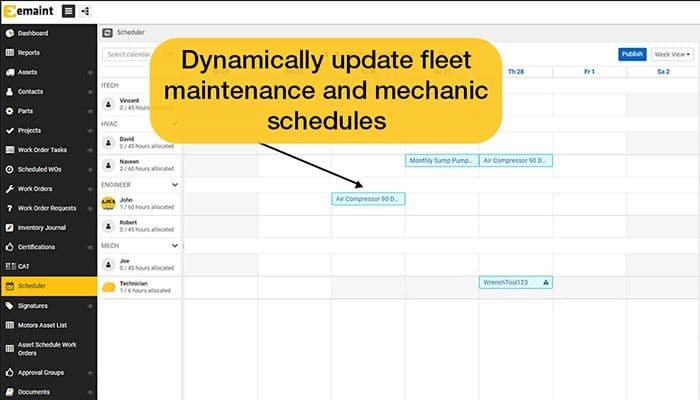
Work orders are easy to create, assign, and track for maintenance tasks, and they can also be prioritized. The software centralizes work requests, assignments, and completions in one system. It enables teams to use drag-and-drop scheduling, automated notifications, and mobile access to keep tasks moving.
Preventive Maintenance
Tasks are easily scheduled and automated, which saves time and labor and extends asset life. The platform enables recurring maintenance schedules based on time, meter readings, or asset conditions. It lets managers visually plan workloads, avoid scheduling conflicts, and automate PM generation.
Predictive Maintenance
Machine failures are picked up before they come, and the respective team is notified. eMaint connects with sensors and plant systems to monitor vibration, temperature, and other condition data. Additionally, aerts notify teams of developing issues, while automatic work orders speed response times.
Analyze and Reporting
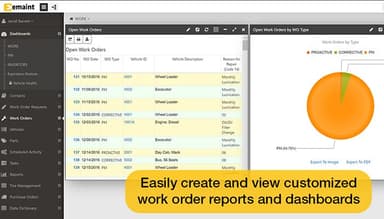
It helps to analyze maintenance data and generate reports to identify trends and track key performance indicators. The functionality allows users to build dashboards and reports to track KPIs such as uptime, MTTR, OEE, and work completion rates. Automated reporting, further, saves time, while live operational visibility supports faster decisions.
Regulatory Compliance
Compliance is maintained with the regulatory requirements and standards through tracking of maintenance activities and documentation. eMaint features regulatory compliance tools, such as audit trails, approval workflows, and password-protected e-signatures to support regulated environments. It enables teams to store procedures, route tasks for review, and document every maintenance action.
Pros And Cons of eMaint CMMS
Pros
Easy-to-use software that organizes work orders and assets in one place
Excellent customer support quickly resolves issues
Organizes data digitally and makes it searchable
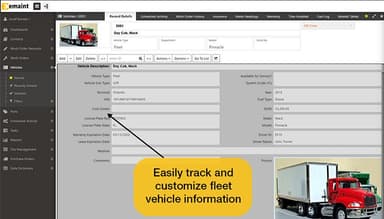
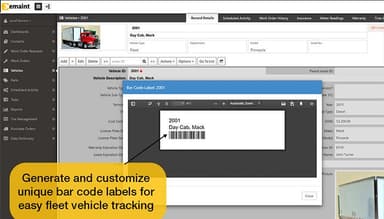
Tracks historical assets and inventory and make them visible across the organization
Cons
Anomaly at times
Time-consuming customizing process
Work order flow can be improved
eMaint CMMS Pricing
Team | Professional | Enterprise |
|---|---|---|
$69 per month | $85 per month | Custom Pricing |
|
|
|
Disclaimer: The pricing details were last updated on Sep 14, 2026 from the vendor's website. Please contact us for a tailored pricing list.
eMaint CMMS Reviews
Total 528 reviews
4.4
All reviews are from verified customers
Rating Distribution
5
Stars54%
4
Stars37%
3
Stars6%
2
Stars2%
1
Stars1%
Share your experience
Warehousing, 11-50 employees
Less than a year
“work orders are super handy”
Pros
Using the work order setup has been really convenient for me. The layout makes sense, so I can get in, understand what I need and move through my daily stuff without any hassle. Uploading photos is pretty quick most of the time and putting together work orders doesn't feel like a chore. Overall, it feels user-friendly and I can usually finish things without second-guessing anything.
Cons
Now and then, I run into slowdowns when the network acts up. Because of that, photo uploads can take longer than expected and that sometimes holds up the process for me.
Rating Distribution
Ease of use
10
Value for money
10
Customer Support
10
Functionality
8
Not Specified, 500+ employees
Less than a year
“clear reports everyone can follow”
Pros
The first thing that really clicked for me was the reporting. The way everything is laid out makes the reports very clear and both my customers and management like being able to look through them without confusion. That has helped me a lot when I need to explain the details and show people exactly what they need to see.
Cons
At first, the system felt a bit tricky to get around and I needed some time to learn where things were. After I got used to the setup, though, it started to feel much more natural and a lot less overwhelming.
Rating Distribution
Ease of use
8
Value for money
10
Customer Support
10
Functionality
10
Food Production, 500+ employees
Less than a year
“custom fit with helpful support”
Pros
One of the biggest reasons I value this software is how much I can tweak it to match the way I work. Different parts can be set up around my needs and that has made it a lot more useful in my daily routine. Another thing that has stood out to me is the support team. When problems come up, I usually get useful advice and practical fixes which has helped me keep things moving.
Cons
I've had to contact support quite a few times and the experience can vary depending on who responds. Some representatives provide very clear and helpful advice, while others suggest solutions that don't really address the issue I'm facing. Even though support is still a strong part of the product for me, keeping up with updates has been tricky. After the February 9 update, my cycle count issue still wasn't fixed which was frustrating since even support and the product specialist couldn't resolve it.
Rating Distribution
Ease of use
8
Value for money
8
Customer Support
6
Functionality
8
Frequently Asked Questions
Does eMaint CMMS offer an API?
Yes, eMaint CMMS offers an API.
What language does eMaint CMMS support?
Yes, eMaint CMMS offers global language support in Dutch, English, Spanish, and Portuguese, as well as real-time chat translation to other global languages.
What other apps does eMaint CMMS integrate with?
eMaint CMMS effectively integrates with QuickBooks, Salesforce, Slack, Zapier, and a few other applications.
Does eMaint CMMS support mobile devices?
Yes, eMaint CMMS supports Android and iOS devices.
What types of pricing plans does eMaint CMMS offer?
eMaint CMMS pricing varies between $69/month to $85/month. The software offers three pricing plans: Team ($69/user/month), Professional ($85/user/month), and Enterprise (custom pricing). You can get custom quotes catering to your business. Get a personalized eMaint CMMS cost today.
Who are the typical users of eMaint CMMS?
The typical users of eMaint CMMS are automotive, food and beverage, manufacturing, and health care.
What level of support does eMaint CMMS offer?
eMaint CMMS provides 18 hours of live chat support, email, and phone support along with a customer success portal.